
 |
1EdTech Question & Test Interoperability QTILite Specification Final Specification Version 1.2 |
| Copyright © 2002 1EdTech Consortium, Inc. All Rights Reserved. The 1EdTech Logo is a trademark of 1EdTech Consortium, Inc. Document Name: 1EdTech Question & Test Interoperability QTILite Specification Date: 11 February 2002
|
IPR and Distribution Notices
Recipients of this document are requested to submit, with their comments, notification of any relevant patent claims or other intellectual property rights of which they may be aware that might be infringed by any implementation of the specification set forth in this document, and to provide supporting documentation.
1EdTech takes no position regarding the validity or scope of any intellectual property or other rights that might be claimed to pertain to the implementation or use of the technology described in this document or the extent to which any license under such rights might or might not be available; neither does it represent that it has made any effort to identify any such rights. Information on 1EdTech's procedures with respect to rights in 1EdTech specifications can be found at the 1EdTech Intellectual Property Rights web page: http://www.imsglobal.org/ipr/imsipr_policyFinal.pdf.
Copyright © 2002 1EdTech Consortium. All Rights Reserved.
Permission is granted to all parties to use excerpts from this document as needed in producing requests for proposals.
Use of this specification to develop products or services is governed by the license with 1EdTech found on the 1EdTech website: http://www.imsglobal.org/license.html.
The limited permissions granted above are perpetual and will not be revoked by 1EdTech or its successors or assigns.
THIS SPECIFICATION IS BEING OFFERED WITHOUT ANY WARRANTY WHATSOEVER, AND IN PARTICULAR, ANY WARRANTY OF NONINFRINGEMENT IS EXPRESSLY DISCLAIMED. ANY USE OF THIS SPECIFICATION SHALL BE MADE ENTIRELY AT THE IMPLEMENTER'S OWN RISK, AND NEITHER THE CONSORTIUM, NOR ANY OF ITS MEMBERS OR SUBMITTERS, SHALL HAVE ANY LIABILITY WHATSOEVER TO ANY IMPLEMENTER OR THIRD PARTY FOR ANY DAMAGES OF ANY NATURE WHATSOEVER, DIRECTLY OR INDIRECTLY, ARISING FROM THE USE OF THIS SPECIFICATION.
Table of Contents
1. Introduction
1.1 Question & Test Interoperability Overview
1.2 Scope & Context
1.3 Structure of this Document
1.4 Nomenclature
1.5 References
2. Overall Data Model
2.1 Information Model
2.2 QTILite XML Schema Tree
3. XML Binding
3.1 Item Binding
3.1.1 <questestinterop> Elements
3.1.2 <item> Elements
3.1.3 <objectives> Elements
3.1.4 <rubric> Elements
3.1.5 <presentation> Elements
3.1.6 <response_lid> Elements
3.1.7 <render_choice> Elements
3.1.8 <response_label> Elements
3.1.9 <resprocessing> Elements
3.1.10 <outcomes> Elements
3.1.11 <respcondition> Elements
3.1.12 <conditionvar> Elements
3.1.13 <itemfeedback> Elements
3.1.14 <material> Elements
3.1.15 <altmaterial> Elements
4. Example XML Instances
4.1 Basic ASI Examples
4.1.1 Standard True/False (Text)
4.1.2 Standard Multiple Choice (Text)
4.1.3 Enhanced Standard Multiple Choice (Text)
4.1.4 Standard Multiple Choice (Image)
5. XML Instance Example Lists
5.1 The ASI XML Instance Example Files
6. Implementation Guidance
6.1 Items
6.1.1 Elements and their Attributes
6.1.2 Groups of Elements
6.2 Aggregated Scoring and Response Processing
6.3 Naming Conventions
6.3.1 Identities and Labels
6.4 Scoping Rules
6.4.1 Identities and Labels
7. Compatibility with the Full 1EdTech QTI
7.1 QTI ASI Compatibility
7.2 Results Reporting Compatibility
8. Conformance
8.1 Valid Data Issues
8.2 Conformance Summary
8.3 Interoperability Statement
8.4 A QTILite Conformance Example
Appendix A - Glossary of Terms
About This Document
List of Contributors
Revision History
Index
1. Introduction
1.1 Question & Test Interoperability Overview
The Question & Test Interoperability (QTI) specification describes a basic structure for the representation of question (item) and test (assessment) data and their corresponding results reports [QTI, 02i]. Therefore, the specification enables the exchange of this test, assessment and results data between Learning Management Systems, as well as content authors and, content libraries and collections. The QTI specification is defined in XML to promote the widest possible adoption. XML is a powerful, flexible, industry standard markup language used to encode data models for Internet-enabled and distributed applications. The QTI specification is extensible and customizable to permit immediate adoption, even in specialized or proprietary systems. Leading suppliers and consumers of learning products, services and content contributed time and expertise to produce this final specification.
This document describes the components that are required to construct the simplest form of a QTI-compliant system. QTILite supports multiple-choice questions (this includes the true/false questions) only and limits the rendering form to the classical one response from a set of choices. Multiple Items can be exchanged in a single QTI-XML instance but Assessments and Sections are not supported. The QTILite specification is a standalone document in that none of the others are required to understand and construct QTILite-compliant systems. All QTILite compliant Items are compliant with the full 1EdTech QTI V1.1 and V1.2 specifications but they are not backwards compatible with V1.0 or 1.01 of the specification.
1.2 Scope & Context
This document is the '1EdTech Question & Test Interoperability QTILite Specification'. This specification is based upon the '1EdTech QTI: ASI Information Model' [QTI, 02a] and is the realization of a subset of that model. QTILite is presented as the entry-level specification to the full QTI specification. QTILite does not support all of the features of the full QTI specification however an instance that conforms to QTILite will also conform to the full QTI specification. The key differences between QTILite and the full specification are:
- The only question-types to be supported within QTILite are:
- Simple response processing to provide for a single right answer and using the default mechanisms;
- No support for:
- Hints and solutions
- Meta-data
- Comments
- Extensions
- Options that are "fuzzy"
- Limited media types and limited text types
- All time-based mechanisms.
1.3 Structure of this Document
The structure of this document is:
1.4 Nomenclature
1.5 References
2. Overall Data Model
2.1 Information Model
The system model for QTI is shown in Figure 2.1 (this is the same as that described in the QTI: ASI Information Model, [QTI, 02a]).
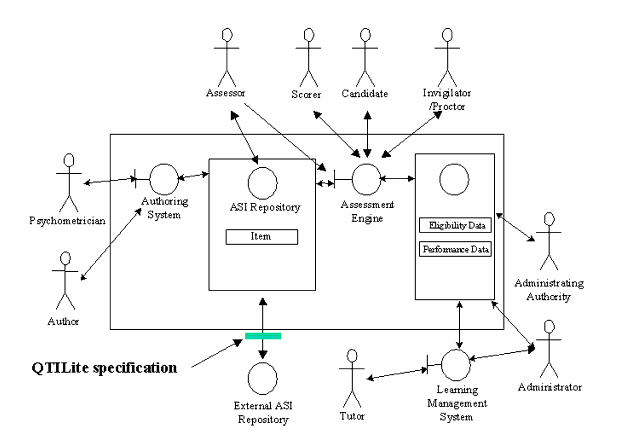
The QTILite specification is concerned with the exchange of Items between Assessment systems. The internal representation may conform to the QTILite but the adoption in this way is beyond the scope of the specification. Nine distinct 'views' have been identified for each of the core participants i.e. Administering, Administrator, Assessor, Author, Candidate, Invigilator/Proctor, Psychometrician, Scorer and Tutor. Different types of information may be made available to each of these actors.
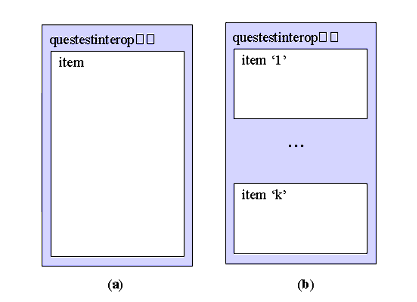
The core data structures that can be exchanged using the QTILite Specification are shown in Figure 2.2. QTILite supports the exchange of Items only cf. the full specification that also supports the exchange of Assessments and Sections.
2.2 QTILite XML Schema Tree1
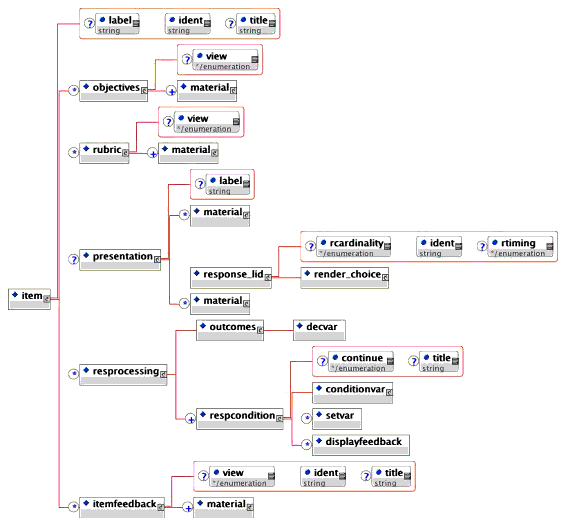
The generic XML schema tree is shown in Figure 2.3. This representation reflects the overall structure of an Item.
3. XML Binding
3.1 Item Binding
3.1.1 <questestinterop> Elements
Description: The <questestinterop> is the holder for the core QTILite objects. This may contain one or more Items.

Multiplicity: This is the core element and must occur only once in the XML instance file.
3.1.2 <item> Elements
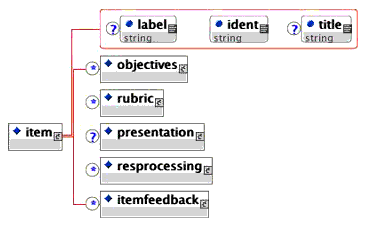
Description: The Item is the only data object that can be exchanged using the QTILite specification (cf. Assessments, Sections and Items in the full specification). Each Item consists of five distinct parts, namely: objectives - the materials used to describe the objectives with respect to each view; rubric - the materials used to define the context of the Item and available for each view; presentation - the instructions describing the nature of the question to be asked; resprocessing - the instructions to be followed when analyzing the responses to create a corresponding score and feedback; itemfeedback - the materials to be presented as feedback to the entered response.
Multiplicity: Occurs one or more times within the <questestinterop> element.
- title (optional). The title of the Item.
Data-type = String (max of 256 chars). - label (optional). A label that can be used by authoring tools to identify key features.
Data-type = String (max of 256 chars). - ident (required). The unique identifier for the Item. This identifier should be globally unique (a possible naming convention is included later in this specification).
Data-type = String (max of 256 chars).
3.1.3 <objectives> Elements
Description: The objectives element is used to store the information that describes the educational aims of the Item. These objectives can be defined for each of the different 'view' perspectives. This element should not be used to contain information specific to an Item because the question-engine may not make this information available to the Item during the actual test.
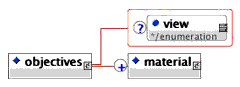
Multiplicity: Occurs zero or more times within the <item> element.
- view (optional with selection from the enumerated list of: All, Administrator, AdminAuthority, Assessor, Author, Candidate, InvigilatorProctor, Psychometrician, Scorer, Tutor. Default=All). The view defines the scope for the display of the associated information i.e. to whom the material can be presented.
Data-type = Enumerated list.
3.1.4 <rubric> Elements
Description: The rubric element is used to contain contextual information that is important to the Item e.g. it could contain standard data values that might or might not be useful for answering the question. Different sets of rubric can be defined for each of the possible 'views'.
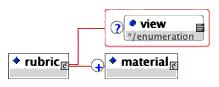
Multiplicity: Occurs zero or more times within the <item> element.
- view (optional with selection from the enumerated list of: All, Administrator, AdminAuthority, Assessor, Author, Candidate, InvigilatorProctor, Psychometrician, Scorer, Tutor. Default=All). The view defines the scope for the display of the associated information i.e. to whom the material can be presented.
Data-type = Enumerated list.
3.1.5 <presentation> Elements
Description: This element contains all of the instructions for the presentation of the question during a test. This information includes the actual material to be presented. The labels for the possible responses are also identified and these are used by the response processing element defined elsewhere in the Item.
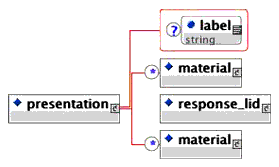
Multiplicity: Occurs zero or once within the <item> element.
- label (optional). A label that can be used by authoring tools to identify key features.
Data-type = String (max of 256 chars).
3.1.6 <response_lid> Elements
Description: The <response_lid> element contains the instructions for the presentation of questions whose response will be the logical label of the selected answer. QTILite supports the <response_lid> form of response only (cf. the full specification). The QTILite specification supports the render_choice option only (cf. the full specification).

Multiplicity: Occurs zero or more times within the <presentation> element.
- ident (required). The unique identifier for the response presentation block. This identifier will be used within the response processing structure to ensure the right set of response labels are processed.
Data-type = String (max of 256 chars). - rcardinality (optional - enumerated list: Single). Indicates the number of responses expected from the user. All QTILite questions are defined as requiring a single response i.e. 'rcardinality=Single'.
Data-type = Enumerated list. - rtiming (optional - enumerated list: No). Indicates whether or not the responses are time dependent. All QTILite questions are defined as time independent i.e. 'rtiming=No'.
Data-type = Enumerated list.
3.1.7 <render_choice> Elements
Description: The <render_choice> element instructs the question-engine to render the question using a classical multiple-choice format. The number of possible responses is determined by the <response_label> elements contained.

Multiplicity: Occurs zero or once within the <response_lid> element.
- shuffle (optional - enumerated list of: Yes, No. Default = No). Shows whether or not the list of possible responses can be shuffled between consecutive displays to the user.
Data-type = Enumerated list.
3.1.8 <response_label> Elements
Description: The <response_label> is used to define the possible response choices that are presented to the user. This information includes the material to be shown to the user and the logical label that is associated with that response. The label is used in the response processing.

Multiplicity: This occurs zero or more times within the <render_choice> element.
- labelrefid (optional). A label that can be used by authoring tools to identify key features.
Data-type = String (max of 256 chars). - ident (required). The unique identifier for the response_label section. This identifier is used by the response processing mechanism to identify the selected response.
Data-type = String (max of 256 chars). - rshuffle (optional - enumerated list of: Yes, No. Default = Yes). Defines whether the associated response_label can be shuffled between consecutive displays to the user.
Data-type = Enumerated list.
3.1.9 <resprocessing> Elements
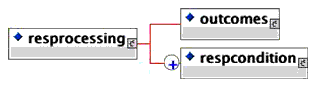
Description: This is the element within which all of the instructions for the response processing are contained. This includes the scoring variables to contain the associated scores and the set of response condition tests that are to be applied to the received user response. Multiple <resprocessing> elements should be used to provide alternative response processing algorithms which may or may not be used by the response processing engine.
Multiplicity: Occurs zero or more times within the <item> element.
3.1.10 <outcomes> Elements
Description: The <outcomes> element contains all of the variable declarations that are to be made available to the scoring algorithm. Each variable is declared using the <decvar> element apart from the default variable called 'SCORE' that is an integer and has a default value of zero (0). In QTILite only one other variable declaration is supported.

Multiplicity: This occurs once within the <resprocessing> element.
3.1.10.1 <decvar> Element
Description: The <decvar> element declares a single scoring variable. In QTILite only integer variables are supported.
Multiplicity: This occurs once within the <outcomes> element.
- varname (optional. Default = 'SCORE'). The name of the variable that is to be declared. The default name is 'SCORE'.
Data-type = String (max of 256 chars). - vartype (Enumerated list: Integer). The type of the variable declared - for QTILite this is fixed.
Data-type = Enumerated list. - defaultval (optional). The default value to which the variable is to be initialized.
Data-type = String (max of 16 chars).
3.1.11 <respcondition> Elements
Description: This element contains the actual test to be applied to the user responses to determine their correctness or otherwise. Each <respcondition> contains an actual test, the assignment of a value to the associate scoring variables and the identification of the feedback to be associated with the test.
Multiplicity: This occurs one or more times within the <resprocessing> element.
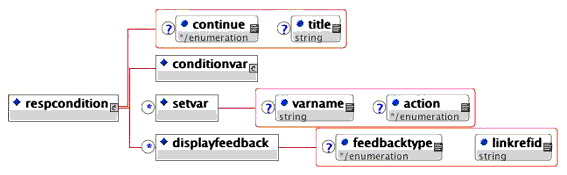
- title (optional). The title of the response condition test e.g. 'correct response test', etc.
Data-type = String (max of 256 chars). - continue (optional - enumerated list: Yes, No. Default=No). This is a switch to indicate if further response condition tests are to be applied. The state of this switch is only valid if the application of the previous condition resulted in 'True'.
Data-type = Enumerated list.
3.1.11.1 <setvar> Element
Description: The <setvar> element is responsible for changing the value of the scoring variable as a result of the associated response processing test. Within QTILite the only supported action is to set the value of the integer variable to some defined number.
Multiplicity: This occurs once within the <respcondition> element.
- varname (optional. Default = 'SCORE'). The name of the variable that is to be processed. The default name is 'SCORE'.
Data-type = String (max of 256 chars). - action (optional - enumerated list: Set. Default=Set). The action that is to be applied to the named variable - in QTILite this is fixed.
Data-type = Enumerated list.
3.1.11.2 <displayfeedback> Element
Description: The <displayfeedback> element is responsible for assigning an associated feedback to the response processing if the 'True' state results. Within QTILite the only supported feedback is generic content for the user.
Multiplicity: This occurs zero or more times within the <respcondition> element.
- feedbacktype (optional - enumerated list: Response. Default = Response). The type of feedback that has been triggered by the associated response condition - In QTILite this is fixed.
Data-type = Enumerated list. - linkrefid (required). The identifier of the associated feedback. An <itemfeedback> element must exist with this identifier as defined by the 'ident' attribute.
Data-type = String (max of 256 chars).
3.1.12 <conditionvar> Elements
Description: The conditional test that is to be applied to the user's response. In QTILite the only test supported is the equivalence test on the label. The negative test is also available along with the condition for detecting no attempt at the question.
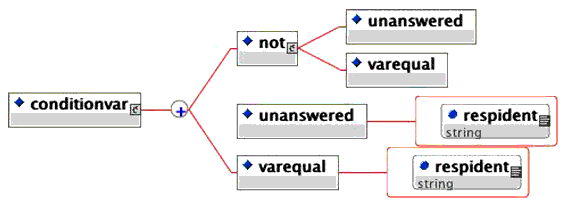
Multiplicity: This occurs once within the <respcondition> element.
3.1.12.1 <varequal> Element
Description: The <varequal> element is the test of equivalence. The data for the test is contained within the element's PCDATA string and must be the same as one of the <response_label> values (this were assigned using the ident attribute).
Multiplicity: This occurs zero or once within the <conditionvar> element, and zero or once within the <not> element.
- respident (required). The identifier of the <response_lid> element (this was assigned using its ident attribute).
Data-type = String (max of 256 chars).
3.1.12.2 <not> Element
Description: The <not> element inverts the logical test outcome that is required. In the case of the <varequal> element produces a 'not equals' test. In the case of <unanswered> this becomes the equivalent of answered i.e. the correctness or otherwise is unimportant.
Multiplicity: This occurs zero or more times within the <conditionvar> element.
3.1.12.3 <unanswered> Element
Description: The <unanswered> element is the condition to be applied if a response is not received for the Item i.e. it is unanswered.
Multiplicity: This occurs zero or more times within the <conditionvar> element, and zero or once within the <not> element.
- respident (required). The identifier of the <response_lid> element (this was assigned using its ident attribute).
Data-type = String (max of 256 chars).
3.1.13 <itemfeedback> Elements
Description: The container for the feedback that is to be presented as a result of the user's responses. In QTILite no hints or solutions are supported.

Multiplicity: Occurs zero or more times within the <item> element.
- title (optional). The title of the feedback section.
Data-type = String (max of 256 chars). - ident (required). The unique identifier for the feedback. This identifier is used within the <resprocessing> element to identify the feedback to be presented as a consequence of the processing of the user's response.
Data-type = String (max of 256 chars). - view (optional with selection from the enumerated list of: All, Administrator, AdminAuthority, Assessor, Author, Candidate, InvigilatorProctor, Psychometrician, Scorer, Tutor. Default=All). The view defines the scope for the display of the associated information i.e. to whom the material can be presented.
Data-type = Enumerated list.
3.1.14 <material> Elements
Description: This is the container for any content that is to be displayed by the question-engine. Within QTILite the only supported content types are text (emphasized or not) and images. The content can be internally referenced to avoid the need for duplicate copies. Alternative information can be defined - this is used if the primary content cannot be displayed.
Multiplicity: This occurs once or more times in: <objectives>, <rubric>, and <itemfeedback>. Occurs zero or more times in <presentation> and <response_label>.
- label (optional). A label that can be used by authoring tools to identify key features.
Data-type = String (max of 256 chars).
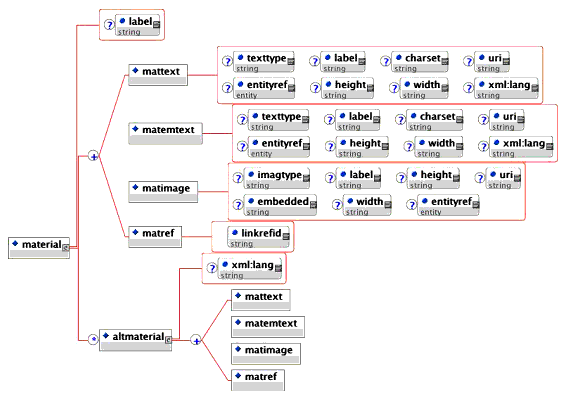
3.1.14.1 <mattext> Element
Description: The <mattext> element contains any text that is to be displayed to the users.
Multiplicity: This occurs zero or more times within the <material> element.
- texttype (optional. Default='text/plain'). This identifies the type of text string. The format of the string is as defined by RFC1521.
Data-type = String (max of 32 chars). - charset (optional. Default='ascii-us'). The character set that is to be used to represent the text string.
Data-type = String (max of 32 chars). - label (optional). A label that is used to uniquely identify the text content.
Data-type = String (max of 256 chars). - uri (optional). The 'uri' identifying the external reference that contains the text to be presented.
Data-type = String (max of 256 chars). - entityref (optional). An alternative mechanism for identifying the external reference that contains the text to be presented. This allows the file reference to be bound to the XML instance itself.
Data-type = String (max of 256 chars). - width (optional). This identifies the width of the text box i.e. its x-axis length.
Data-type = String (max of 32 chars representing an integer in the range 0-231-1). - height (optional). This identifies the height of the text box i.e. its y-axis length.
Data-type = String (max of 32 chars representing an integer in the range 0-231-1). - xml:lang (optional). The language of the text content. As per the ISO639 standard vocabulary.
Data-type = String (max of 32 chars).
3.1.14.2 <matemtext> Element
Description: The <matemtext> element contains any emphasized text that is to be displayed to the users. The type of emphasis is dependent on the question-engine rendering the text.
Multiplicity: This occurs zero or more times within the <material> element.
- texttype (optional. Default='text/plain'). This identifies the type of text string. The format of the string is as defined by RFC1521.
Data-type = String (max of 32 chars). - charset (optional. Default='ascii-us'). The character set that is to be used to represent the text string.
Data-type = String (max of 32 chars). - label (optional). A label that is used to uniquely identify the text content.
Data-type = String (max of 256 chars). - uri (optional). The 'uri' identifying the external reference that contains the text to be presented.
Data-type = String (max of 256 chars). - entityref (optional). An alternative mechanism for identifying the external reference that contains the text to be presented. This allows the file reference to be bound to the XML instance itself.
- width (optional). This identifies the width of the text box i.e. its x-axis length.
Data-type = String (max of 32 chars representing an integer in the range 0-231-1). - height (optional). This identifies the height of the text box i.e. its y-axis length.
Data-type = String (max of 32 chars representing an integer in the range 0-231-1).
Data-type = String (max of 256 chars). - xml:lang (optional). The language of the text content. As per the ISO639 standard vocabulary.
Data-type = String (max of 32 chars).
3.1.14.3 <matimage> Element
Description: The <matimage> element is used to contain image content that is to be displayed to the users.
Multiplicity: This occurs zero or more times within the <material> element.
- imagtype (optional. Default='image/jpeg'). This identifies the type of image. The format of the string is as defined by RFC1521.
Data-type = String (max of 32 chars). - label (optional). A label that is used to uniquely identify the image content.
Data-type = String (max of 256 chars). - uri (optional). The 'uri' identifying the external reference that contains the image to be presented.
Data-type = String (max of 256 chars). - entityref (optional). An alternative mechanism for identifying the external reference that contains the image to be presented. This allows the file reference to be bound to the XML instance itself.
Data-type = String (max of 256 chars). - width (optional). This identifies the width of the image i.e. its x-axis length.
Data-type = String (max of 32 chars representing an integer in the range 0-231-1). - height (optional). This identifies the height of the image i.e. its y-axis length.
Data-type = String (max of 32 chars representing an integer in the range 0-231-1). - embedded (optional. Default='Base64'). This defines the nature of the encoding of the image if it is embedded within the XML instance itself.
Data-type = String (max of 32 chars).
3.1.14.4 <matref> Element
Description: The <matref> element is used to content by reference to the individual material components e.g. <mattext>. This material will have had an identifier assigned to enable such a reference to be reconciled when the instance is parsed into the system.
Multiplicity: This occurs zero or more times within the <material> element.
- linkrefid (required). The identifier of the content that is being referenced. This material will have been assigned by the label attribute of the associated element e.g. <matimage>.
Data-type = String (max of 256 chars).
3.1.15 <altmaterial> Elements
Description: This is the container for alternative content. This content is to be displayed if, for whatever reason, the primary content cannot be rendered.
Multiplicity: This occurs zero or once within the <material> element.
4. Example XML Instances
4.1 Basic ASI Examples
The examples of the basic Item types are lists under:
- Standard True/False (text-based options) - two choice-based rendering with response processing;
- Standard Multiple Choice (text-based options) - four choice-based rendering without response processing;
- Standard Multiple Choice (text-based options) - five choice-based rendering without response processing;
- Standard Multiple Choice e (text-based options) - five choice-based rendering with correct answer response processing;
- Standard Multiple Choice (text-based options) - five choice-based rendering with correct and incorrect answer response processing;
- Standard Multiple Choice (text-based options) - five choice-based rendering with response processing and rubric and objectives content;
- Standard Multiple Choice (image-based options) - four choice-based rendering with correct answer response processing.
Note: These examples also comply with the full 1EdTech QTI Specification V1.1 and V1.2. They DO NOT necessarily comply with the 1EdTech QTI V1.0 or V1.01 specifications.
4.1.1 Standard True/False (Text)
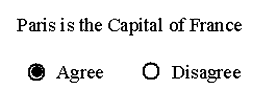
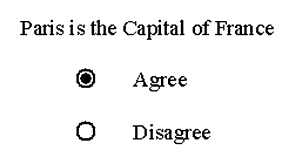
Figure 4.1 shows a typical True/False multiple-choice question where the possible answers are formatted in to different ways. The corresponding XML is listed after the figure. The user is expected to select either the 'Agree' or 'Disagree' radio buttons.
 |
 |
|
|
|
The equivalent XML using the QTILite V1.2 specification is:
1 2 3 4 5 6 7 8 9 10 11 12 13 14 15 16 17 18 19 20 21 22 23 24 25 26 27 28 29 30 31 32 |
<questestinterop>
  <item ident="IMS_V01_I_QTILiteExample001">
    <presentation label="QTILiteExample001">
      <material>
      <mattext>Paris is the Capital of France</mattext>
      </material>
      <response_lid ident="TF01" rcardinality="Single" rtiming="No">
      <render_choice>
        <response_label ident="T">
            <material><mattext>Agree</mattext></material>
        </response_label>
        <response_label ident="F">
            <material><mattext>Disagree</mattext></material>
        </response_label>
        </render_choice>
      </response_lid>
  </presentation>
    <resprocessing>
      <outcomes><decvar/></outcomes>
      <respcondition title="Correct">
        <conditionvar>
          <varequal respident="TF01">T</varequal>
        </conditionvar>
        <setvar action="Set">1</setvar>
        <displayfeedback feedbacktype="Response" linkrefid="Correct"/>
      </respcondition>
    </resprocessing>
    <itemfeedback ident="Correct" view="Candidate">
        <material><mattext>Yes, you are right.</mattext></material>
    </itemfeedback>
  </item>
</questestinterop>
|
This XML code is available in the file: 'ims_qtiasiv1p2/qtilite/trfl_ir_001/trfl_ir_001.xml'. The key points of this example are:
- The actual material to be presented to pose the question is shown in lines 4-6;
- The possible responses and the content to be displayed with each option are shown in lines 8-15. The form of rendering is denoted by the <render_choice> element (line 8);
- The type and number of responses is determined by the <response_lid> element which has the cardinality set as "Single" i.e. only one response is permitted and that there is no time dependence for the answer;
- The processing to be undertaken once a user's response has been obtained is described in lines 18-27. The test for the correct response is shown in lines 21-23 i.e. the label of the correct response is 'T' (the two possible labels were assigned in lines 9 and 12). Each distinct test is enclosed in its own <respcondition> element (line 20) and so a separate test is required to detect an incorrect answer;
- The result of getting the correct answer is to set the default scoring variable to 1 (line 24) and to trigger some feedback (line 25);
- The feedback that is displayed as a result of getting the right answer is shown in lines 28-30.
It should be noted that the actual rendering of the question as shown in Figures 4.1a and 4.1b is dependent upon the actual rendering-engine. V1.2 of the full QTI specification provides mechanisms to influence the ways in which the rendering-engine will render a question but these capabilities are not included within QTILite.
4.1.2 Standard Multiple Choice (Text)
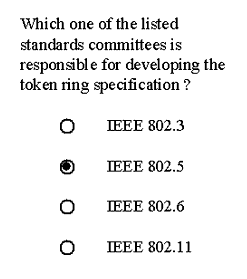
Figure 4.2 shows a typical text-based multiple-choice question. The corresponding XML is listed after the figure. The user is required to choose one of the available options by clicking the appropriate radio button.
The XML instance for Figure 4.2 is:
1 2 3 4 5 6 7 8 9 10 11 12 13 14 15 16 17 18 19 20 21 22 23 24 25 26 27 28 |
<questestinterop>
  <item title="Standard Multiple Choice Item" ident="IMS_V01_I_QTILiteExample004">
    <presentation label="QTILiteExample004">
      <material>
        <mattext>
          Which one of the listed standards committees is responsible
          for developing the token ring specification ?
        </mattext>
      </material>
      <response_lid ident="MCb_01" rcardinality="Single" rtiming="No">
        <render_choice>
          <response_label ident="A">
            <material><mattext>IEEE 802.3</mattext></material>
          </response_label>
          <response_label ident="B">
            <material><mattext>IEEE 802.5</mattext></material>
          </response_label>
          <response_label ident="C">
            <material><mattext>IEEE 802.6</mattext></material>
          </response_label>
          <response_label ident="D">
            <material><mattext>IEEE 802.11</mattext></material>
          </response_label>
        </render_choice>
      </response_lid>
    </presentation>
  </item>
</questestinterop>
|
This XML code is available in the file: 'ims_qtiasiv1p2/qtilite/mchc_i_001/mchc_i_001.xml'. The key points of this example are:
- The actual material to be presented to pose the question is shown in lines 4-9;
- The possible responses and the content to be displayed with each option are shown in lines 12-23. The form of rendering is denoted by the <render_choice> element (line 11). Four possible choices are shown and these each have a unique label identifier;
- The type and number of responses is determined by the <response_lid> element which has the cardinality set as "Single" i.e. only one response is permitted and that there is no time dependence for the answer.
4.1.3 Enhanced Standard Multiple Choice (Text)
Figure 4.3 shows a typical text-based multiple-choice question. The corresponding XML is listed after the figure. The user is required to choose one of the available options by clicking the appropriate radio button. Note that this example is very similar to that shown in Figure 4.2.

The XML instance for Figure 4.3 is:
1 2 3 4 5 6 7 8 9 10 11 12 13 14 15 16 17 18 19 20 21 22 23 24 25 26 27 28 29 30 31 32 |
<questestinterop>
  <item title="Standard Multiple Choice Item" ident="IMS_V01_I_QTILiteExample005">
    <presentation label="QTILiteExample005">
      <material>
        <mattext>Which </mattext>
        <matemtext>one </matemtext>
        <mattext>of the listed standards committees is responsible
             for developing the token ring specification ?
        </mattext>
      </material>
      <response_lid ident="MCb_01" rcardinality="Single" rtiming="No">
        <render_choice shuffle="Yes">
          <response_label ident="A">
            <material><mattext>IEEE 802.3</mattext></material>
          </response_label>
          <response_label ident="B">
            <material><mattext>IEEE 802.5</mattext></material>
          </response_label>
          <response_label ident="C">
            <material><mattext>IEEE 802.6</mattext></material>
          </response_label>
          <response_label ident="D">
            <material><mattext>IEEE 802.11</mattext></material>
          </response_label>
          <response_label ident="E" rshuffle="No">
            <material><mattext>None of the above.</mattext></material>
        </response_label>
        </render_choice>
      </response_lid>
    </presentation>
  </item>
</questestinterop>
|
This XML code is available in the file: 'ims_qtiasiv1p2/qtilite/mchc_i_002/mchc_i_002.xml'. The key points of this example are:
- The actual material to be presented to pose the question is shown in lines 4-10. The difference between this example and that discussed in Figure 4.2 is the inclusion of the emphasized word 'one'. This emphasis is created using line 5;
- The possible responses and the content to be displayed with each option are shown in lines 13-27. The form of rendering is denoted by the <render_choice> element (line 11). Five possible choices are now shown (four were given in Figure 4.2). The relative order of these choices can be varied as denoted by the use of the shuffle="Yes" attribute (line 12). The exception to the shuffle is the last choice that is fixed to occur always as the last choice by the usage of the rshuffle="No" attribute line 25).
The next stage is to use the same example shown in Figure 4.3 but to add response processing and feedback to the XML instance. This gives rise to the XML instance (lines 1-30 are identical to the previous XML example):
1 2 3 4 5 6 7 8 9 10 11 12 13 14 15 16 17 18 19 20 21 22 23 24 25 26 27 28 29 30 31 32 33 34 35 36 37 38 39 40 41 42 43 44 45 46 47 |
<questestinterop>
  <item title="Standard Multiple Choice Item" ident="IMS_V01_I_QTILiteExample006">
    <presentation label="QTILiteExample006">
      <material>
        <mattext>Which </mattext>
        <matemtext>one </matemtext>
        <mattext>of the listed standards committees is responsible
             for developing the token ring specification ?
        </mattext>
      </material>
      <response_lid ident="MCb_01" rcardinality="Single" rtiming="No">
        <render_choice shuffle="Yes">
          <response_label ident="A">
            <material><mattext>IEEE 802.3</mattext></material>
          </response_label>
          <response_label ident="B">
            <material><mattext>IEEE 802.5</mattext></material>
          </response_label>
          <response_label ident="C">
            <material><mattext>IEEE 802.6</mattext></material>
          </response_label>
          <response_label ident="D">
            <material><mattext>IEEE 802.11</mattext></material>
          </response_label>
          <response_label ident="E" rshuffle="No">
            <material><mattext>None of the above.</mattext></material>
        </response_label>
        </render_choice>
      </response_lid>
    </presentation>
    <resprocessing>
      <outcomes>
        <decvar  vartype="Integer" defaultval="0"/>
      </outcomes>
      <respcondition title="Correct">
        <conditionvar>
          <varequal respident="MCb_01">B</varequal>
        </conditionvar>
        <setvar action="Set">1</setvar>
        <displayfeedback feedbacktype="Response" linkrefid="Correct"/>
      </respcondition>
    </resprocessing>
    <itemfeedback ident="Correct" view="Candidate">
        <material><mattext>Yes, you are right.</mattext></material>
    </itemfeedback>
  </item>
</questestinterop>
|
This XML code is available in the file: 'ims_qtiasiv1p2/qtilite/mchc_ir_002/mchc_ir_002a.xml'. The key points of this example are:
- The response processing information is contained in lines 31-42 and the associated feedback is given in lines 43-45;
- The response processing is designed to identify the correct answer. The test for the correct answer is shown in lines 36-38 (the presence of label 'B' is tested). If the correct answer is detected then the default scoring variable is set to 1 (line 39) and the feedback is triggered (line 40). The scoring variable is initialized as '0' (line 33) and so the score for an incorrect answer is 0 by implication;
- The feedback for the correct answer is denoted by the content shown in line 44.
The next stage is to use the same example shown in Figure 4.3 but to add response processing and feedback associate with the user selecting an incorrect answer. This gives rise to the XML instance (lines 1-41 are identical to the previous XML example):
1 2 3 4 5 6 7 8 9 10 11 12 13 14 15 16 17 18 19 20 21 22 23 24 25 26 27 28 29 30 31 32 33 34 35 36 37 38 39 40 41 42 43 44 45 46 47 48 49 50 51 52 53 54 |
<questestinterop>
  <item title="Standard Multiple Choice Item" ident="IMS_V01_I_QTILiteExample007">
    <presentation label="QTILiteExample007">
      <material>
        <mattext>Which </mattext>
        <matemtext>one </matemtext>
        <mattext>of the listed standards committees is responsible
              for developing the token ring specification ?
        </mattext>
      </material>
      <response_lid ident="MCb_01" rcardinality="Single" rtiming="No">
        <render_choice shuffle="Yes">
          <response_label ident="A">
            <material><mattext>IEEE 802.3</mattext></material>
          </response_label>
          <response_label ident="B">
            <material><mattext>IEEE 802.5</mattext></material>
          </response_label>
          <response_label ident="C">
            <material><mattext>IEEE 802.6</mattext></material>
          </response_label>
          <response_label ident="D">
            <material><mattext>IEEE 802.11</mattext></material>
          </response_label>
          <response_label ident="E" rshuffle="No">
            <material><mattext>None of the above.</mattext></material>
        </response_label>
        </render_choice>
      </response_lid>
    </presentation>
    <resprocessing>
      <outcomes>
        <decvar  vartype="Integer" defaultval="0"/>
      </outcomes>
      <respcondition title="Correct">
        <conditionvar>
          <varequal respident="MCb_01">B</varequal>
        </conditionvar>
        <setvar action="Set">1</setvar>
        <displayfeedback feedbacktype="Response" linkrefid="Correct"/>
      </respcondition>
      <respcondition title="Incorrect">
        <conditionvar>
          <not><varequal respident="MCb_01">B</varequal></not>
        </conditionvar>
        <setvar action="Set">-1</setvar>
        <displayfeedback feedbacktype="Response" linkrefid="Incorrect"/>
      </respcondition>
    </resprocessing>
    <itemfeedback ident="Correct" view="Candidate">
      <material><mattext>Yes, you are right.</mattext></material>
    </itemfeedback>
    <itemfeedback ident="Incorrect" view="Candidate">
      <material>
|
55 56 57 58 59 60 |
        <matemtext>No.</matemtext>
        <mattext>  The right answer is B.</mattext>
      </material>
    </itemfeedback>
  </item>
</questestinterop>
|
This XML code is available in the file: 'ims_qtiasiv1p2/qtilite/mchc_ir_002/mchc_ir_002b.xml'. The key points of this example are:
- The response processing information to detect an incorrect answer is contained in lines 42-48 and the associated feedback is given in lines 53-58;
- The response processing is designed to identify the incorrect answer. The test for the incorrect answer is shown in lines 43-45 i.e. not the correct answer. If an incorrect answer is detected then the default scoring variable is set to -1 (line 46) and the feedback is triggered (line 47). Note that the score now has three possible values of 1 (correct), -1 (incorrect) and 0 (unanswered);
- The feedback for the incorrect answer is denoted by the content shown in lines 55-56 (note that the word 'No' is to be emphasized).
The next stage is to use the same example shown in Figure 4.3 but objectives and rubric information are added. This gives rise to the XML instance:
1 2 3 4 5 6 7 8 9 10 11 12 13 14 15 16 17 18 19 20 21 22 23 24 25 26 27 28 29 30 31 32 33 34 |
<questestinterop>
  <item title="Standard Multiple Choice Item" ident="IMS_V01_I_QTILiteExample008">
    <objectives view="Candidate">
      <material>
        <mattext>To test your understanding of LAN standards.</mattext>
      </material>
    </objectives>
    <rubric view="Candidate">
      <material>
        <mattext>Attempt all questions.</mattext>
      </material>
    </rubric>
    <rubric view="Scorer">
      <material>
        <mattext>Negative marking is employed.</mattext>
      </material>
    </rubric>
    <presentation label="QTILiteExample008">
      <material>
        <mattext>Which </mattext>
        <matemtext>one </matemtext>
        <mattext>of the listed standards committees is responsible
             for developing the token ring specification ?
        </mattext>
      </material>
      <response_lid ident="MCb_01" rcardinality="Single" rtiming="No">
        <render_choice shuffle="Yes">
          <response_label ident="A">
            <material><mattext>IEEE 802.3</mattext></material>
          </response_label>
          <response_label ident="B">
            <material><mattext>IEEE 802.5</mattext></material>
          </response_label>
          <response_label ident="C">
|
35 36 37 38 39 40 41 42 43 44 45 46 47 48 49 50 51 52 53 54 55 56 57 58 59 60 61 62 63 64 65 66 67 68 69 70 71 72 73 74 75 |
            <material><mattext>IEEE 802.6</mattext></material>
          </response_label>
          <response_label ident="D">
            <material><mattext>IEEE 802.11</mattext></material>
          </response_label>
          <response_label ident="E" rshuffle="No">
            <material><mattext>None of the above.</mattext></material>
        </response_label>
        </render_choice>
      </response_lid>
    </presentation>
    <resprocessing>
      <outcomes>
        <decvar  vartype="Integer" defaultval="0"/>
      </outcomes>
      <respcondition title="Correct">
        <conditionvar>
          <varequal respident="MCb_01">B</varequal>
        </conditionvar>
        <setvar action="Set">1</setvar>
        <displayfeedback feedbacktype="Response" linkrefid="Correct"/>
      </respcondition>
      <respcondition title="Incorrect">
        <conditionvar>
          <not><varequal respident="MCb_01">B</varequal></not>
        </conditionvar>
        <setvar action="Set">-1</setvar>
        <displayfeedback feedbacktype="Response" linkrefid="Incorrect"/>
      </respcondition>
    </resprocessing>
    <itemfeedback ident="Correct" view="Candidate">
      <material><mattext>Yes, you are right.</mattext></material>
    </itemfeedback>
    <itemfeedback ident="Incorrect" view="Candidate">
      <material>
        <matemtext>No.</matemtext>
        <mattext>  The right answer is B.</mattext>
      </material>
    </itemfeedback>
  </item>
</questestinterop>
|
This XML code is available in the file: 'ims_qtiasiv1p2/qtilite/mchc_ir_003/mchc_ir_003.xml'. The key points of this example are:
- The objectives are given in lines 3-7. These objectives are available to everyone as denoted by the view="All" attribute;
- Two sets of rubric information are supplied in lines 8-17. The first set is for the candidate (line 8) and the second set for the scorer (line 13).
4.1.4 Standard Multiple Choice (Image)
Figure 4.4 shows a typical image-based multiple-choice question. The corresponding XML is listed after the figure. The user is required to choose one of the available options by clicking the appropriate radio button.

The XML instance for Figure 4.4 is:
1 2 3 4 5 6 7 8 9 10 11 12 13 14 15 16 17 18 19 20 21 22 23 24 25 26 27 28 29 30 31 32 33 34 35 36 37 38 39 40 41 42 43 44 45 46 |
<!DOCTYPE questestinterop SYSTEM "IMS_QTIv1p1.dtd"[
  <!NOTATION gif PUBLIC "">
  <!ENTITY image01 SYSTEM "image1.gif" NDATA gif>
  <!ENTITY image02 SYSTEM "image2.gif" NDATA gif>
  <!ENTITY image03 SYSTEM "image3.gif" NDATA gif>
  <!ENTITY image04 SYSTEM "image4.gif" NDATA gif>
]>
<questestinterop>
  <item title="Standard Multiple Choice with Images Item"
    ident="IMS_V01_I_QTILiteExample010">
  <presentation label="QTILiteExample0010">
      <material>
      <mattext>Which symbol is the 'Stop' sign ?</mattext>
      </material>
      <response_lid ident="MC02" rcardinality="Single" rtiming="No">
      <render_choice shuffle="Yes">
        <response_label ident="A">
            <material>
            <matimage imagtype="image/gif" entityref="image01">
              </matimage>
            </material>
        </response_label>
        <response_label ident="B">
            <material>
            <matimage imagtype="image/gif" entityref="image02">
              </matimage>
            </material>
        </response_label>
        <response_label ident="C">
            <material>
            <matimage imagtype="image/gif" entityref="image03">
              </matimage>
            </material>
        </response_label>
        <response_label ident="D">
            <material>
            <matimage imagtype="image/gif" entityref="image04">
              </matimage>
            </material>
        </response_label>
        </render_choice>
      </response_lid>
  </presentation>
    <resprocessing>
      <outcomes>
        <decvar varname="SCORE1" vartype="Integer" defaultval="1"/>
|
47 48 49 50 51 52 53 54 55 56 57 58 59 60 |
      </outcomes>
      <respcondition>
        <conditionvar>
          <varequal respident="MC02">B</varequal>
        </conditionvar>
        <setvar action="Set" varname="SCORE1">10</setvar>
        <displayfeedback feedbacktype="Response" linkrefid="Correct"/>
      </respcondition>
    </resprocessing>
    <itemfeedback ident="Correct" view="Candidate">
        <material><mattext>Yes, you are right.</mattext></material>
    </itemfeedback>
  </item>
</questestinterop>
|
This XML code is available in the file: 'ims_qtiasiv1p2/qtilite/mchc_ir_004/mchc_ir_004b.xml'. The key points of this example are:
- The actual material to be presented to pose the question is shown in lines 12-14 and the associated graphics are identified in lines 19-20, 25-26, 31-32 and 37-38. The image files are externally referenced using the entityref attribute. These references are bound to the XML instance using the XML <!ENTITY...> statements in lines 2-6;
- The possible responses and the content to be displayed with each option are shown in lines 17-40. The form of rendering is denoted by the <render_choice> element (line 16) and shuffling of the options is to be used;
- The type and number of responses is determined by the <response_lid> element which has the cardinality set as "Single" i.e. only one response is permitted and that there is no time dependence for the answer;
- The processing to be undertaken once a user's response has been obtained is described in lines 44-55. The test for the correct response is shown in lines 49-51 i.e. the label of the correct response is 'B'. Each distinct test is enclosed in its own <respcondition> element (lines 48-54) and so a separate test is required to detect an incorrect answer;
- The result of getting the correct answer is to set the default scoring variable, 'SCORE1' to 10 (line 52) and to trigger some feedback (line 53). The scoring variable is declared in line 46;
- The feedback that is displayed as a result of getting the right answer is shown in lines 56-58.
5. XML Instance Example Lists
5.1 The ASI XML Instance Example Files
The full set of example files, as referred to in Section 4, are available as part of the Q&TILite Resource Kit. These files are listed in Table 5.1. The XML files are denote by an '.xml' extension.
The directory for these files is: 'ims_qtiasiv1p2/qtilite/...'
6. Implementation Guidance
6.1 Items
6.1.1 Elements and their Attributes
Objectives
The Objectives element should be used to define the objectives of the Item for each of the available actors. The objectives can include any type of content and so they can be presented in a wide range of forms.
Rubric
The rubric element should be used to present material that is to be applied to a set of the contained Items. These descriptions can be supplied for each view that is to be supported. The element <itemrubric> is not a supported alternative in QTILite (this is deprecated in favour of <rubric> and is a legacy issue with V1.0 and V1.01)
6.1.2 Groups of Elements
Response Types
In the full QTI are five basic response types, as listed in Section 3.2 of the '1EdTech Q&TI: ASI Information Model'. It is important to realize that the response-type is determined by the manner in which the response is to be internally processed. In QTILite, only the single response classical multiple-choice question types are supported using the response_lid element.
Rendering Types
At present there are four rendering types: render_choice, render_hotspot, render_slider and render_fib. It is important to note that the rendering type is only loosely imposed by the response-type but it is closely linked to the educational objective of the question. In QTILite, only the classical multiple-choice question types can be supported using render_choice.
Itemfeedback
The itemfeedback element contains the hint and solution elements and its contents are triggered using the displayfeedback element. In QTILite, only the standard feedback is supported i.e. hints and solutions are not available.
Variable Manipulation
The manipulation of the scoring variables declared in the outcomes/decvar combination is contained within the conditionvar element. In QTILite the only variable comparisons are made individually using the varequals element. The state of these comparisons can be inverted using the logical 'NOT' element.
The response processing variables are declared using the decvar element. Each implementation of the QTILite must generate a default integer variable called 'SCORE' whose default value is zero. This variable is used whenever a condition test is applied and the corresponding setvar does not include a particular variable name. When supporting the response processing there is one special condition that can be trapped:
- When the response has not been answered - this can be supported using the unanswered element placed within conditionvar and is activated whenever that response has not been attempted.
6.2 Aggregated Scoring and Response Processing
A key question is how the test engine is to decide the type of responses and their subsequent response processing i.e. how does an implementation ascertain the sequence in which the response tests are to be applied to an Item that expects multiple responses. Consider the most simple case of a single response multiple choice question, "Which is the first working day of the week ?". The XML QTI code is shown below:
1 2 3 4 5 6 7 8 9 10 11 12 13 14 15 16 17 18 19 20 21 22 23 24 25 26 27 28 29 30 31 32 33 34 35 36 37 38 39 40 41 42 43 44 45 46 47 |
<questestinterop>
  <item title="Single response" ident="A">
    <presentation label="BasicExample002a">
      <material>
        <mattext>Which is the first working day of the week ?</mattext>
      </material>
      <response_lid ident="MCb_01" rcardinality="Single" rtiming="No">
        <render_choice>
          <response_label ident="A">
            <material><mattext>Saturday</mattext></material>
          </response_label>
          <response_label ident="B">
            <material><mattext>Monday</mattext></material>
          </response_label>
          <response_label ident="C">
            <material><mattext>Wednesday</mattext></material>
          </response_label>
          <response_label ident="D">
            <material><mattext>Tuesday</mattext></material>
          </response_label>
          <response_label ident="E">
            <material><mattext>Sunday</mattext></material>
        </response_label>
          <response_label ident="F">
            <material><mattext>Friday</mattext></material>
        </response_label>
          <response_label ident="G">
            <material><mattext>Thursday</mattext></material>
        </response_label>
        </render_choice>
      </response_lid>
    </presentation>
    <resprocessing>
      <outcomes><decvar/></outcomes>
      <respcondition title="Correct">
        <conditionvar>
          <varequal respident="MCb_01">B</varequal>
        </conditionvar>
        <setvar action="Set">1</setvar>
        <displayfeedback feedbacktype="Response" linkrefid="Correct"/>
      </respcondition>
    </resprocessing>
    <itemfeedback ident="Correct" view="Candidate">
      <material><mattext>Yes, you are right.</mattext></material>
    </itemfeedback>
  </item>
</questestinterop>
|
The response processing test on line 37 does the check to see if the response has been 'Monday', the correct answer. The system is aware that a single response is required because of the value in line 7 of the rcardinality attribute i.e. 'Single'.
6.3 Naming Conventions
6.3.1 Identities and Labels
| |
URN:<nid>:<nss> | |
| Where: | |
|
| |
<nid> | = Namespace identifier |
| |
|
= 1EdTech-PLIRID-V1 |
| |
<nss> | = Namespace specific string |
| |
|
= <sourcelabel>:<sourceidentifier>:<schemelabel>:<schemeidentifier> |
| |
|
= ABCDEFGH:abcdefghijklmnop:qtiv1p2:?-***...*** |
| |
in which: | |
| |
||
| |
||
| |
||
| |
||
| |
||
| An example of this for an assessment identifier created by 'ETS' under the Q&TI v1.2 specification is: | ||
| |
URN:1EdTech-PLIRID-V1:ETS:23459:qtilitev1p2:I_TESTITEMv0011 | |
| Therefore, we request that organizations wishing to create proprietary extensions register their 1-8 letter organization identifier with 1EdTech so that 1EdTech can ensure a unique set of identifier names. |
||
6.4 Scoping Rules
6.4.1 Identities and Labels
Scoping within XML is very limited. It is possible to create globally unique identifiers within a file by using the 'ID' attribute and reference to these elements is possible through the usage of 'IDREF' and 'IDREFs'. During the development of the Q&TILite specification this global uniqueness was considered too constraining and so the scoping rules listed in Table 6.1 should be followed whenever possible:
7. Compatibility with the Full 1EdTech QTI
7.1 QTI ASI Compatibility
The compatibility between the different versions of the specification and the full QTI and QTILite is shown schematically in Figure 7.1.
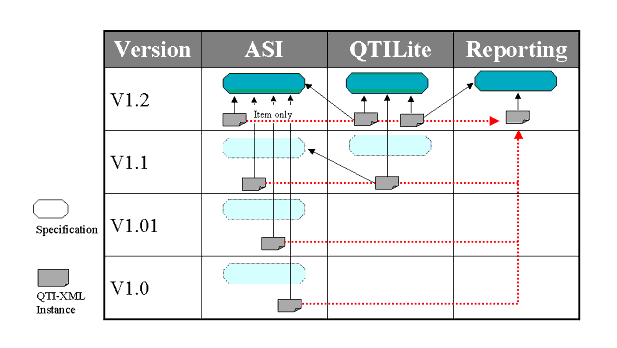
At the current time four versions of the full QTI specification have been released and two versions of the QTILite. Figure 7.1 shows that any instance file created under versions 1.0 and 1.01 are fully compatible with version 1.1. From the QTILite perspective, any instances created under V1.1 are not backwards compatible. This is because of the following issues:
- The itemrubric element is not supported in QTILite - this is deprecated in favour of rubric;
- The entityref and xml:lang attributes are available in QTILite but not in any release of the full QTI earlier than V1.1;
- The matemtext element is supported as a valid entry within content material.
8. Conformance
The purpose of this statement is to provide a mechanism for customers to fairly compare vendors of assessment systems, tools and content.2 It is not mandatory for a vendor to support every feature of the QTILite specification, but a vendor must detail their level of support with a "Conformance Statement". For example vendors may choose to accept or publish QTI data, but not choose to repackage QTI data. Compliance is represented by:
- Conformance summary - this is a summary that shows, in colloquial terms, the capabilities of a particular implementation with respect to the 1EdTech QTILite specification;
- Interoperability statement - this is a detailed technical checklist that identifies all of the feature capabilities of the implementation in terms of the QTILite specification functions.
8.1 Valid Data Issues
Vendors claiming conformance shall publish, accept, and/or repackage valid QTILite data as defined by the DTD including proprietary extensions where applicable. Vendors claiming their tools publish QTILite shall export valid QTI data. Vendors claiming their system tools accept QTILite data shall be able to parse and recognize valid QTI data. Vendors claiming their system tools repackage QTILite data shall be able "pass through" valid QTILite data whether the tool recognizes the optional elements or not. Vendors claiming their assessment content conforms to this specification shall provide valid QTILite data. Publishers claiming their content conforms to QTILite shall provide valid QTILite data.
8.2 Conformance Summary
Vendors claiming conformance must provide a "Conformance Summary", detailing their level of conformance, substantially similar to the information shown below, upon a reasonable request from a member of the 1EdTech, or a prospective customer(s). It is expected that this table, a template of which is shown in Table 8.1, is a summary of the information given in the 'Interoperability statement'. The intention is for the 'Conformance Summary' to be informative in nature.
Completion of the three columns is intended to reflect:
- Publish - this implies that the XML instance contains the identified elements. If such an element is not ticked then it will not occur within the exported QTI-XML instance(s);
- Accept - it is assumed that the ability to accept the contents of an element is accompanied by the ability to use, and if appropriate, display that content. If this is not the case but the content of the material can be exported then the 'Repackage' column can still be ticked;
- Repackage - this is the ability to import QTI_XML instances from one or more sources and to create a new instance that combines the imported information. It is not necessary for the repackaging system to be able to operate on the information supplied.
8.3 Interoperability Statement
An example of the detailed 'Interoperability Statement' is shown in Tables 8.2. Compliance to QTI means that at least one of the columns must be completed.
Note that the 'Interoperability Statement' addresses support for the various elements within the binding. The set of attributes are not considered. Inclusion of conformance with respect to attributes will be considered in later versions of the specification.
It is important that the 'Interoperability Statement' is clear in showing what is and, perhaps more importantly, what is not supported. The usage of descriptive conformance approach has been adopted to encourage vendors to be as clear as possible when describing the capabilities of their QTI-compliant systems.
8.4 A QTILite Conformance Example
An example of QTI conformance is shown in Tables 8.3 and 8.4. In this example the system being defined is an import only tool i.e. a tool that imports QTILite Items. This means that only the middle column in each table has content.
Note that the 'Interoperability Statement' addresses support for the various elements within the binding. The set of attributes are not considered. Inclusion of conformance with respect to attributes will be considered in later versions of the specification.
Appendix A - Glossary of Terms
About This Document
| Title | 1EdTech Question & Test Interoperability QTILite Specification |
| Authors | Colin Smythe, Eric Shepherd, Lane Brewer and Steve Lay |
| Version | 1.2 |
| Version Date | 11 February 2002 |
| Status | Final Specification |
| Summary |
This document presents the 1EdTech QTILite Specification. This specification is one of the set of the 1EdTech Question & Test Interoperability specifications. The QTILite specification conforms to the 1EdTech QTI Information Model but realizes only a subset of that model. |
| Revision Information | 22 January 2002 |
| Purpose | Defines the entry-level version of the QTI specification. The QTILite functionality is a subset of the full QTI specification features and functionality. |
| Document Location | http://www.imsglobal.org/question/v1p2/imsqti_litev1p2.html |
List of Contributors
The following individuals contributed to the development of this document:
Revision History
Index
A
Administrating Authority 1
Administrator 1, 2, 3, 4, 5
ASI 1, 2, 3, 4, 5, 6, 7, 8, 9, 10
Assessment 1, 2, 3
Assessment Elements
assessment 1, 2, 3, 4
Assessor 1, 2, 3, 4, 5
Attributes
action 1, 2, 3, 4, 5, 6, 7, 8, 9
charset 1, 2, 3, 4
columns 1
continue 1, 2, 3
defaultval 1, 2, 3, 4, 5, 6
embedded 1, 2
encoding 1, 2, 3
entityref 1, 2, 3, 4, 5, 6, 7, 8
height 1, 2, 3, 4
ident 1, 2, 3, 4, 5, 6, 7, 8, 9, 10, 11, 12, 13, 14, 15, 16, 17, 18
imagtype 1, 2, 3
label 1, 2, 3, 4, 5, 6, 7, 8, 9, 10, 11, 12, 13, 14, 15, 16, 17, 18, 19, 20, 21, 22
linkrefid 1, 2, 3, 4, 5, 6, 7, 8, 9, 10
maxvalue 1
members 1
minvalue 1
rarea 1
rcardinality 1, 2, 3, 4, 5, 6, 7, 8, 9, 10
respident 1, 2, 3, 4, 5, 6, 7, 8, 9, 10
rrange 1
rshuffle 1, 2, 3, 4, 5, 6
rtiming 1, 2, 3, 4, 5, 6, 7, 8, 9, 10
shuffle 1, 2, 3, 4, 5, 6, 7, 8
texttype 1, 2, 3, 4
title 1, 2, 3, 4, 5, 6, 7, 8, 9, 10, 11, 12, 13
type 1, 2, 3, 4, 5, 6, 7, 8, 9, 10, 11, 12
uri 1, 2, 3, 4, 5, 6
varname 1, 2, 3, 4, 5, 6
vartype 1, 2, 3, 4, 5, 6, 7
view 1, 2, 3, 4, 5, 6, 7, 8, 9, 10, 11, 12, 13, 14, 15
width 1, 2, 3, 4
xmllang 1, 2, 3, 4
Author 1, 2, 3, 4, 5
B
Basic 1
C
Candidate 1, 2, 3, 4, 5, 6, 7, 8, 9, 10, 11, 12
Common Elements
altmaterial 1, 2, 3, 4, 5, 6, 7
conditionvar 1, 2, 3, 4, 5, 6, 7, 8, 9, 10, 11, 12, 13, 14
decvar 1, 2, 3, 4, 5, 6, 7, 8, 9, 10, 11, 12, 13, 14
displayfeedback 1, 2, 3, 4, 5, 6, 7, 8, 9, 10
interpretvar 1, 2
matemtext 1, 2, 3, 4, 5, 6, 7, 8, 9, 10, 11, 12, 13, 14
material 1, 2, 3, 4, 5, 6, 7, 8, 9, 10, 11, 12, 13, 14, 15, 16, 17, 18, 19, 20, 21, 22, 23, 24, 25, 26, 27
matimage 1, 2, 3, 4, 5, 6, 7, 8
matref 1, 2, 3, 4, 5, 6
mattext 1, 2, 3, 4, 5, 6, 7, 8, 9, 10, 11, 12, 13, 14, 15, 16, 17
matvideo 1
objectives 1, 2, 3, 4, 5, 6, 7, 8, 9, 10, 11, 12
other 1, 2, 3
outcomes 1, 2, 3, 4, 5, 6, 7, 8, 9, 10, 11, 12, 13
qticomment 1
reference 1, 2, 3, 4
rubric 1, 2, 3, 4, 5, 6, 7, 8, 9, 10, 11, 12
scorecondition 1
setvar 1, 2, 3, 4, 5, 6, 7, 8, 9, 10, 11
unanswered 1, 2, 3, 4, 5
varequal 1, 2, 3, 4, 5, 6, 7, 8, 9, 10
varlt 1, 2
varlte 1
Conformance 1, 2, 3
E
Elements
altmaterial 1, 2, 3, 4, 5, 6, 7
assessment 1, 2, 3, 4
conditionvar 1, 2, 3, 4, 5, 6, 7, 8, 9, 10, 11, 12, 13, 14
decvar 1, 2, 3, 4, 5, 6, 7, 8, 9, 10, 11, 12, 13, 14
displayfeedback 1, 2, 3, 4, 5, 6, 7, 8, 9, 10
hint 1, 2
interpretvar 1, 2
itemfeedback 1, 2, 3, 4, 5, 6, 7, 8, 9, 10, 11, 12, 13, 14, 15
itemrubric 1, 2
matemtext 1, 2, 3, 4, 5, 6, 7, 8, 9, 10, 11, 12, 13, 14
material 1, 2, 3, 4, 5, 6, 7, 8, 9, 10, 11, 12, 13, 14, 15, 16, 17, 18, 19, 20, 21, 22, 23, 24, 25, 26, 27
matimage 1, 2, 3, 4, 5, 6, 7, 8
matref 1, 2, 3, 4, 5, 6
mattext 1, 2, 3, 4, 5, 6, 7, 8, 9, 10, 11, 12, 13, 14, 15, 16, 17
matvideo 1
objectives 1, 2, 3, 4, 5, 6, 7, 8, 9, 10, 11, 12
order 1, 2
other 1, 2, 3
outcomes 1, 2, 3, 4, 5, 6, 7, 8, 9, 10, 11, 12, 13
presentation 1, 2, 3, 4, 5, 6, 7, 8, 9, 10, 11, 12, 13, 14, 15, 16, 17, 18, 19
qticomment 1
reference 1, 2, 3, 4
render_choice 1, 2, 3, 4, 5, 6, 7, 8, 9, 10, 11, 12, 13, 14, 15, 16, 17, 18, 19, 20
render_fib 1
render_hotspot 1, 2
render_slider 1
respcondition 1, 2, 3, 4, 5, 6, 7, 8, 9, 10, 11, 12, 13, 14, 15
response_label 1, 2, 3, 4, 5, 6, 7, 8, 9, 10, 11, 12, 13, 14, 15, 16, 17, 18, 19
response_lid 1, 2, 3, 4, 5, 6, 7, 8, 9, 10, 11, 12, 13, 14, 15, 16, 17, 18, 19
response_xy 1
resprocessing 1, 2, 3, 4, 5, 6, 7, 8, 9, 10, 11, 12, 13, 14, 15, 16
scorecondition 1
selection 1, 2, 3, 4
setvar 1, 2, 3, 4, 5, 6, 7, 8, 9, 10, 11
solution 1, 2
unanswered 1, 2, 3, 4, 5
varequal 1, 2, 3, 4, 5, 6, 7, 8, 9, 10
varlt 1, 2
varlte 1
H
Hints 1
I
Interoperability structures
Assessment 1, 2, 3
Item 1, 2, 3, 4, 5, 6, 7, 8, 9, 10, 11, 12, 13, 14, 15, 16, 17, 18, 19, 20, 21, 22, 23
Section 1, 2, 3, 4, 5
Invigilator 1, 2
Item 1, 2, 3, 4, 5, 6, 7, 8, 9, 10, 11, 12, 13, 14, 15, 16, 17, 18, 19, 20, 21, 22, 23
Item Elements
hint 1, 2
itemfeedback 1, 2, 3, 4, 5, 6, 7, 8, 9, 10, 11, 12, 13, 14, 15
itemrubric 1, 2
presentation 1, 2, 3, 4, 5, 6, 7, 8, 9, 10, 11, 12, 13, 14, 15, 16, 17, 18, 19
render_choice 1, 2, 3, 4, 5, 6, 7, 8, 9, 10, 11, 12, 13, 14, 15, 16, 17, 18, 19, 20
render_fib 1
render_hotspot 1, 2
render_slider 1
respcondition 1, 2, 3, 4, 5, 6, 7, 8, 9, 10, 11, 12, 13, 14, 15
response_label 1, 2, 3, 4, 5, 6, 7, 8, 9, 10, 11, 12, 13, 14, 15, 16, 17, 18, 19
response_lid 1, 2, 3, 4, 5, 6, 7, 8, 9, 10, 11, 12, 13, 14, 15, 16, 17, 18, 19
response_xy 1
resprocessing 1, 2, 3, 4, 5, 6, 7, 8, 9, 10, 11, 12, 13, 14, 15, 16
solution 1, 2
M
Meta-data
Description 1, 2, 3
Elements
qmd_renderingtype 1
qmd_responsetype 1 Language 1
Objectives 1, 2, 3
Resource Identifier 1, 2, 3
Version 1, 2, 3, 4, 5, 6, 7
Multiple choice 1, 2
O
Outcomes 1
Outcomes processing
Elements
outcomes 1, 2, 3, 4, 5, 6, 7, 8, 9, 10, 11, 12, 13
P
Participant
Administering Authority 1, 2, 3
Administrator 1, 2, 3, 4, 5
Assessor 1, 2, 3, 4, 5
Author 1, 2, 3, 4, 5
Candidate 1, 2, 3, 4, 5, 6, 7, 8, 9, 10, 11, 12
Invigilator 1, 2
Proctor 1, 2
Psychometrician 1, 2, 3, 4, 5
Scorer 1, 2, 3, 4, 5, 6
Tutor 1, 2, 3, 4, 5
Proctor 1, 2
Psychometrician 1, 2, 3, 4, 5
Q
QTILite 1, 2, 3, 4, 5, 6, 7, 8, 9, 10, 11, 12, 13, 14, 15, 16, 17, 18, 19, 20, 21, 22, 23
Question 1, 2, 3, 4, 5, 6, 7
R
Resource Identifier 1, 2, 3
Response 1, 2, 3, 4, 5, 6, 7, 8, 9, 10, 11, 12
Response processing 1, 2, 3
S
Section 1, 2, 3, 4, 5
Selection & ordering 1
Elements
selection 1, 2, 3, 4 Solution 1
T
True/false 1, 2
Tutor 1, 2, 3, 4, 5
V
Version 1.01 Additions
Elements
rubric 1, 2, 3, 4, 5, 6, 7, 8, 9, 10, 11, 12 Version 1.1 Additions
Attributes
entityref 1, 2, 3, 4, 5, 6, 7, 8
matemtext 1, 2, 3, 4, 5, 6, 7, 8, 9, 10, 11, 12, 13, 14 Version 1.2 Additions
Elements
outcomes 1, 2, 3, 4, 5, 6, 7, 8, 9, 10, 11, 12, 13
X
XML 1, 2, 3, 4, 5, 6, 7, 8, 9, 10, 11, 12, 13, 14, 15, 16, 17, 18, 19, 20, 21, 22, 23, 24, 25, 26, 27
XML Schema
DTD 1, 2
XSD 1
XSD 1
1EdTech Consortium, Inc. ("1EdTech") is publishing the information contained in this 1EdTech Question & Test Interoperability QTILite Specification ("Specification") for purposes of scientific, experimental, and scholarly collaboration only.
1EdTech makes no warranty or representation regarding the accuracy or completeness of the Specification.
This material is provided on an "As Is" and "As Available" basis.
The Specification is at all times subject to change and revision without notice.
It is your sole responsibility to evaluate the usefulness, accuracy, and completeness of the Specification as it relates to you.
1EdTech would appreciate receiving your comments and suggestions.
Please contact 1EdTech through our website at http://www.imsglobal.org
Please refer to Document Name: 1EdTech Question & Test Interoperability QTILite Specification Date: 11 February 2002