
 |
1EdTech Enterprise Best Practice and Implementation Guide Version 1.1 Final Specification |
| Copyright © 2002 1EdTech Consortium, Inc. All Rights Reserved. The 1EdTech Logo is a trademark of 1EdTech Consortium, Inc. Document Name: 1EdTech Enterprise Best Practice and Implementation Guide Date: 01 July 2002
|
IPR and Distribution Notices
Recipients of this document are requested to submit, with their comments, notification of any relevant patent claims or other intellectual property rights of which they may be aware that might be infringed by any implementation of the specification set forth in this document, and to provide supporting documentation.
1EdTech takes no position regarding the validity or scope of any intellectual property or other rights that might be claimed to pertain to the implementation or use of the technology described in this document or the extent to which any license under such rights might or might not be available; neither does it represent that it has made any effort to identify any such rights. Information on 1EdTech's procedures with respect to rights in 1EdTech specifications can be found at the 1EdTech Intellectual Property Rights web page: http://www.imsglobal.org/ipr/imsipr_policyFinal.pdf.
Copyright © 2002 1EdTech Consortium. All Rights Reserved.
Permission is granted to all parties to use excerpts from this document as needed in producing requests for proposals.
Use of this specification to develop products or services is governed by the license with 1EdTech found on the 1EdTech website: http://www.imsglobal.org/license.html.
The limited permissions granted above are perpetual and will not be revoked by 1EdTech or its successors or assigns.
THIS SPECIFICATION IS BEING OFFERED WITHOUT ANY WARRANTY WHATSOEVER, AND IN PARTICULAR, ANY WARRANTY OF NONINFRINGEMENT IS EXPRESSLY DISCLAIMED. ANY USE OF THIS SPECIFICATION SHALL BE MADE ENTIRELY AT THE IMPLEMENTER'S OWN RISK, AND NEITHER THE CONSORTIUM, NOR ANY OF ITS MEMBERS OR SUBMITTERS, SHALL HAVE ANY LIABILITY WHATSOEVER TO ANY IMPLEMENTER OR THIRD PARTY FOR ANY DAMAGES OF ANY NATURE WHATSOEVER, DIRECTLY OR INDIRECTLY, ARISING FROM THE USE OF THIS SPECIFICATION.
Table of Contents
1. Introduction
1.1 Enterprise Specification Overview
1.2 Scope and Context
1.3 Structure of this Document
1.4 Nomenclature
1.5 References
2. Relationship to Other Specifications
2.1 1EdTech Specifications
2.2 Related Specifications
2.2.1 IEEE P1484
2.2.2 Schools Interoperability Framework (SIF)
2.2.3 ANSI TS 130 Student Educational Record
2.2.4 Internet vCard Specification
2.2.5 Internet2 eduPerson
2.2.6 HR-XML Consortium Specifications
2.3 Related Activities
2.3.1 ISO/IEC JTC1/SC36 Learning Technology
2.3.2 Advanced Distributed Learning (ADL) Initiative
2.3.3 Aviation Industry CBT Committee (AICC)
2.3.4 CEN/ISSS
2.4 1EdTech Specification Development Process
3. Overall Data Model
3.1 Core Data Objects
3.2 Simple Transaction Model
3.3 XML Schema
3.3.1 Enterprise Root Structure
3.3.2 Membership Data Object
4. Basic Example XML Instances
4.1 Person Examples
4.1.1 Create a Single Person Record
4.1.2 Create Multiple Person Records
4.2 Group Examples
4.2.1 Create a Single Group Record
4.2.2 Create Multiple Group Records
4.2.3 Create Sub-Group Records
4.2.4 Support for Cross-Listed Groups
4.3 Membership Examples
4.3.1 Create a Single Membership Record
4.3.2 Create Multiple Membership Records
5. Advanced Example XML Instances
5.1 A V1.0 Example Renovated in V1.1 Format
5.2 A Course Catalog
6. 1EdTech Enterprise and Other Specifications
6.1 1EdTech Specifications
6.1.1 1EdTech Learner Information Package (LIP) Mapping
6.2 Other Specifications
6.2.1 IETF vCard Mapping
6.2.2 Internet2/Educause 'eduPerson' Mapping
6.2.3 LDAP Attribute Mapping
7. Implementation Guidance
7.1 Achieving Interoperability
7.1.1 Interworking Enterprise Systems
7.2 Architectural Considerations
7.2.1 Interface Architectures
7.2.2 Single File from Multiple Systems
7.2.3 Addresses and Identifiers
7.3 Using Person
7.4 Using Group
7.4.1 Groups and Sub-Groups
7.4.2 Cross-Listed Course Sections
7.5 Using Membership
7.5.1 Assigning Group Membership Role-type
7.6 1EdTech Harmonization
7.7 Example Set
8. Proprietary Extensions
9. V1.0/V1.01/V1.1 Issues and Compatibility
9.1 V1.1 Functional Additions
9.2 V1.0/V1.01/V1.1 Compatibility
9.3 V2.0 Specification and Compatibility
10. Conformance
10.1 Valid Data Issues
10.2 Conformance Summary
10.3 Interoperability Statement
10.4 Completing a Conformance Summary
10.5 An Example Conformance Statement
Appendix A - Glossary of Terms
Appendix B - Summary of Changes
About This Document
List of Contributors
Revision History
Index
1. Introduction
1.1 Enterprise Specification Overview
The original 1EdTech Enterprise V1.0 Specification was released in September 1999 with the errata V1.01 release following in December 1999 [Ent, 99a], [Ent, 99b], [Ent, 99c]. In August 2001 there was an 1EdTech Enterprise Specification Validation meeting hosted by WebCT and held in Vancouver, Canada. At this meeting a review was held of the many successfully installed interoperable Enterprise systems based upon the 1EdTech Enterprise Specification. The result of this meeting was the development and acceptance of the 1EdTech Enterprise V1.1/V2.0 scoping document [Ent, 01].
The V1.1 1EdTech Enterprise Specification is fully backwards compatible with the V1.01 Specification1. The core amendments for this version are:
- Support for a number of the proprietary extensions used to extend interoperability for the v1.01 release. These extensions cover the <person>, <group> and <membership> data objects;
- Support for multiple <sourcedid> and <userid> structures. Password support has been added to the <userid> structure;
- Provision of enumerated non-numeric vocabularies. V1.0 uses numeric-based vocabularies. Wherever possible the vocabularies are to be extended to reflect common usage;
- 'Internationalization' of the core data objects including:
1.2 Scope and Context
This document is the second revised version of the 1EdTech Enterprise Best Practice and Implementation Guide V1.1 Final Specification document. As such it should be used in conjunction with:
- 1EdTech Enterprise Information Model v1.1 [Ent, 02a];
- 1EdTech Enterprise XML Binding v1.1 [Ent, 02b];
This requirement has been derived from the agreed 1EdTech Enterprise V1.1/2.0 Scoping document [Ent, 01]. The contents of this document contain the accumulated wisdom on the best practices for using the 1EdTech Enterprise Specification.
1.3 Structure of this Document
The structure of this document is:
1.4 Nomenclature
1.5 References
2. Relationship to Other Specifications
2.1 1EdTech Specifications
Version 1.1 of the 1EdTech Enterprise Specification is made up of three documents:
- 1EdTech Enterprise Information Model - Version 1.1. This document describes the data structures that are used to provide interoperability between Internet-based Enterprise systems;
- 1EdTech Enterprise XML Binding - Version 1.1. This document describes how to encode the enterprise objects in XML and provides the corresponding XML schema;
- 1EdTech Enterprise Best Practice and Implementation Guide - Version 1.1. This document (the one you are reading now) provides an overview and describes how the 1EdTech Enterprise Information Model and XML Binding can be applied to specific types of interoperability scenarios.
The 1EdTech Enterprise Specification is related to several other 1EdTech specifications, both complete and in-progress. This specification is intended to be consistent with these other initiatives wherever possible, in order to reduce redundancy and confusion between specifications. The related specifications are:
- 1EdTech Meta-data Specification - the 1EdTech Enterprise Specification recommends the usage, where appropriate, of the 1EdTech Meta-data definitions [MD, 01a], [MD, 01b], [MD, 01c] to support the meta-data entities to be used in the context of the Enterprise objects;
- 1EdTech Learner Information Package (LIP) Specification - the 1EdTech LIP Specification defines the structures used to support the exchange of personal profile data [LIP, 01a], [LIP, 01b], [LIP, 01c]
- 1EdTech Content Packaging Specification - multiple 1EdTech Enterprise XML instances could be packaged using the 1EdTech Content Packaging [CP, 01a], [CP, 01b], [CP, 01c] mechanisms.
2.2 Related Specifications
2.2.1 IEEE P1484
The IEEE Learning Technology Standardization Committee P1484 is the only body engaged in the educational domain, which has a recognized formal standing. Given the diversity of the fora represented by the participants in the IEEE, there exist a large number of working groups focused on specific activities, as well as more horizontal activities (such as the Architecture and Reference Model and the Glossary working groups) that attempt to tie the wider ranging work together. The IEEE Public & Private Information (PAPI) Specification is an attempt to define a 'portable' learner [IEEE, 988]. The 1EdTech LIP has, in part, been derived from the PAPI (versions 5.0, 6.0 and 7.0).
2.2.2 Schools Interoperability Framework (SIF)
The Schools Interoperability Framework is an industry initiative to develop a technical blueprint for K-12 software that will enable diverse applications to interact and share data now and in the future. SIF has two deliverables: the SIF Message Specification and the Implementation Specification. While the SIF Message Specification defines the messages that each application can exchange with others, the Implementation Specification defines the software implementation guidelines for SIF. The Implementation Specification does not make any assumption of what hardware and software products need to be used to develop SIF-compliant applications. Instead, it only defines the requirements of architecture, communication, software components, and interfaces between them. The goal of SIF is to ensure that all the SIF-compliant applications can achieve interoperability, regardless of how they are implemented. SIF is truly an open industrial initiative. SIF is focused on supporting interoperability between schools-based educational administration systems whereas 1EdTech Enterprise is focussed on the exchange of data within and between institutional Enterprise systems
2.2.3 ANSI TS 130 Student Educational Record
The ANSI TS130 contains the format and establishes the data contents of a Student Educational Record (Transcript) Transaction Set for use within the context of Electronic Data Interchange (EDI) environment. The student transcript is used by schools and school districts, and by post-secondary educational institutions to transmit current and historical records of educational accomplishment and other significant information for students enrolled at the sending schools and institutions. The transcript may be sent to other educational institutions, to other agencies, or to prospective or current employers. The student transcript contains personal history and identifying information about the student, the current academic status, dates of attendance, courses completed with grades earned, degrees and diplomas awarded, health information (Pre-Kindergarten through Grade 12 only), and testing information.
2.2.4 Internet vCard Specification
The vCard specification allows the open exchange of Personal Data Interchange (PDI) information typically found on traditional paper business cards. The specification defines a format for an electronic business card, or vCard. The vCard specification is suitable as an interchange format between applications or systems. The format is defined independent of the particular method used to transport it. The transport for this exchange might be a file system, point-to-point public switched telephone networks, wired-network transport, or some form of unwired transport. The vCard has direct application to the way users utilize the Internet network. The vCard can be used to forward personal data in an electronic mail message. The numerous forms a user of the WWW fills out on a homepage can also be automated using the vCard. The Internet Mail Consortium is working with the Internet Engineering Task Force (IETF) to complete work on an extension to the Internet MIME-based electronic mail standard to allow for this capability. An XML binding of the vCard specification has produced a DTD [vCard, 98] and this has been used to inform the development of the 1EdTech Enterprise Person structure.
2.2.5 Internet2 eduPerson
In February 2001the joint Internet2(R) and EDUCAUSE working group announced the release of the 'eduPerson' specification for services that provide seamless access to network-accessible information regardless of where or how the original information is stored. The eduPerson specification provides a set of standard higher-education attributes for an enterprise directory, which facilitate inter-institutional access to applications and resources across the higher education community. The EDUCAUSE/Internet2 eduPerson task force has the mission of defining a Lightweight Directory Access Protocol (LDAP) object class that includes widely-used person attributes in higher education.
2.2.6 HR-XML Consortium Specifications
The HR-XML Consortium is an independent, non-profit association dedicated to the development and promotion of a standard suite of XML specifications to enable e-commerce and the automation of human resources-related data exchanges. The mission of the HR-XML Consortium is to develop and publish open data exchange standards based upon XML. Some of the Consortium's initial targets for standardization activities include recruiting, staffing, compensation and benefits. The Consortium's Recruiting and Staffing workgroup is working on a first version of Staffing Exchange Protocol (SEP), an XML-based messaging framework that supports dynamic, real-time staffing transactions over the Web. Transactions supported by SEP include the posting of job opportunities to job boards and other recruiting venues and the return of resumes matching those postings. The protocol also supports the up-dating and recall of job postings, the supplying of contact information for a job candidate where only partial information was initially supplied, employer feedback to job boards on positions that have been filled, and the update and recall of resumes by job seekers. The Consortium's Compensation and Benefits Workgroup has begun work on an XML framework for communicating employee benefit enrollment information between employers and insurance carriers, managed care organizations, and third party administrators. The workgroup also is working to deploy a demonstration of how standardized XML can streamline the transfer of Defined Contribution and Defined Benefit (DC/DB) data between a plan sponsor, such as an employer, and a plan provider.
2.3 Related Activities
2.3.1 ISO/IEC JTC1/SC36 Learning Technology
As of 10 November 1999, the ISO/IEC Joint Technical Committee 1 meeting in Seoul agreed resolution 6, which brought into existence Sub-Committee 36 - Learning Technology. The international secretariat for SC36 is provided by the US National Body, the American National Standards Institute (ANSI). ISO/IEC JTC1/SC36 is intended to address standardization in the area of information technologies that support automation for learners, learning institutions, and learning resources. It is the intention that SC36 shall not create standards or technical reports that define educational standards, cultural conventions, learning objectives, or specific learning content.
2.3.2 Advanced Distributed Learning (ADL) Initiative
ADL is a US military programme started by the White House in 1997 that aims to advance the use of state-of-the-art on-line training amongst the countries defence forces. There is some collaboration with experts in military training applications from other NATO countries. ADL is very focused on content for particular areas of training. It also has the Shareable Content Object Reference Model (SCORM v1.2) as a working document to encourage discussion and input on the emerging standards. No separate Enterprise specification work is underway.
2.3.3 Aviation Industry CBT Committee (AICC)
The Aviation Industry CBT Committee is a membership-based international forum that develops recommendations on interoperable learning technology, principally for the commercial aviation and related industries. As such its members include both plane and equipment manufacturers, carriers, software and multimedia vendors and a growing number of interested parties not directly engaged in the sector, but nevertheless interested in the work being done there. A sub-group of the AICC have been working with the ADL and other organization from the IEEE LTSC.
2.3.4 CEN/ISSS
CEN/ISSS, in co-operation with the European Commission's DG III & DG XIII has set up a working group to address European requirements for Educational Technology. This working group aims to achieve a consensus view in this area through the following actions:
- A requirements gathering stage to discover the precise needs of European developers and users;
- Consensus within a working group established under the TEISS (Telematics European Industry Standardization Support) framework on the standardization process for educational technology;
- Coherent development of standards for interoperability which allow learning resources to work together and seamlessly with learning management systems;
- Publication and transmission of recommendations by the work group to publishers, suppliers of hardware and services, telecommunications operators, industry bodies generally, standardization bodies, the European Commission and international standards bodies.
2.4 1EdTech Specification Development Process
The development life-cycle for an 1EdTech specification has been established as:
- Month 0 - set-up of the team including identification of the team leads (for Enterprise this is Geoff Collier, EduWorks Inc., and Chris Etesse, Blackboard Inc.), editor (for Enterprise this is Colin Smythe, Dunelm Services Ltd.) and key collaborating groups and organizations. Team and scope/requirements development;
- Month 1 - Initial internal team documents developed;
- Months 2 & 3 - Base document development and vote. Approval of the Base Documents by the Technical Board;
- Months 4 & 5 - Document improvement. Open issues are identified and solutions developed. Companies are encouraged to develop code against the base documents. Further document improvement and feedback from organizations involved in implementations;
- Month 6 - Completion of the Public Draft Specification and approval by the 1EdTech Technical Board;
- Months 7 & 8 - Accept feedback from organizations working to the Public Draft Specification. Resolve any issues raised;
- Month 9 - Completion of the Final Specification and approval by the 1EdTech Technical Board. This is the combination of the Public Draft Specification plus resolutions due to experience gained in working with it.
The term 'Base Document' is used for draft specifications that have reached a relatively high level of stability based on input from the team and the Technical Board. Base documents represent the stage in the specification process of final development and refinement. It is base documents that are presented in their final forms to the 1EdTech Technical Board for vote. If approved, the document becomes a 'Public Draft Specification' and is listed as such on the 1EdTech public website. If not approved, the team works through whatever adjustments and recommendations the Technical Board provides, and then resubmits the document. After three months the Public Draft Specification should be adopted as a 'Final Specification'.
After a final specification is released, the team develops the next scope document for the subsequent work. New requirements and features dropped from the previous specification constitute the scope of the next effort.
3. Overall Data Model
3.1 Core Data Objects
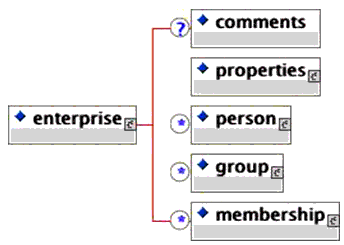
A schematic representation of the core data objects exchanged using the 1EdTech Enterprise Specification is given in Figure 3.1.

- Person - the individuals who are undertaking some form of study and/or group related activity e.g., they are members of a particular course. The personal structure only contains information that is used to identify the individual and that is needed in learning systems. It is not designed to be a data repository for all of the personal information about an individual;
- Group - a collection of objects related to learning activities or individuals. The group is a generic container used to define any set of related activities e.g., a tutor group, a class, a curriculum, etc. There is no restriction on how the Group and sub-group structures can be used with respect to containing other groups, persons, etc.;
- Group Membership - the membership structure is used to define the members of a Group. A member can be a Person or another Group. A Group or Person can be a member of any number of groups. The Group and the member are identified using their sourcedids.
An Enterprise XML instance is designed to contain any number of Person, Group and Membership structures but the order in which these can occur are limited to all of the Person objects, followed by all of the Group objects followed by all of the Membership objects.
3.2 Simple Transaction Model
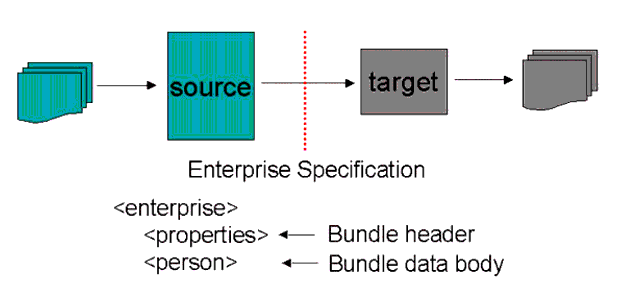
The 1EdTech Enterprise Specification contains a very simple messaging model that is assumed to underlie the exchange of the data between the communicating Enterprise systems. The basic data exchange mechanism is shown in Figure 3.2 in which the 'source' and 'target' Enterprise systems exchange an 1EdTech Enterprise XML instance file. The XML instance consists of a message/bundle header (called <properties>) and the message/bundle data body (this contains the appropriate mixture of <person>, <group> and <membership> structures).
It is important to remember that the structure of the XML instance and the actual usage of XML has no bearing on how the same information is contained within the 'source' and 'target' Enterprise systems. It is simply an exchange interoperability representation of the data (the information that crosses the dotted line in Figure 3.2).
3.3 XML Schema
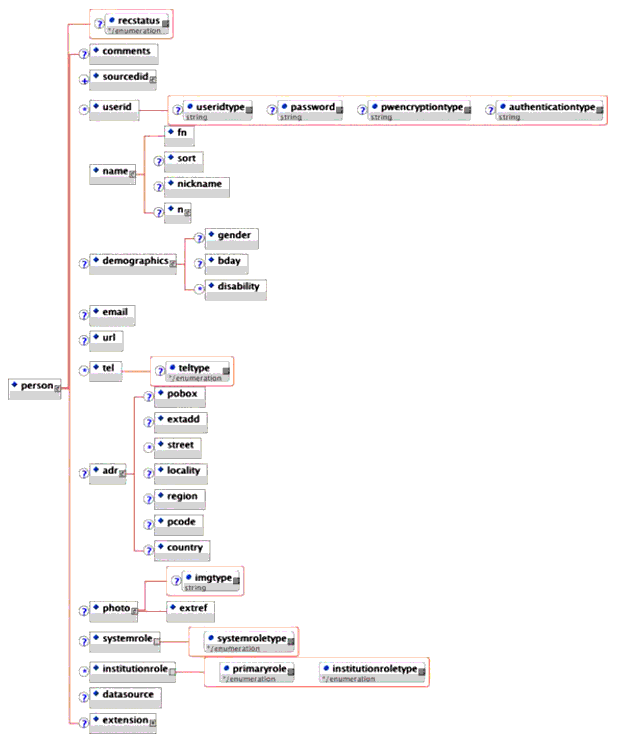
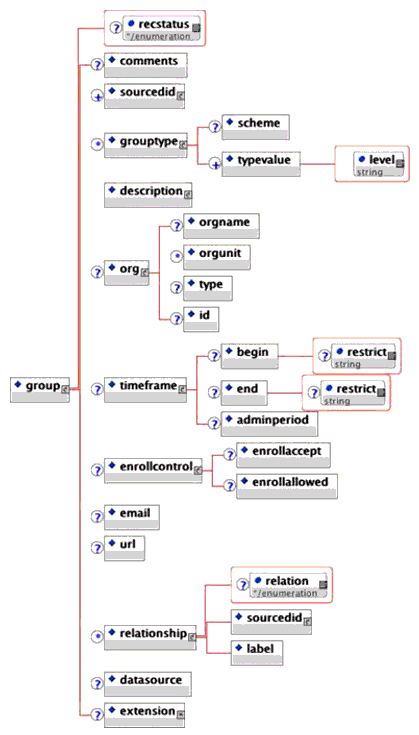
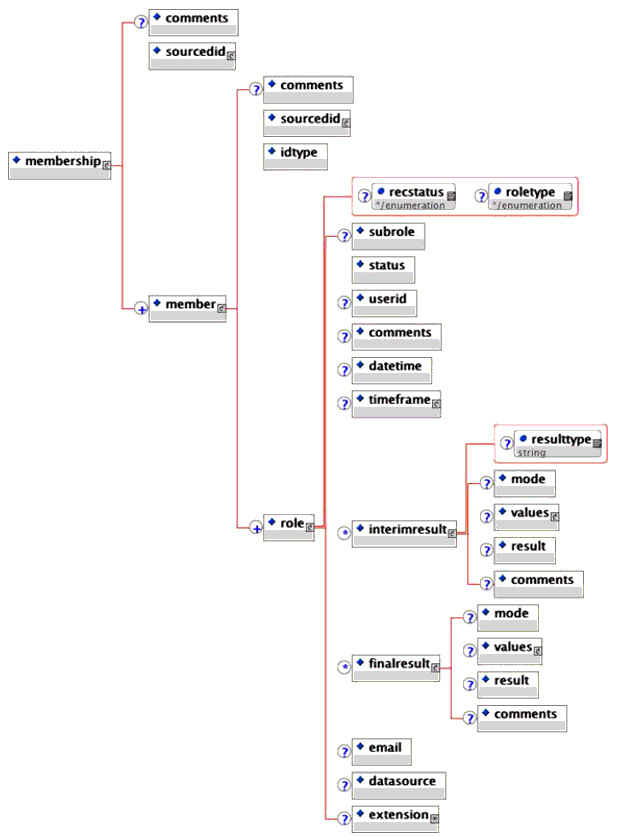
Figures 3.3, 3.4, 3.5 and 3.6 show schematic representations of the XML binding of the Enterprise Information Model.
3.3.1 Enterprise Root Structure
3.3.2 Membership Data Object
4. Basic Example XML Instances
4.1 Person Examples
4.1.1 Create a Single Person Record
In this example a new Person record is created as shown by lines 005 (the message header control field) and 008 (the record transaction type).
<enterprise>
  <properties>
    <datasource>Dunelm Services Limited</datasource>
    <target>Telecommunications LMS</target>
    <type>CREATE</type>
    <datetime>2001-08-08</datetime>
  </properties>
  <person recstatus = "1">
    <comments>This an imaginary set of personal details.</comments>
    <sourcedid>
      <source>Dunelm Services Limited</source>
      <id>CS1</id>
    </sourcedid>
    <userid password = "myencryptedpassword" pwencryptiontype = "PKC"
      authenticationtype = "Kerberos">ColinS34
    </userid>
    <name>
      <fn>Colin Smythe</fn>
      <sort>Smythe, C</sort>
      <nickname>Colin</nickname>
      <n>
        <family>Smythe</family>
        <given>Colin</given>
        <other>Manfred</other>
        <other>Wingarde</other>
        <prefix>Dr.</prefix>
        <suffix>C.Eng</suffix>
        <partname partnametype = "Initials">C.M.W.</partname>
      </n>
    </name>
    <demographics>
      <gender>2</gender>
      <bday>1958-02-18</bday>
      <disability>None.</disability>
    </demographics>
    <email>colin@dunelm.com</email>
    <url>http://www.dunelm.com</url>
    <tel teltype = "1">441142335019</tel>
    <tel teltype = "2">441142335019</tel>
    <adr>
      <pobox>PO Box 24</pobox>
      <extadd>Dunelm Services Limited</extadd>
      <street>34 Acorn Drive</street>
      <street>Stannington</street>
      <locality>Sheffield</locality>
      <region>S.Yorks</region>
      <pcode>S7 6WA</pcode>
      <country>UK</country>
    </adr>
    <photo imgtype = "gif">
      <extref>http://www.dunelm.com/staff/colin.gif</extref>
    </photo>
    <systemrole systemroletype = "User"/>
    <institutionrole primaryrole = "Yes" institutionroletype = "Faculty"/>
    <institutionrole primaryrole = "No" institutionroletype = "Student"/>
    <datasource>dunelm:colinsmythe:1</datasource>
  </person>
</enterprise>
Note: The usage of the new elements and attributes is denoted by the blue lines.
4.1.2 Create Multiple Person Records
In this example three Person records are to be processed: the first is a new record (line 008), the second is an update (line 028) and the third is a record deletion (line 071).
<enterprise>
  <properties>
    <datasource>Dunelm Services Limited</datasource>
    <target>Telecommunications LMS</target>
    <type>DATABASE UPDATE</type>
    <datetime>2001-08-08</datetime>
  </properties>
  <person recstatus = "1">
    <comments>Add a new Person record.</comments>
    <sourcedid>
      <source>Dunelm Services Limited</source>
      <id>CK1</id>
    </sourcedid>
    <name>
      <fn>Clark Kent</fn>
      <sort>Kent, C</sort>
      <nickname>Superman</nickname>
    </name>
    <demographics>
      <gender>2</gender>
    </demographics>
    <adr>
      <extadd>The Daily Planet</extadd>
      <locality>Metropolis</locality>
      <country>USA</country>
    </adr>
  </person>
  <person recstatus = "2">
    <comments>Update a previously created record.</comments>
    <sourcedid>
      <source>Dunelm Services Limited</source>
      <id>CS1</id>
    </sourcedid>
    <name>
      <fn>Colin Smythe</fn>
      <sort>Smythe, C</sort>
      <nickname>Colin</nickname>
      <n>
        <family>Smythe</family>
        <given>Colin</given>
        <other>Manfred</other>
        <other>Wingarde</other>
        <prefix>Dr.</prefix>
        <suffix>C.Eng</suffix>
        <partname partnametype = "Initials">C.M.W.</partname>
      </n>
    </name>
    <demographics>
      <gender>2</gender>
      <bday>1958-02-18</bday>
      <disability>None.</disability>
    </demographics>
    <email>colin@dunelm.com</email>
    <url>http://www.dunelm.com</url>
    <tel teltype = "Mobile">4477932335019</tel>
    <adr>
      <extadd>Dunelm Services Limited</extadd>
      <street>34 Acorn Drive</street>
      <street>Stannington</street>
      <locality> Sheffield</locality>
      <region>S.Yorks</region>
      <pcode>S7 6WA</pcode>
      <country>UK</country>
    </adr>
    <photo imgtype = "gif">
      <extref>http://www.dunelm.com/staff/colin2.gif</extref>
    </photo>
    <institutionrole primaryrole = "No" institutionroletype = "Alumni"/>
    <datasource>dunelm:colinsmythe:1</datasource>
  </person>
  <person recstatus = "3">
    <comments>Delete this record.</comments>
    <sourcedid>
      <source>Dunelm Services Limited</source>
      <id>LL1</id>
    </sourcedid>
    <name>
      <fn>Lois Lane</fn>
      <sort>Lane, L</sort>
    </name>
  </person>
</enterprise>
- The update record (lines 028-070) contains all of the information that should be changed. The implied behavior is that this information replaces that equivalent information already present;
- The deletion record (lines 071-081) contains the minimal amount of information.
4.2 Group Examples
4.2.1 Create a Single Group Record
In this example a new Group record is created as shown by lines 005 (the message header control field) and 008 (the record transaction type).
<enterprise>
  <properties>
    <datasource>University of Durham: SIS</datasource>
    <target>University of Durham: LMS</target>
    <type>CREATE</type>
    <datetime>2001-08-08</datetime>
  </properties>
  <group recstatus = "1">
    <comments>A comment about the Group.</comments>
    <sourcedid>
      <source>University of Durham: SIS</source>
      <id>1976_APE</id>
    </sourcedid>
    <grouptype>
      <scheme>University of Durham</scheme>
      <typevalue level = "2"/>
    </grouptype>
    <description>
      <short>Applied Physics 1976 Cohort</short>
    </description>
    <org>
      <orgname>University of Durham</orgname>
      <orgunit>Applied Physics</orgunit>
      <type>Academic Unit</type>
      <id>Electronics_101</id>
    </org>
    <timeframe>
      <begin restrict = "1">1976:10:01</begin>
      <end restrict = "1">1979:07:01</end>
      <adminperiod>Three year degree cohort:Oct, 1976 to July 1979.</adminperiod>
    </timeframe>
    <enrollcontrol>
      <enrollaccept>0</enrollaccept>
      <enrollallowed>0</enrollallowed>
    </enrollcontrol>
    <email>cohort76@appliedphysics.dur.ac.uk</email>
    <url>http://www.dur.ac.uk/appiedphysics</url>
    <datasource>University of Durham: SIS</datasource>
  </group>
</enterprise>
4.2.2 Create Multiple Group Records
In this example two new Group records are created as shown by lines 005 (the message header control field) and 008 and 040 (the record transaction types).
<enterprise>
  <properties>
    <datasource>University of Durham: SIS</datasource>
    <target>University of Durham: LMS</target>
    <type>CREATE</type>
    <datetime>2001-08-08</datetime>
  </properties>
  <group recstatus = "1">
    <sourcedid>
      <source>University of Durham</source>
      <id>CS1</id>
    </sourcedid>
    <grouptype>
      <scheme>University of Durham</scheme>
      <typevalue level = "2"/>
    </grouptype>
    <description>
      <short>Applied Physics 1976 Cohort</short>
    </description>
    <org>
      <orgname>University of Durham</orgname>
      <orgunit>Applied Physics</orgunit>
      <type>Academic Unit</type>
      <id>Electronics_101</id>
    </org>
    <timeframe>
      <begin restrict = "1">1976:10:01</begin>
      <end restrict = "1">1979:07:01</end>
      <adminperiod>Three year degree cohort of: Oct, 1976 to July 1979.
      </adminperiod>
    </timeframe>
    <enrollcontrol>
      <enrollaccept>0</enrollaccept>
      <enrollallowed>0</enrollallowed>
    </enrollcontrol>
    <email>cohort76@appliedphysics.dur.ac.uk</email>
    <url>http://www.dur.ac.uk/appiedphysics</url>
    <datasource>University of Durham: SIS</datasource>
  </group>
  <group recstatus = "1">
    <sourcedid>
      <source>University of Durham</source>
      <id>CS1.1</id>
    </sourcedid>
    <grouptype>
      <scheme>University of Durham</scheme>
      <typevalue level = "3"/>
    </grouptype>
    <description>
      <short>Applied Physics 1976 Cohort Maths Group</short>
    </description>
    <org>
      <orgname>University of Durham</orgname>
      <orgunit>Applied Physics</orgunit>
      <type>Academic Unit</type>
      <id>Applied_Physics_Maths_1</id>
    </org>
    <timeframe>
      <begin restrict = "1">1976:10:01</begin>
      <end restrict = "1">1977:07:01</end>
      <adminperiod>Maths Year 1 Lecture Group for Applied Physics 1976 Cohort
      </adminperiod>
    </timeframe>
    <enrollcontrol>
      <enrollaccept>0</enrollaccept>
      <enrollallowed>0</enrollallowed>
    </enrollcontrol>
    <email>cohort76@appliedphysics.dur.ac.uk</email>
    <url>http://www.dur.ac.uk/appiedphysics</url>
    <relationship relation = "2">
      <sourcedid>
        <source>University of Durham</source>
        <id>CS1</id>
      </sourcedid>
      <label>Course Lecture Group</label>
    </relationship>
    <datasource>University of Durham: SIS</datasource>
  </group>
</enterprise>
4.2.3 Create Sub-Group Records
In this example the first Group is created (lines 008-028) and then a Sub-group is created (lines 029-045). This Sub-group is a child of the first Group created. The final transaction issues an update to the parent Group (lines 046-052). This explicit bi-directional binding of the relationship may not be necessary in some Enterprise systems.
<enterprise>
  <properties>
    <datasource>MLE</datasource>
    <target>VLE</target>
    <type>CREATE</type>
    <datetime>2002-03-31</datetime>
  </properties>
  <group recstatus = "1">
    <comments>A comment about the Parent Group.</comments>
    <sourcedid>
      <source>MLE</source>
      <id>Degree Cohort</id>
    </sourcedid>
    <grouptype>
      <scheme>University</scheme>
      <typevalue level = "1">Level 1 - Degree</typevalue>
    </grouptype>
    <description>
      <short>Three year degree cohort</short>
    </description>
    <org>
      <orgname>MIT</orgname>
      <orgunit>Physics</orgunit>
      <type>Academic Unit</type>
      <id>Physics_2002</id>
    </org>
    <datasource>MIT: SIS</datasource>
  </group>
  <group recstatus = "1">
    <comments>A comment about the Child Group. </comments>
    <sourcedid>
      <source>MLE</source>
      <id>Degree Cohort</id>
    </sourcedid>
    <description>
      <short>Three year degree cohort.</short>
    </description>
    <relationship relation = "2">
      <sourcedid>
        <source>MLE</source>
        <id>Year 1 Cohort</id>
      </sourcedid>
      <label>The Year 1 Cohort is the CHILD of the Degree Cohort.</label>
    </relationship>
  </group>
  <group recstatus = "2">
    <comments>A comment about the Parent Group</comments>
    <sourcedid>
      <source>MLE</source>
      <id>Year 1 Cohort</id>
    </sourcedid>
    <description>
      <short>First year cohort of the degree cohort.</short>
    </description>
    <relationship relation = "1">
      <sourcedid>
        <source>MLE</source>
        <id>Degree Cohort</id>
      </sourcedid>
      <label>The Degree Cohort is a PARENT of the Year 1 Cohort.</label>
    </relationship>
  </group>
</enterprise>
4.2.4 Support for Cross-Listed Groups
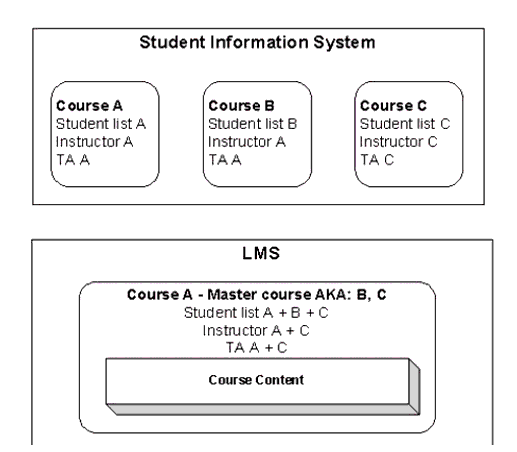
This example illustrates how the 1EdTech Enterprise spec can be used to communicate information about cross-listed courses from a Student Information System (SIS) to a Learning Management System (LMS). Cross-listed courses are those that are listed as separate sections in course catalogue but are taught by the same instructor in the same room as one class. It means that what is listed, as multiple courses in SIS, should be presented to users as a single course in LMS.
Courses A, B, and C are listed as separate unrelated courses (sections), however, they are taught as one course (section) in LMS. LMS will associate students, TA (teaching assistant), and instructors with "Master" course. For course management and presentation purposes LMS may keep the following information:
- Ids of cross-listed courses associated with a master course. In our example we need to know that courses A, B, and C are all related and that course A is the 'master' course;
- An original course ID will be associated with every student, TA, and Instructor in a master course with associated alias courses.
The 'cross-listed' relation between courses is expressed using the <relationship> element in the group object with the "relation" attribute equal to 3 (also known as). If all three courses refer to each other, the order they appear in XML is not important. The first cross-listed course encountered by LMS is setup as the "Master" course.
<enterprise>
  <properties>
    <datasource>BANNER University SCT banner</datasource>
    <type>Initial creation</type>
    <datetime>2002-10-18t10:22:36</datetime>
  </properties>
  <group>
    <!--course section data object-->
    <sourcedid>
      <source>BANNER University SCT banner</source>
      <id>10001.200210</id>
    </sourcedid>
    <grouptype>
      <typevalue level = "1">Instruction</typevalue>
      <typevalue level = "2">Term</typevalue>
      <typevalue level = "3">Course</typevalue>
      <typevalue level = "4">Section</typevalue>
    </grouptype>
    <description>
      <short>chem-1151-001</short>
      <long>General Chemistry I</long>
    </description>
    <org>
      <orgname>BANNER University</orgname>
      <orgunit>Chemistry</orgunit>
      <id>123456</id>
    </org>
    <timeframe>
      <begin>2002-09-05</begin>
      <end>2002-12-19</end>
    </timeframe>
    <enrollcontrol>
      <enrollaccept>1</enrollaccept>
      <enrollallowed>0</enrollallowed>
    </enrollcontrol>
    <relationship relation = "3">
      <sourcedid>
        <source>BANNER University SCT banner</source>
        <id>10002.200210</id>
      </sourcedid>
      <label>Cross-listed course</label>
    </relationship>
    <relationship relation = "3">
      <sourcedid>
        <source>BANNER University SCT banner</source>
        <id>10003.200210</id>
      </sourcedid>
      <label>Cross-listed course</label>
    </relationship>
    <datasource>BANNER University SCT banner</datasource>
  </group>
  <group>
    <!--course section data object-->
    <sourcedid>
      <source>BANNER University SCT banner</source>
      <id>10002.200210</id>
    </sourcedid>
    <grouptype>
      <typevalue level = "1">instruction</typevalue>
      <typevalue level = "2">term</typevalue>
      <typevalue level = "3">course</typevalue>
      <typevalue level = "4">section</typevalue>
    </grouptype>
    <description>
      <short>chem-1151-101</short>
      <long>Chemistry Introduction</long>
    </description>
    <org>
      <orgname>BANNER university</orgname>
      <orgunit>Chemistry</orgunit>
      <id>123456</id>
    </org>
    <timeframe>
      <begin>2002-09-05</begin>
      <end>2002-12-19</end>
    </timeframe>
    <enrollcontrol>
      <enrollaccept>1</enrollaccept>
      <enrollallowed>0</enrollallowed>
    </enrollcontrol>
    <relationship relation = "3">
      <sourcedid>
        <source>BANNER University SCT banner</source>
        <id>10001.200210</id>
      </sourcedid>
      <label>cross-listed course</label>
    </relationship>
    <relationship relation = "3">
      <sourcedid>
        <source>BANNER University SCT banner</source>
        <id>10003.200210</id>
      </sourcedid>
      <label>cross-listed course</label>
    </relationship>
    <datasource>BANNER University SCT banner</datasource>
  </group>
  <group>
    <!--course section data object-->
    <sourcedid>
      <source>BANNER University SCT banner</source>
      <id>10003.200210</id>
    </sourcedid>
    <grouptype>
      <typevalue level = "1">Instruction</typevalue>
      <typevalue level = "2">Term</typevalue>
      <typevalue level = "3">Course</typevalue>
      <typevalue level = "4">Section</typevalue>
    </grouptype>
    <description>
      <short>eng-1151-156</short>
      <long>General Chemistry</long>
    </description>
    <org>
      <orgname>BANNER university</orgname>
      <orgunit>Engineering</orgunit>
      <id>123456</id>
    </org>
    <timeframe>
      <begin>2002-09-05</begin>
      <end>2002-12-19</end>
    </timeframe>
    <enrollcontrol>
      <enrollaccept>1</enrollaccept>
      <enrollallowed>0</enrollallowed>
    </enrollcontrol>
    <relationship relation = "3">
      <sourcedid>
        <source>BANNER University SCT banner</source>
        <id>10002.200210</id>
      </sourcedid>
      <label>cross-listed course</label>
    </relationship>
    <relationship relation = "3">
      <sourcedid>
        <source>BANNER University SCT banner</source>
        <id>10001.200210</id>
      </sourcedid>
      <label>cross-listed course</label>
    </relationship>
    <datasource>BANNER University SCT banner</datasource>
  </group>
</enterprise>
4.3 Membership Examples
4.3.1 Create a Single Membership Record
This example illustrates the creation of two Member records (lines 013-046 and 047-080) in the Group identified (lines 009-012). A role is defined in the first Member record (lines 019-045).
<enterprise>
  <properties>
    <datasource>University of Durham: LMS</datasource>
    <target>University of Durham: SIS</target>
    <type>CREATE</type>
    <datetime>2002-03-31</datetime>
  </properties>
  <membership>
    <sourcedid>
      <source>University of Durham: SIS</source>
      <id>2000_APE</id>
    </sourcedid>
    <member>
      <sourcedid>
        <source>University of Durham: SIS</source>
        <id>2000_APE_001</id>
      </sourcedid>
      <idtype>1</idtype>
      <role>
        <status>1</status>
        <datetime>2001-10-01</datetime>
        <timeframe>
          <begin restrict = "0">2000-10-01</begin>
          <end restrict = "0">2001-07-01</end>
          <adminperiod>2000-01 Academic Year</adminperiod>
        </timeframe>
        <finalresult>
          <mode>Percentage</mode>
          <values valuetype = "1">
            <min>0</min>
            <max>100</max>
          </values>
          <result>65</result>
          <comments>Examination Result: Passed</comments>
        </finalresult>
        <finalresult>
          <mode>Percentage</mode>
          <values valuetype = "1">
            <min>0</min>
            <max>100</max>
          </values>
          <result>60</result>
          <comments>Practical Result: Passed</comments>
        </finalresult>
      </role>
    </member>
    <member>
      <sourcedid>
        <source>University of Durham: SIS</source>
        <id>2000_APE_004</id>
      </sourcedid>
      <idtype>1</idtype>
      <role>
        <status>1</status>
        <datetime>2001-10-01</datetime>
        <timeframe>
          <begin restrict = "0">2000-10-01</begin>
          <end restrict = "0">2001-07-01</end>
          <adminperiod>2000-01 Academic Year</adminperiod>
        </timeframe>
        <finalresult>
          <mode>Percentage</mode>
          <values valuetype = "1">
            <min>0</min>
            <max>100</max>
          </values>
          <result>60</result>
          <comments>Examination Result: Passed</comments>
        </finalresult>
        <finalresult>
          <mode>Percentage</mode>
          <values valuetype = "1">
            <min>0</min>
            <max>100</max>
          </values>
          <result>30</result>
          <comments>Practical Result: Failed</comments>
        </finalresult>
      </role>
    </member>
  </membership>
</enterprise>
4.3.2 Create Multiple Membership Records
In this example two Membership instances are created. Each Membership contains a single Member each with one role being defined.
<enterprise>
  <properties>
    <datasource>University of Durham: LMS</datasource>
    <target>University of Durham: SIS</target>
    <type>CREATE</type>
    <datetime>2002-03-31</datetime>
  </properties>
  <membership>
    <sourcedid>
      <source>University of Durham: SIS</source>
      <id>2000_APE</id>
    </sourcedid>
    <member>
      <sourcedid>
        <source>University of Durham: SIS</source>
        <id>2000_APE_004</id>
      </sourcedid>
      <idtype>1</idtype>
      <role>
        <status>1</status>
        <datetime>2001-10-01</datetime>
        <timeframe>
          <begin restrict = "0">2000-10-01</begin>
          <end restrict = "0">2001-07-01</end>
          <adminperiod>2000-01 Academic Year</adminperiod>
        </timeframe>
        <finalresult>
          <mode>Percentage</mode>
          <values valuetype = "1">
            <min>0</min>
            <max>100</max>
          </values>
          <result>60</result>
          <comments>Examination Result: Passed</comments>
        </finalresult>
        <finalresult>
          <mode>Percentage</mode>
          <values valuetype = "1">
            <min>0</min>
            <max>100</max>
          </values>
          <result>30</result>
          <comments>Practical Result: Failed</comments>
        </finalresult>
      </role>
    </member>
  </membership>
  <membership>
    <sourcedid>
      <source>University of Durham: HR</source>
      <id>Staff_3</id>
    </sourcedid>
    <member>
      <sourcedid>
        <source>University of Durham: HR</source>
        <id>Staff:625745</id>
      </sourcedid>
      <idtype>1</idtype>
      <role roletype = "01">
        <status>1</status>
        <datetime>2001-10-01</datetime>
        <timeframe>
          <begin restrict = "0">1980-10-01</begin>
          <end restrict = "0">2021-07-01</end>
          <adminperiod>Employment until Retirement</adminperiod>
        </timeframe>
      </role>
    </member>
  </membership>
</enterprise>
5. Advanced Example XML Instances
5.1 A V1.0 Example Renovated in V1.1 Format
Below is an example, from Blackboard, that includes Person, Group and Membership structures based upon the V1.0 Enterprise Specification. It includes uses of Blackboard extensions (see the shaded lines).
<ENTERPRISE>
  <PROPERTIES>
    <DATASOURCE>California State University San Marcos</DATASOURCE>
    <TARGET>Computing and Telecommunications LMS</TARGET>
    <TYPE>REFRESH</TYPE>
    <DATETIME>1999-02-03</DATETIME>
  </PROPERTIES>
  <PERSON transaction="2">
    <SOURCEDID>
      <SOURCE>California State University San Marcos</SOURCE>
      <ID>111-22-3344<!--Campus User Key -->
      </ID>
    </SOURCEDID>
    <USERID>rpeterson<!--Username-->
    </USERID>
    <NAME>
      <FN>Raymond F. Peterson</FN>
      <SORT>Peterson, Raymond</SORT>
      <NICKNAME>Ray</NICKNAME>
      <N>
        <FAMILY>Peterson<!--Last Name-->
        </FAMILY>
        <GIVEN>Raymond<!--First Name-->
        </GIVEN>
        <OTHER>Franklin<!--Middle Name-->
        </OTHER>
        <PREFIX>Mr.<!--Title-->
        </PREFIX>
      </N>
    </NAME>
    <DEMOGRAPHICS>
      <BDAY>1972-10-11<!--Birthday-->
      </BDAY>
    </DEMOGRAPHICS>
    <EMAIL>rpeterson@blackboard.com<!--User Email-->
    </EMAIL>
    <TEL teltype="1">7607504785
    </TEL>
    <TEL teltype="2">7607503257</TEL>
    <ADR>
      <STREET>1899 L Street<!--Address Line 1-->
      </STREET>
      <STREET>234243<!--Address Line 2-->
      </STREET>
      <LOCALITY>Washington<!--City-->
      </LOCALITY>
      <REGION>DC<!--State Province-->
      </REGION>
      <PCODE>20036<!--Zip postal code-->
      </PCODE>
      <COUNTRY>US<!--Country-->
      </COUNTRY>
    </ADR>
    <EXTENSION>
      <X_BB_SYSTEMROLE>0<!--0-System Admin -->
      </X_BB_SYSTEMROLE>
      <X_BB_INSTITUTIONROLE>0<!-- 0-Student -->
      </X_BB_INSTITUTIONROLE>
      <X_BB_STUDENTID>144532<!--Person Id-->
      </X_BB_STUDENTID>
      <X_BB_PASSWORD>rpeterson<!--User Password-->
      </X_BB_PASSWORD>
    </EXTENSION>
  </PERSON>
  <PERSON transaction="1">
    <SOURCEDID>
      <SOURCE>California State University San Marcos</SOURCE>
      <ID>111-22-3344<!--Campus User Key-->
      </ID>
    </SOURCEDID>
    <USERID>rpeterson<!--Username-->
    </USERID>
    <NAME>
      <FN>Raymond F. Peterson</FN>
      <SORT>Peterson, Raymond</SORT>
      <NICKNAME>Ray</NICKNAME>
      <N>
        <FAMILY>Peterson<!--Last Name-->
        </FAMILY>
        <GIVEN>Raymond<!--First Name-->
        </GIVEN>
        <OTHER>Franklin<!--Middle Name-->
        </OTHER>
        <PREFIX>Mr.<!--Title-->
        </PREFIX>
      </N>
    </NAME>
    <DEMOGRAPHICS>
      <BDAY>1972-10-11<!--Birthday-->
      </BDAY>
    </DEMOGRAPHICS>
    <EMAIL>rpeterson@blackboard.com<!--User Email-->
    </EMAIL>
    <TEL teltype="1">7607504785<!--Telphone. 1-Home Fax -->
    </TEL>
    <TEL teltype="2">7607503257</TEL>
    <ADR>
      <STREET>1899 L Street<!--Address Line 1-->
      </STREET>
      <STREET>234243<!--Address Line 2-->
      </STREET>
      <LOCALITY>Washingtom<!--City-->
      </LOCALITY>
      <REGION>DC<!--State Province-->
      </REGION>
      <PCODE>20036<!--Zip postal code-->
      </PCODE>
      <COUNTRY>US<!--Country-->
      </COUNTRY>
    </ADR>
    <EXTENSION>
      <X_BB_SYSTEMROLE>0<!-- 0-System Admin -->
      </X_BB_SYSTEMROLE>
      <X_BB_INSTITUTIONROLE>1<!-- 1-Faculty -->
      </X_BB_INSTITUTIONROLE>
      <X_BB_STUDENTID>144123<!--Person Id-->
      </X_BB_STUDENTID>
      <X_BB_PASSWORD>wlove<!--User Password-->
      </X_BB_PASSWORD>
    </EXTENSION>
  </PERSON>
  <GROUP transaction="1">
    <SOURCEDID>
      <SOURCE>College of Arts and Sciences</SOURCE>
      <ID>CS-697C-Section_1_Fall_1999<!--Course Section Key-->
      </ID>
    </SOURCEDID>
    <GROUPTYPE>
      <SCHEME>Blackboard, Inc.</SCHEME>
      <!--Only scheme currently supported. Anything else is in error.-->
      <TYPEVALUE level="0">1<!--Service Level. 0-Course, 1-Organization-->
      </TYPEVALUE>
    </GROUPTYPE>
    <DESCRIPTION>
      <SHORT>Security-In-Computing<!--Abbreviated Title-->
      </SHORT>
      <LONG>Graduate Level Special Topics course security in computing today.
      </LONG>
      <FULL>This course will examine threats and security issues in today's common
        computing environments. Prerequisites: Advanced Networks (CS 301) and
        Cryptography (CS 633).<!--Course Description-->
      </FULL>
    </DESCRIPTION>
    <ORG>
      <ORGNAM>College of Arts and Sciences</ORGNAM>
      <ORGUNIT>Computer Science</ORGUNIT>
      <TYPE>Academic</TYPE>
    </ORG>
    <TIMEFRAME>
      <BEGIN restrict="0">1999-08-26<!--Start Date-->
      </BEGIN>
      <END restrict="0">1999-12-20<!--End Date-->
      </END>
      <ADMINPERIOD>Fall 1999</ADMINPERIOD>
    </TIMEFRAME>
    <ENROLLCONTROL>
      <ENROLLACCEPT>1</ENROLLACCEPT>
    </ENROLLCONTROL>
    <EXTENSION>
      <X_BB_GROUP_TYPE>1<!--Service Level. 0-Course, 1-Organization-->
      </X_BB_GROUP_TYPE>
    </EXTENSION>
  </GROUP>
  <MEMBERSHIP>
    <SOURCEDID>
      <SOURCE>College of Arts and Sciences</SOURCE>
      <ID>CS-697C-Section_1_Fall_1999<!--Course Section Key-->
      </ID>
    </SOURCEDID>
    <MEMBER>
      <SOURCEDID>
        <SOURCE>California State University San Marcos</SOURCE>
        <ID>111-22-3344<!--Campus user Key-->
        </ID>
      </SOURCEDID>
      <IDTYPE idtype="1"/>
      <ROLE transaction="1" roletype="01">
        <!--Course Role. 0-Instructor, 1-Teaching Assistant, 2-Course Builder,
        3-Grader, 4-Student, 5-Guest, 6-None-->
        <STATUS>1</STATUS>
        <COMMENTS>This student has no special needs.</COMMENTS>
        <FINALRESULT>
          <MODE>Letter Grade requested</MODE>
          <VALUES listrange="0">
            <LIST>A</LIST>
            <LIST>C</LIST>
            <LIST>F</LIST>
          </VALUES>
        </FINALRESULT>
      </ROLE>
    </MEMBER>
  </MEMBERSHIP>
</ENTERPRISE>
The equivalent v1.1 XML instance is shown below. The structures that have been used instead of the Blackboard extensions are shown in blue.
<enterprise>
  <properties>
    <datasource>California State University San Marcos</datasource>
    <target>Computing and Telecommunications LMS</target>
    <type>REFRESH</type>
    <datetime>1999-02-03</datetime>
  </properties>
  <person recstatus = "2">
    <sourcedid>
      <source>California State University San Marcos</source>
      <id>111-22-3344
        <!--campus user key -->
      </id>
    </sourcedid>
    <userid password = "rpeterson" useridtype = "username">rpeterson</userid>
    <userid useridtype = "StudentId">144532</userid>
    <name>
      <fn>Raymond F. Peterson</fn>
      <sort>Peterson, Raymond</sort>
      <nickname>Ray</nickname>
      <n>
        <family>Peterson
          <!--last name-->
        </family>
        <given>Raymond
          <!--first name-->
        </given>
        <prefix>Mr.
          <!--title-->
        </prefix>
        <partname partnametype = "Middle">Franklin</partname>
      </n>
    </name>
    <demographics>
      <bday>1972-10-11
        <!--birthday-->
      </bday>
    </demographics>
    <email>rpeterson@blackboard.com
      <!--user email-->
    </email>
    <tel teltype = "1">7607504785
      <!--telphone. 0-home phone 1, 1-home fax, 2-workphone 1, 3-work fax, 4-
      mobile phone-->
    </tel>
    <tel teltype = "2">7607503257</tel>
    <adr>
      <street>1899 L Street
        <!--address line 1-->
      </street>
      <street>234243
        <!--address line 2-->
      </street>
      <locality>Washington
        <!--city-->
      </locality>
      <region>DC
        <!--state province-->
      </region>
      <pcode>20036
        <!--zip postal code-->
      </pcode>
      <country>US
        <!--country-->
      </country>
    </adr>
    <systemrole systemroletype = "SysAdmin"/>
    <institutionrole primaryrole = "Yes" institutionroletype = "Student"/>
  </person>
  <person recstatus = "1">
    <sourcedid>
      <source>California State University San Marcos</source>
      <id>111-22-3344
        <!--campus user key-->
      </id>
    </sourcedid>
    <userid password = "wlove" useridtype = "username">rpeterson</userid>
    <userid useridtype = "StudentId">144123</userid>
    <name>
      <fn>Raymond F. Peterson</fn>
      <sort>Peterson, Raymond</sort>
      <nickname>Ray</nickname>
      <n>
        <family>Peterson
          <!--last name-->
        </family>
        <given>Raymond
          <!--first name-->
        </given>
        <other>Franklin
          <!--middle name-->
        </other>
        <prefix>Mr.
          <!--title-->
        </prefix>
      </n>
    </name>
    <demographics>
      <bday>1972-10-11
        <!--birthday-->
      </bday>
    </demographics>
    <email>rpeterson@blackboard.com
      <!--user email-->
    </email>
    <tel teltype = "1">7607504785
      <!--telphone. 0-home phone 1, 1-home fax, 2-workphone 1, 3-work fax, 4-
      mobile phone-->
    </tel>
    <tel teltype = "2">7607503257</tel>
    <adr>
      <street>1899 L Street
        <!--address line 1-->
      </street>
      <street>234243
        <!--address line 2-->
      </street>
      <locality>Washingtom
        <!--city-->
      </locality>
      <region>DC
        <!--state province-->
      </region>
      <pcode>20036
        <!--zip postal code-->
      </pcode>
      <country>US
        <!--country-->
      </country>
    </adr>
    <systemrole systemroletype = "SysAdmin"/>
    <institutionrole primaryrole = "Yes" institutionroletype = "Faculty"/>
  </person>
  <group recstatus = "1">
    <sourcedid>
      <source>College of Arts and Sciences</source>
      <id>CS-697C-Section_1_Fall_1999
        <!--course section key-->
      </id>
    </sourcedid>
    <grouptype>
      <scheme>Blackboard, Inc.</scheme>
      <!--Only scheme currently supported. Anything else is in error.-->
      <typevalue level = "0">1
        <!--Service level. 0-Course, 1-Organization-->
      </typevalue>
    </grouptype>
    <description>
      <short>Security-In-Computing</short>
      <long>Graduate Level Special Topics course covering security in computing
        today.<!--title-->
      </long>
      <full>This course will examine threats and security issues in today's common
        computing environments. Prerequisites: Advanced Networks (CS 301) and
        Cryptography (cs 633).<!--course description-->
      </full>
    </description>
    <org>
      <orgname>College of Arts and Sciences</orgname>
      <orgunit>Computer Science</orgunit>
      <type>Academic</type>
    </org>
    <timeframe>
      <begin restrict = "0">1999-08-26
        <!--start date-->
      </begin>
      <end restrict = "0">1999-12-20
        <!--end date-->
      </end>
      <adminperiod>Fall 1999</adminperiod>
    </timeframe>
    <enrollcontrol>
      <enrollaccept>1</enrollaccept>
    </enrollcontrol>
  </group>
  <membership>
    <sourcedid>
      <source>College of Arts and Sciences</source>
      <id>CS-697C-Section_1_Fall_1999
        <!--course section key-->
      </id>
    </sourcedid>
    <member>
      <sourcedid>
        <source>California State University San Marcos</source>
        <id>111-22-3344
          <!--campus user key-->
        </id>
      </sourcedid>
      <idtype>1</idtype>
      <role recstatus = "1" roletype = "01">
        <!--course role. 0-instructor, 1-teaching assistant, 2-course builder,
        3-grader, 4-student, 5-guest, 6-none-->
        <status>1</status>
        <comments>This student has no special needs.</comments>
        <finalresult>
          <mode>Letter Grade requested</mode>
          <values valuetype = "0">
            <list>A</list>
            <list>C</list>
            <list>F</list>
          </values>
        </finalresult>
      </role>
    </member>
  </membership>
</enterprise>
5.2 A Course Catalog
An example of the usage of the Group structure to support the definition of a course catalogue is shown below. This makes use of the <group_members> element to contain the associated courses (lines 034-131).
<enterprise>
  <properties>
    <datasource>QLS</datasource>
    <target>MLE</target>
    <type>Query</type>
    <datetime>2001-10-25</datetime>
  </properties>
  <person>
    <sourcedid>
      <source>QLS</source>
      <id>p654321</id>
    </sourcedid>
    <name>
      <fn>Some Body</fn>
    </name>
    <tel>+44 1162 123456</tel>
  </person>
  <group>
    <sourcedid>
      <source>QLS</source>
      <id>cc205</id>
    </sourcedid>
    <grouptype>
      <scheme/>
      <typevalue level = "p"/>
    </grouptype>
    <description>
      <short>computing (p/t)</short>
    </description>
    <timeframe>
      <begin restrict = "0">9/21/98</begin>
      <end restrict = "0">9/30/01</end>
    </timeframe>
    <groupmembers>
      <sourcedid>
        <source>QLS</source>
        <id>soft 1234</id>
      </sourcedid>
      <sourcedid>
        <source>QLS</source>
        <id>soft 2345</id>
      </sourcedid>
      <sourcedid>
        <source>QLS</source>
        <id>soft 3456</id>
      </sourcedid>
      <sourcedid>
        <source>QLS</source>
        <id>soft 4567</id>
      </sourcedid>
      <sourcedid>
        <source>QLS</source>
        <id>soft 5678</id>
      </sourcedid>
      <sourcedid>
        <source>QLS</source>
        <id>soft 6789</id>
      </sourcedid>
      <sourcedid>
        <source>QLS</source>
        <id>soft 4321</id>
      </sourcedid>
      <sourcedid>
        <source>QLS</source>
        <id>soft 5432</id>
      </sourcedid>
      <sourcedid>
        <source>QLS</source>
        <id>soft 6543</id>
      </sourcedid>
      <sourcedid>
        <source>QLS</source>
        <id>soft 7654</id>
      </sourcedid>
      <sourcedid>
        <source>QLS</source>
        <id>soft 8765</id>
      </sourcedid>
      <sourcedid>
        <source>QLS</source>
        <id>soft 9876</id>
      </sourcedid>
      <sourcedid>
        <source>QLS</source>
        <id>soft 0987</id>
      </sourcedid>
      <sourcedid>
        <source>QLS</source>
        <id>soft 1111</id>
      </sourcedid>
      <sourcedid>
        <source>QLS</source>
        <id>soft 2222</id>
      </sourcedid>
      <sourcedid>
        <source>QLS</source>
        <id>soft 3333</id>
      </sourcedid>
      <sourcedid>
        <source>QLS</source>
        <id>soft 4444</id>
      </sourcedid>
      <sourcedid>
        <source>QLS</source>
        <id>soft 5555</id>
      </sourcedid>
      <sourcedid>
        <source>QLS</source>
        <id>soft 6666</id>
      </sourcedid>
      <sourcedid>
        <source>QLS</source>
        <id>soft 7777</id>
      </sourcedid>
      <sourcedid>
        <source>QLS</source>
        <id>soft 8888</id>
      </sourcedid>
      <sourcedid>
        <source>QLS</source>
        <id>soft 9999</id>
      </sourcedid>
      <sourcedid>
        <source>QLS</source>
        <id>soft 0000</id>
      </sourcedid>
      <sourcedid>
        <source>QLS</source>
        <id>soft 1357</id>
      </sourcedid>
    </groupmembers>
  </group>
  <membership>
    <sourcedid>
      <source>QLS</source>
      <id>cc205</id>
    </sourcedid>
    <member>
      <sourcedid>
        <source>QLS</source>
        <id>p654321</id>
      </sourcedid>
      <idtype>1</idtype>
      <role roletype = "01">
        <status>1</status>
      </role>
    </member>
  </membership>
</enterprise>
6. 1EdTech Enterprise and Other Specifications
6.1 1EdTech Specifications
6.1.1 1EdTech Learner Information Package (LIP) Mapping
The mapping between the 1EdTech Enterprise <person> element and the 1EdTech LIP <identification> element is shown in Table 6.1.
6.2 Other Specifications
6.2.1 IETF vCard Mapping
The 1EdTech Enterprise is compatible with the IETF vCard specification i.e. many of the vCard fields can be contained by an Enterprise-XML instance and the rest are supported through the use of the Person extension element. This relationship is shown in Table 6.2, namely:
6.2.2 Internet2/Educause 'eduPerson' Mapping
The eduPerson specification is an object class for LDAP services whereas Enterprise is a set of data objects for the exchange of learner Enterprise information and not just directory-related information. The relationship between the eduPerson V1.0 specification and the 1EdTech Enterprise V1.1 is summarized in Table 6.3.
6.2.3 LDAP Attribute Mapping
Most enterprise systems utilize a directory to store organizational and person information. Many directories use the Lightweight Directory Access Protocol (LDAP) to store this data and make it accessible to other Enterprise applications. It is likely that Learning Management Systems will use some of the data in an LDAP directory to populate equivalent fields in the 1EdTech Enterprise XML Binding. Table 6.4 represents a preliminary mapping between LDAP base schema items and 1EdTech Enterprise elements. This is provided only as an example. The reader who wishes to incorporate LDAP data into learning management applications is encouraged to consult authoritative sources regarding LDAP.
7. Implementation Guidance
7.1 Achieving Interoperability
7.1.1 Interworking Enterprise Systems
The following list describes some types of systems for which the 1EdTech Enterprise Specification may support Learning Management interoperability. It includes a list of some interfaces that the current specification can support.
7.1.1.1 Human Resource Management System
Human Resource Management Systems (HRMS) manage personnel records, payroll, benefits, competency management, and other functions for an enterprise. Interoperability that can be supported by this specification include:
- Person data maintained in the HRMS and passed to the LMS;
- HR departments passed as groups, and employees of those departments passed as members;
- Special groups of employees (new hires for example) passed to the LMS as training groups.
- After the completion of training courses, course information return to the HRMS as groups, and completion of training courses, - could come back as membership in those groups, with result information included.
7.1.1.2 Corporate Training Management System
Corporate Training Administration systems keep track of employee training plans, schedule training courses (including instructors and resources), enroll people in training, record training completed, and update employee competencies in an HRMS. They are also used to manage training delivered to customers. Interoperability that can be supported by this specification include:
- Person data might be passed to the LMS from the training system;
- Training groups (courses) and memberships could be passed from training to the LMS.
- After the completion of training courses, membership objects could be sent to the Training Administration system from the LMS with result (completion) information included.
7.1.1.3 Student Administration System
Student Administration systems (SA) keep track of student education plans, schedule courses (including instructors and resources), enroll people in courses, record course results, and update student academic progress. Interoperability that can be supported by this specification include:
- Person data for people enrolled in groups that are managed by the LMS;
- Group data could be passed from SA to the LMS to create the groups;
- Group membership (course enrollment) data may be passed from SA to the LMS;
- Final grade information may be passed to the LMS from the SA in an updated Membership object if final grading occurs in the SA, and the LMS needs the final grade for its records.
- Final grades could be returned to SA from the LMS by passing back Membership records with the Result data provided. This data could then be entered into a formal grade roster process on the SA side.
7.1.1.4 Library Management System
Library Management systems can be thought of as a particular class of Learning Management system, in that they provide a set of services for managing the interaction of learners with learning objects. Therefore, it is appropriate to use this specification to support interfaces from other enterprise systems to Library Management systems in much the same way that these interfaces are supported with Learning Management Systems.
- People data;
- Groups (course sections for access to specific material, HR departments for access to services, alumni for access to limited services, etc.);
- Group membership.
7.2 Architectural Considerations
7.2.1 Interface Architectures
The 1EdTech Enterprise Information Model and XML Binding Specification are intended to support either the "Snapshot" or Event Driven interface types discussed.
7.2.1.1 The "Snapshot" Interface
The 1EdTech Enterprise team's consensus is that the most robust and easily implemented interface would involve the passing of a complete "snapshot" of the Person, Group, and Group Membership data. The target system would examine this snapshot to determine what changes had occurred. This very basic type of interface allows a receiving system to pick up an interface at any time and synchronize its data with the source system - regardless of how many interfaces had been passed in the interim. A purely event driven "transactional" interface, on the other hand, cannot tolerate any loss or skipping of interface records.
This basic interface also allows the target system to implement many different strategies for dealing with the interface data. Taking a "snapshot" means that the full set of relevant data from the source system can be moved to the target system environment on any timing needed to support the business processes. This interface architecture has the advantage of being very tolerant of lost messages or missed data objects because the next transmittal will always get the target system back in synchronization with the source system. However, the major drawback is that the target system can never be sure that the data has not changed in the source system since the last snapshot was received. Also, this interface architecture does not effectively support two-way interfaces. In a two-way interface, data object maintenance occurs in both systems, and the data objects are passed in both directions.
7.2.1.2 Event Driven Interface
In an event driven interface, the source system publishes data object messages when events occur. This changes the relevant data, and the target system receives and processes the event transactions. The existence of an event driven interface does not eliminate the usefulness of the "snapshot" interface. Because an event driven interface is not tolerant of missed transactions, the "snapshot" interface can be used at regular intervals to "re-synchronize" the data in the target system with that in the source system. This increases the fault tolerance of the overall interface architecture.
7.2.2 Single File from Multiple Systems
During integration engagements conducted by Blackboard in the Summer and Fall of 1999, it was determined that some institutions might store certain objects in multiple systems. The initial version of the 1EdTech Enterprise Information Model V1.0 handled this situation if the file was sent separately from each system and the system was identified by the <datasource> attribute in Properties. However, Blackboard found that some institutions preferred to produce one file and send that to Blackboard CourseInfo Enterprise. In this case a <datasource> attribute at the file level is not sufficient. It was recommended that the 1EdTech Enterprise Information Model be changed to include a <datasource> element for People, Groups and Group Membership. The element would be at the top level for People and Groups, but off Role for Group Membership. This <datasource> element identifies the system from which the record (object) came while the source in the sourcedid identifies the system that guarantees the uniqueness of the record. This modification was introduced in V1.01 and is sustained in V1.1.
7.2.3 Addresses and Identifiers
An underlying assumption in a transaction-based system is that the sequence of messages will, in general, refer to the same objects at different moments in time e.g., the 'creation' of a Person, the 'updating' of a person and eventually the 'deletion' of the Person record. This means that the objects must have a unique identifier and that this address/label is unique between the communicating systems (an object may have more that one identifier even between the same two systems). The 1EdTech Enterprise Specification calls these identifiers the 'sourcedid' of the object and it consists of a 'source' (globally unique across all the Enterprise systems) and an 'id' (unique within the source Enterprise system).

The usage of the 'sourcedid' for labelling the objects being exchanged gives rise to the scenario shown in Figure 7.1. The consequence of this approach is that any object will have multiple identifiers depending on which part of the system is being considered i.e.
- The 'sourcedid' is the exchange identifier and will be unique to a particular source system;
- The local identifier within the source system. This could be a database record number, etc. The source system must maintain the local identifier mapping table between the local identifier and the 'sourcedid';
- The local identifier within the target systems. In general the local identifier in each target system will be different. It is the responsibility of the target systems to maintain the local mapping table between the 'sourcedid' and their local identifier.
7.3 Using Person
Within the 1EdTech Enterprise Specification the Person structure has undergone the most significant changes. The salient points to note when using the person structure are:
- The <sourcedid> and <name> elements are mandatory and the <fn> element within <name> also mandatory. This means that every Person instance must contain at the very least the empty <fn> element even when the 'Delete' transaction is being undertaken;
- The <userid> element has been revised. Some implementations were using this, incorrectly, to store passwords. The revisions now support passwords as well as authentication;
- The <name> element has been revised to include the <partname> structure (this supports increased internationalization). This should be used in preference to the <other> element. At the current time no agreed vocabulary has been identified for usage when identifying the name component;
- The <disability> element has been added to the <demographics> element. This should be used to store disability codes e.g., blind, deaf, etc. and should not be used to contain computer accessibility preferences information. The <ethnicity> amendment has not been included;
- The <url> element has been added to enable the Person's Web address to be identified. This should be supplied in the form of an absolute URL;
- The <teltype> attribute on the <tel> has been extended to support mobile and pager telephone numbers as well as the voice and fax ones;
- The <adr> structure has not been altered. It was considered unnecessary to increase its functionality for internationalization purposes as all of the appropriate features were already available;
- The <systemrole> and <institutionrole> elements have been added to remove the need for the proprietary extensions that have been created elsewhere. A Person is expected to have a single <systemrole> but will have, in general> several <institutionrole> elements. The vocabularies for each of these elements are enumerated and so all roles must be mapped onto those vocabularies.
7.4 Using Group
7.4.1 Groups and Sub-Groups
The Group structure is used as a generic collection structure for objects that have a similar functionality, responsibility, etc. It can be a Group of other Groups or a Group of Person records. A Group does not contain Sub-groups per se but the relationship between one Group and another can be defined as per a sub-grouping.
The relationship between two Groups is defined using the <relationship> element. This allows the definition of uni-directional and bi-directional references depending on the desired implementation. The sub-group hierarchy is defined using the '1=Parent' and '2=Child' values in the <relation> attribute of the <relationship> element. This tree structure can be defined to have any number of roots and the equivalence of Groups can be defined using the '3-Cross Listing' value for <relation>.
7.4.2 Cross-Listed Course Sections
Cross-Listed course sections are a fairly common scenario in higher education. A Cross-Listed course section refers to a situation where the same course is offered under more than one name. This is typically done because different groups of students will enroll in different sections based on the program they are studying. For example, Statistics 101 section 1 and Psychology 101 section 1 are really the same course section, offered by the same instructor, meeting at the same time and place (physical or virtual), using the same course materials. The only difference is that Math students enroll in Statistics 101, and Psychology students enroll in Psychology 101. A problem arises in this situation when the Enterprise system treats these sections as separate groups. In the Learning Management System, they need to be treated as a single group, or at least the LMS needs to know they are related.
One approach is to resolve this in the source system before passing Groups and Memberships over to the target system. In other words, a single group (perhaps called "Introductory Statistics", without the Math or Psychology designator) would be created in the Learning Management System and membership from both groups in the Enterprise system would be passed to this single group in the LMS. Another approach is to pass two separate groups to the target system, but relate them to each other through the use of the Relationship element. In this case, the two groups could be tagged as follows in the Relationship element:
- Sourced ID - The ID of the cross-listed course section in the source system;
- Label - Would contain something like 'Cross Listed Section';
- Relation - Would contain "3" (also known as).
In general, the best practice would be to resolve the issue in the source system, before passing the group and membership data to the target system, but there may be cases where the second approach is required.
7.5 Using Membership
7.5.1 Assigning Group Membership Role-type
Roletype is a data structure in the Group Membership object that has a defined set of domain values. This means that only those values defined in the domain can be used for this element. Recognizing that no defined list of roles can ever be absolutely complete; the optional element <subrole> can be used to further qualify a person's role in a group. It is essential to have a defined list of values for the mandatory <roletype> element so source systems can generate standard Group Membership data objects that target systems can process without having to first negotiate the meaning of role-types with the source system. To help developers understand what meaning is embedded in each of the role-type values, the Table 7.1 shows the LMS functions to which each roletype will typically have access. This is not intended to be a precise and exclusive list of all functions that these roles will have access to in all LMSs. Rather, it is provided as an interpretive guide intended to communicate the meaning the developers of the specification had in mind for each role. In addition, access to these functions will be less for some sub-roles. For example, a supervisor may be a sub-role for a manager, and a supervisor will likely not have access to results for the people they supervise.
Note: The key is: X=Available, R=Read, M=Main, S=Some, T=Theirs.
In any particular implementation or in any specific vendor's product, the Instructor role and the Administrator role will frequently have several sub-roles.
7.6 1EdTech Harmonization
The 1EdTech Enterprise Specification is complemented by the 1EdTech Learner Information Package (LIP) Specification [LIP, 01a], [LIP, 01b],[LIP, 01c]. There is some confusion about when and where the two specifications should be used and so the following recommendations are made:
- Information that is limited to a small sub-set of the full personal details of an individual and to be used to populate an LMS for learning activities should be exchanged using the 1EdTech Enterprise Specification (the <person> structure). The exception is personal information required to support computer-based accessibility that should be exchanged using the 1EdTech LIP <accessibility> data object;
- Information about Group activities, groups of people and membership information should be exchanged using the 1EdTech Enterprise Specification using the <group> and <membership> data objects;
- Information about a single individual, particularly when focused on their life-long learning log/profile, should be exchanged using the 1EdTech LIP Specification e.g., their set of examination results.
There may be some confusion between the 1EdTech Enterprise, 1EdTech LIP and the 1EdTech Question and Test Interoperability (QTI) Results Reporting Specifications with respect to exchanging assessment results. The following recommendations are made:
- Information from an Assessment Engine reporting the set of results for a single individual or group of people should be reported to another Assessment Engine or within the Assessment System using the 1EdTech QTI Specification;
- Personal results being reported from an Assessment System to a Profiles System should be exchanged using the 1EdTech LIP;
- Personal and group results being reported from and LMS to an Enterprise System should be reported using the 1EdTech Enterprise Specification.
7.7 Example Set
The set of examples available to demonstrate the usage of the 1EdTech Enterprise Specification V1.1 are listed in Table 7.2.
8. Proprietary Extensions
The proprietary extensions facilities listed in Table 8.1 are supported as elements within the specifications:
Note: These elements are only used if the suppliers of the Enterprise solution require proprietary features that are not supported by the available range of elements. It is recommended that these elements are used sparingly.
9. V1.0/V1.01/V1.1 Issues and Compatibility
9.1 V1.1 Functional Additions
The elements listed in Table 9.1 are used to indicate where new functionality has been added in the V1.1 Specification:
9.2 V1.0/V1.01/V1.1 Compatibility
The basic structure of V1.1 is backwards compatible with previous versions. All of the extension features in V1.0/1.01 have been maintained within V1.1. The outstanding issues for compatibility are:
- In V1.1 the element and attribute names are all lower-case. The original V1.0/1.01 Enterprise DTDs used upper-case element and attribute names. A V1.0/1.01 Enterprise XML instance must have the element and attribute names converted to lower-case before it will be a valid V1.1 XML instance;
- Different vendors have made usage of the V1.0/1.01 extension features. Some of the functions enabled through these extensions have now been adopted within the core functionality for the V1.1 release. The original V1.01/1.1 XML instances using these extensions are still valid under V1.1. However the usage of the extension features should be deprecated in favour of the equivalent new functionality.
9.3 V2.0 Specification and Compatibility
At the current time it is unclear the extent to which the V2.0 will be backwards compatible with the V1.1 Specification. The anticipated migration from V1.1 to V2.0 is:
- Common Infrastructure - the usage of the V2.0 common communications infrastructure to support the exchange of the V1.1 data objects;
- Hybrid Functionality - the usage of the V2.0 common communications infrastructure to support the exchange of an appropriate combination of the V2.0 and V1.1 data objects;
- Sole V2.0 Functionality - the usage of the V2.0 common communications infrastructure to support the exchange of the V2.0 data objects.
This approach will be possible because the V2.0 Specification is based upon a collection of data objects including those necessary for the provision of a common communications infrastructure. The definition of these new data objects includes behavior as well as the data model.
10. Conformance
The purpose of this statement is to provide a mechanism for customers to fairly compare vendors of Enterprise systems and sub-systems. It is not mandatory for a vendor to support every feature of the Enterprise Specification, but a vendor must detail their level of support with a "Conformance Statement". Compliance is represented by:
- Conformance summary - this is a summary that shows, in colloquial terms, the capabilities of a particular implementation with respect to the 1EdTech Enterprise Specification;
- Interoperability statement - this is a detailed technical checklist that identifies all of the feature capabilities of the implementation in terms of the 1EdTech Enterprise Specification functions.
10.1 Valid Data Issues
Vendors claiming conformance shall be able to read and write valid instances of the learner information data as defined by the XML Schema including proprietary extensions where applicable. For the handling of an 1EdTech Enterprise instance the conformance statement shall:
- Indicate that all of the mandatory information model elements are correctly formed and located within the instance;
- Indicate that all of the optional information model elements are correctly formed and located when relevant to the instance;
- Indicate where the extension facilities made available within the LIP have been used and/or required.
10.2 Conformance Summary
Vendors claiming conformance must provide a "Conformance Summary", detailing their level of conformance, substantially similar to the information shown below, upon a reasonable request from a member of the 1EdTech, or a prospective customer(s). It is expected that this table, a template of which is shown in Table 5.1 of the 1EdTech Enterprise Information model V1.1 [Ent, 02a], is a summary of the information given in the 'Interoperability Statement'. The intention is for the 'Conformance Summary' to be informative in nature. Completion of the two columns is intended to reflect:
- Publish - this implies that the XML instance contains the identified elements. If such an element is not ticked then it will not occur within the exported Enterprise instance(s);
- Accept - it is assumed that the ability to accept the contents of an element is accompanied by the ability to use, and if appropriate, display that content.
10.3 Interoperability Statement
An example of the detailed 'Interoperability Statement' is shown in Tables 5.2a, 5.2b, 5.2c and 5.2d (one for each of the core structures) of the 1EdTech Enterprise Information Model [Ent, 02a]. Note that the 'Interoperability Statement' addresses support for the various elements within the binding. The set of attributes are not considered. Inclusion of conformance with respect to attributes will be considered in later versions of the specification.
It is important that the 'Interoperability Statement' is clear in showing what is and, perhaps more importantly, what is not supported. The usage of descriptive conformance approach has been adopted to encourage vendors to be as clear as possible when describing the capabilities of their Enterprise-compliant systems.
10.4 Completing a Conformance Summary
There is a close relationship between the 'Conformance Summary' and the 'Interoperability Statement'. The guidelines for completing these tables are:
- An entry of 'Y' in the 'Properties' part of the 'Conformance Summary' shall be accompanied with a 'Properties Interoperability Statement'. The 'Conformance Summary' only indicates whether or not the Properties information is supported - the 'Properties' structure is mandatory;
- An entry of 'Y' in the 'Person' part of the 'Conformance Summary' shall be accompanied with a 'Person Interoperability Statement'. The 'Conformance Summary' gives details of the support for the 'recstatus', 'sourcedid', 'userid', 'name', 'demographics', 'email', 'url', 'tel', 'adr', 'photo', 'systemrole', 'institutionrole' and 'datasource' parts of the 'Interoperability Statement';
- An entry of 'Y' in the 'Group' part of the 'Conformance Summary' shall be accompanied with a 'Group Interoperability Statement'. The 'Conformance Summary' gives details of the support for the 'recstatus', 'sourcedid', 'grouptype', 'description', 'org', 'timeframe', 'enrollcontrol', 'email', 'url', 'relationship', 'groupmembers' and 'datasource';
- An entry of 'Y' in the 'Membership' part of the 'Conformance Summary' shall be accompanied with a 'Membership Interoperability Statement'. The 'Conformance Summary' gives details of the support for the 'sourcedid', 'member', 'member.sourcedid', 'role', 'role.recstatus', 'role.subrole', 'role.status', 'role.userid', 'role.datetime', 'role.timeframe', role.interimresult', 'role.finalresult', 'role.email' and 'role.datasource'.
10.5 An Example Conformance Statement
Table 10.1 shows an example 'Conformance Summary'. This statement is what would be typical of a V1.01 implementation for a V1.1 application i.e. none of the new V1.1 functions are supported.
Note: All of the core data structures are supported.
Appendix A - Glossary of Terms
Appendix B - Summary of Changes
The detailed list of changes are summarized below:
About This Document
| Title: | 1EdTech Enterprise Best Practice and Implementation Guide |
| Authors: | Colin Smythe, Geoff Collier, Chris Etesse, and Wayne Veres |
| Version: | 1.1 |
| Version Date: | 01 July 2002 |
| Status: | Final Specification |
| Summary: | This document presents the 1EdTech Enterprise Best Practice and Implementation Guide. This specification describes the recommended best practices when adopting the 1EdTech Enterprise Specification. |
| Revision Information: | 10 June 2002 |
| Purpose: | This is the third formal release of the 1EdTech Enterprise Best Practice and Implementation Specification. |
| Document Location: | http://www.imsglobal.org/enterprise/entv1p1/imsent_bestv1p1.html |
List of Contributors
The following individuals contributed to the development of this document:
Revision History
Index
A
Architecture 1
Attributes
authenticationtype 1, 2, 3
imgtype 1, 2, 3
institutionroletype 1, 2, 3, 4, 5
lang 1, 2
level 1, 2, 3, 4, 5, 6, 7, 8, 9, 10, 11, 12, 13
partnametype 1, 2, 3, 4, 5
password 1, 2, 3, 4, 5, 6
primaryrole 1, 2, 3, 4, 5, 6
pwencryptiontype 1, 2, 3
recstatus 1, 2, 3, 4, 5, 6, 7, 8, 9, 10, 11, 12, 13, 14, 15
relation 1, 2, 3, 4, 5, 6, 7, 8
restrict 1, 2, 3, 4, 5, 6, 7, 8, 9
resulttype 1, 2
roletype 1, 2, 3, 4, 5, 6
sourcedidtype 1
systemroletype 1, 2, 3, 4
teltype 1, 2, 3, 4, 5, 6, 7, 8, 9
useridtype 1, 2, 3
valuetype 1, 2, 3, 4, 5, 6, 7
C
Conformance 1, 2, 3, 4, 5
Core data objects
Group 1, 2, 3, 4, 5, 6, 7, 8, 9, 10, 11, 12, 13, 14, 15, 16, 17, 18, 19, 20, 21, 22, 23, 24
Membership 1, 2, 3, 4, 5, 6, 7, 8, 9, 10, 11, 12, 13, 14
Person 1, 2, 3, 4, 5, 6, 7, 8, 9, 10, 11, 12, 13, 14, 15, 16, 17, 18, 19, 20, 21, 22, 23
E
Elements
adminperiod 1, 2, 3, 4, 5, 6, 7, 8
adr 1, 2, 3, 4, 5, 6, 7, 8, 9, 10, 11, 12, 13, 14, 15, 16
bday 1, 2, 3, 4, 5, 6, 7, 8
begin 1, 2, 3, 4, 5, 6, 7, 8, 9, 10, 11, 12
comments 1, 2, 3, 4, 5, 6, 7, 8, 9, 10
country 1, 2, 3, 4, 5, 6, 7, 8, 9, 10
datasource 1, 2, 3, 4, 5, 6, 7, 8, 9, 10, 11, 12, 13, 14, 15, 16, 17, 18
datetime 1, 2, 3, 4, 5, 6, 7, 8, 9, 10, 11, 12, 13
demographics 1, 2, 3, 4, 5, 6, 7, 8, 9, 10, 11, 12, 13, 14, 15
description 1, 2, 3, 4, 5, 6, 7, 8, 9, 10, 11, 12, 13, 14, 15, 16, 17, 18, 19
disability 1, 2, 3, 4, 5, 6
email 1, 2, 3, 4, 5, 6, 7, 8, 9, 10, 11
end 1, 2, 3, 4, 5, 6, 7, 8, 9, 10, 11, 12
enrollaccept 1, 2, 3, 4, 5, 6
enrollallowed 1, 2, 3, 4, 5
enrollcontrol 1, 2, 3, 4, 5, 6, 7, 8
enterprise 1, 2, 3, 4, 5, 6, 7, 8, 9, 10, 11, 12, 13, 14, 15, 16, 17, 18, 19, 20, 21
extadd 1, 2, 3, 4, 5, 6
extension 1, 2, 3, 4, 5, 6, 7, 8, 9
extref 1, 2, 3, 4
family 1, 2, 3, 4, 5, 6, 7, 8, 9
finalresult 1, 2, 3, 4, 5, 6, 7, 8, 9, 10
fn 1, 2, 3, 4, 5, 6, 7, 8, 9, 10
full 1, 2, 3, 4, 5, 6, 7, 8, 9, 10
gender 1, 2, 3, 4, 5, 6
given 1, 2, 3, 4, 5, 6, 7, 8, 9, 10, 11, 12
group 1, 2, 3, 4, 5, 6, 7, 8, 9, 10, 11, 12, 13, 14, 15, 16, 17, 18, 19, 20, 21, 22, 23, 24, 25, 26, 27, 28, 29
grouptype 1, 2, 3, 4, 5, 6, 7, 8, 9, 10, 11, 12
id 1, 2, 3, 4, 5, 6, 7, 8, 9, 10, 11, 12, 13, 14, 15, 16, 17, 18, 19, 20, 21, 22, 23, 24
idtype 1, 2, 3, 4, 5, 6, 7
institutionrole 1, 2, 3, 4, 5, 6, 7, 8, 9
interimresult 1, 2, 3, 4, 5, 6, 7
label 1, 2, 3, 4, 5, 6, 7, 8
list 1, 2, 3, 4, 5, 6
locality 1, 2, 3, 4, 5, 6, 7, 8, 9
long 1, 2, 3, 4, 5, 6, 7
max 1, 2, 3, 4
member 1, 2, 3, 4, 5, 6, 7, 8, 9, 10, 11, 12, 13, 14
membership 1, 2, 3, 4, 5, 6, 7, 8, 9, 10, 11, 12, 13, 14, 15, 16
min 1, 2, 3, 4
mode 1, 2, 3, 4, 5, 6
n 1, 2, 3, 4, 5, 6, 7, 8, 9, 10, 11, 12
name 1, 2, 3, 4, 5, 6, 7, 8, 9, 10, 11, 12, 13, 14, 15, 16, 17, 18, 19, 20, 21, 22
nickname 1, 2, 3, 4, 5, 6, 7, 8, 9
org 1, 2, 3, 4, 5, 6, 7, 8, 9, 10, 11, 12, 13
orgname 1, 2, 3, 4, 5, 6, 7, 8, 9
orgunit 1, 2, 3, 4, 5, 6, 7, 8, 9
other 1, 2, 3, 4, 5, 6, 7, 8, 9, 10, 11, 12, 13, 14, 15, 16, 17, 18
partname 1, 2, 3, 4, 5, 6, 7, 8, 9, 10, 11
pcode 1, 2, 3, 4, 5, 6, 7
person 1, 2, 3, 4, 5, 6, 7, 8, 9, 10, 11, 12, 13, 14, 15, 16, 17, 18, 19, 20, 21, 22, 23, 24, 25, 26, 27, 28, 29
photo 1, 2, 3, 4, 5, 6, 7, 8
prefix 1, 2, 3, 4, 5, 6, 7, 8
properties 1, 2, 3, 4, 5, 6, 7, 8, 9, 10, 11, 12, 13, 14, 15, 16, 17, 18
region 1, 2, 3, 4, 5, 6, 7, 8
relationship 1, 2, 3, 4, 5, 6, 7, 8, 9, 10, 11, 12, 13, 14, 15, 16, 17, 18
result 1, 2, 3, 4, 5, 6, 7, 8, 9, 10
role 1, 2, 3, 4, 5, 6, 7, 8, 9, 10, 11, 12, 13, 14, 15, 16, 17, 18, 19, 20, 21, 22, 23
scheme 1, 2, 3, 4, 5, 6, 7, 8, 9
short 1, 2, 3, 4, 5, 6, 7, 8, 9, 10, 11, 12, 13, 14
sort 1, 2, 3, 4, 5, 6, 7, 8
source 1, 2, 3, 4, 5, 6, 7, 8, 9, 10, 11, 12, 13, 14, 15, 16, 17, 18, 19, 20, 21, 22, 23, 24, 25, 26, 27, 28, 29, 30, 31, 32
sourcedid 1, 2, 3, 4, 5, 6, 7, 8, 9, 10, 11, 12, 13, 14, 15, 16, 17, 18, 19, 20, 21, 22, 23, 24, 25, 26, 27, 28, 29, 30
status 1, 2, 3, 4, 5, 6, 7, 8, 9
street 1, 2, 3, 4, 5, 6, 7, 8, 9, 10, 11
subrole 1, 2, 3, 4
suffix 1, 2, 3, 4, 5, 6
systemrole 1, 2, 3, 4, 5, 6, 7
target 1, 2, 3, 4, 5, 6, 7, 8, 9, 10, 11, 12, 13, 14, 15, 16
tel 1, 2, 3, 4, 5, 6, 7, 8, 9, 10, 11
timeframe 1, 2, 3, 4, 5, 6, 7, 8, 9, 10, 11, 12, 13, 14
type 1, 2, 3, 4, 5, 6, 7, 8, 9, 10, 11, 12, 13, 14, 15, 16, 17, 18, 19, 20, 21
typevalue 1, 2, 3, 4, 5, 6, 7, 8, 9, 10
url 1, 2, 3, 4, 5, 6, 7, 8, 9, 10
userid 1, 2, 3, 4, 5, 6, 7, 8, 9, 10, 11, 12, 13, 14, 15
values 1, 2, 3, 4, 5, 6, 7, 8, 9, 10
G
Group 1, 2, 3, 4, 5, 6, 7, 8, 9, 10, 11, 12, 13, 14, 15, 16, 17, 18, 19, 20, 21, 22, 23, 24
M
Membership 1, 2, 3, 4, 5, 6, 7, 8, 9, 10, 11, 12, 13, 14
P
Person 1, 2, 3, 4, 5, 6, 7, 8, 9, 10, 11, 12, 13, 14, 15, 16, 17, 18, 19, 20, 21, 22, 23
U
Use-cases 1
V
Version 1.1 Additions
Attributes
institutionroletype 1, 2, 3, 4, 5
sourcedidtype 1
institutionrole 1, 2, 3, 4, 5, 6, 7, 8, 9
interimresult 1, 2, 3, 4, 5, 6, 7
partname 1, 2, 3, 4, 5, 6, 7, 8, 9, 10, 11
systemrole 1, 2, 3, 4, 5, 6, 7
1EdTech Consortium, Inc. ("1EdTech") is publishing the information contained in this 1EdTech Enterprise Best Practice and Implementation Guide ("Specification") for purposes of scientific, experimental, and scholarly collaboration only.
1EdTech makes no warranty or representation regarding the accuracy or completeness of the Specification.
This material is provided on an "As Is" and "As Available" basis.
The Specification is at all times subject to change and revision without notice.
It is your sole responsibility to evaluate the usefulness, accuracy, and completeness of the Specification as it relates to you.
1EdTech would appreciate receiving your comments and suggestions.
Please contact 1EdTech through our website at http://www.imsglobal.org
Please refer to Document Name: 1EdTech Enterprise Best Practice and Implementation Guide Date: 01 July 2002