
 |
1EdTech General Web Services WSDL Binding Guidelines Version 1.0 Final Specification |
Copyright © 2005 1EdTech Consortium, Inc. All Rights Reserved.
The 1EdTech Logo is a registered trademark of 1EdTech/GLC
Document Name: 1EdTech General Web Services WSDL Binding Guidelines
Revision: 19 December 2005
IPR and Distribution Notices
Recipients of this document are requested to submit, with their comments, notification of any relevant patent claims or other intellectual property rights of which they may be aware that might be infringed by any implementation of the specification set forth in this document, and to provide supporting documentation.
1EdTech takes no position regarding the validity or scope of any intellectual property or other rights that might be claimed to pertain to the implementation or use of the technology described in this document or the extent to which any license under such rights might or might not be available; neither does it represent that it has made any effort to identify any such rights. Information on 1EdTech's procedures with respect to rights in 1EdTech specifications can be found at the 1EdTech Intellectual Property Rights web page: http://www.imsglobal.org/ipr/imsipr_policyFinal.pdf.
Copyright ) 2005 1EdTech Consortium. All Rights Reserved.
Permission is granted to all parties to use excerpts from this document as needed in producing requests for proposals.
Use of this specification to develop products or services is governed by the license with 1EdTech found on the 1EdTech website: http://www.imsglobal.org/license.html.
The limited permissions granted above are perpetual and will not be revoked by 1EdTech or its successors or assigns.
THIS SPECIFICATION IS BEING OFFERED WITHOUT ANY WARRANTY WHATSOEVER, AND IN PARTICULAR, ANY WARRANTY OF NONINFRINGEMENT IS EXPRESSLY DISCLAIMED. ANY USE OF THIS SPECIFICATION SHALL BE MADE ENTIRELY AT THE IMPLEMENTER'S OWN RISK, AND NEITHER THE CONSORTIUM, NOR ANY OF ITS MEMBERS OR SUBMITTERS, SHALL HAVE ANY LIABILITY WHATSOEVER TO ANY IMPLEMENTER OR THIRD PARTY FOR ANY DAMAGES OF ANY NATURE WHATSOEVER, DIRECTLY OR INDIRECTLY, ARISING FROM THE USE OF THIS SPECIFICATION.
Executive Summary
The '1EdTech General Web Services WSDL Binding Guideline' document outlines a process for creating web service bindings using the 1EdTech General Web Services Base Profile, Abstract Framework and business domain knowledge intrinsic to the Information Model of a particular Specification. The 'General Web Services WSDL Binding Guideline' contains a description of how a project teams should use the Unified Modelling Language (UML) and Extensible Mark-up Language (XML) style-sheet language auto-generation tools to specify a Web Service protocol and binding as appropriate.
For the auto-generation approach to work the 1EdTech specification must be represented with UML. 1EdTech has created a Web Services description Profile that defines how UML is to be used to describe a web service-based specification. A specification becomes a collection of UML packages. UML packages are used to ensure that the different ways in which UML models are visually presented by different UML tools do not result in tool interoperability issues. Three types of package stereotypes are used:
- Service Group Model - any specification that is service-based must have one and only one 'ServiceGroupModel' package. This package is used to describe the overall set of services being defined;
- Service Model - the service definition package. Any specification that has a ServiceGroupModel' package must have at least one 'ServiceModel'. Each service should have its own 'ServiceModel' package but the set of services are expected to be related to each other;
- Data Model - the data model for the specification, i.e., the information that is to be represented as an XSD. There can be several 'DataModel' packages. In principle each 'DataModel' package will result in the creation of a separate XSD control document.
The 1EdTech General Web Services Basic Profile introduced the approach of separate bindings for different communications models. Therefore, three sets of transformation rules are required, one for each of the communication models that are to be supported by the bindings, namely (at the current time only the Synchronous binding is described herein):
- Synchronous - the initiator is blocked until the respondent replies;
- Asynchronous - the initiator is not blocked and so there can be more than one outstanding request;
- Polled - once the initiator has sent the request the respondent will not reply until it is polled by the initiator.
This Guideline contains a description of how the 1EdTech Binding Auto-generation Tool-kit (I-BAT) is used to create the WSDL/XSD files from the XMI-based description of the specification. The I-BAT is used to create WSDL/XSD bindings that are categorized as:
- Single file WSDL/XSD representation - the WSDL and XSD descriptions are contained in a single file;
- Split file representation - the WSDL and XSD descriptions are contained in separate files, i.e., one file for the WSDL and a second file for the XSD;
- Split service representation - the WSDL and XSD descriptions are contained in separate files, i.e., two files for the WSDL (one for the abstract description and the other for the service specific description) and a third file for the XSD;
- Multiple file representation - the WSDL descriptions are contained in two files (one for the abstract description and the other for the service specific description) and the XSD is spread over several linked files.
The WSDL/XSD files created are designed to comply with the Web Service Interoperability (WS-I) Consortium Base Profile v1.1. A clear statement of the relationship between the WS-I Base Profile and the 1EdTech General Web Service Basic Profile is described in the 1EdTech GWS Base Profile V1.0 Specification. Furthermore information on how the equivalent WSDL/XSD bindings are created to support the 1EdTech General Web Services extension profiles, e.g., Addressing, Security, Attachments, etc. are supplied in the corresponding profile specifications. This guideline also presents recommendations on how to extend the specification by changing the UML description and re-applying the auto-generation file, and the areas for further work.
Table of Contents
Executive Summary
1. Introduction
1.1 Scope and Context
1.2 Structure of this Document
1.3 Nomenclature
1.4 References
2. Web Services Description Language Files
2.1 WSDL Document Structure
2.2 WSDL Schema
2.2.1 Top-level Structure (<definitions>)
2.2.2 <import> Element Structure
2.2.3 <types> Element Structure
2.2.4 <message> Element Structure
2.2.5 <portType> Element Structure
2.2.6 <binding> Element Structure
2.2.7 <service> Element Structure
2.3 Basic WSDL File Content
2.3.1 Single File Representation
2.3.2 Split File Representation
2.3.3 Service Split File Representation
2.3.4 Multiple File Representation
2.3.5 Structure Relationships and Naming Conventions
2.4 WS-I Basic Profile
3. WSDL Files for the Set of Communications Models
3.1 Synchronous Communications Transformation Algorithms
3.1.1 Single File Representation
3.1.2 Split File Representation
3.1.3 Service Split File Representation
3.1.4 Multiple File Representation
3.2 Asynchronous Communications Transformation Algorithms
3.3 Polled Communications Transformation Algorithms
4. Creating a WSDL Binding
5. Base Profile WSDL Auto-generation
5.1 WSDL Auto-generation for Synchronous Communications
5.1.1 Single File Representation
5.1.2 Split File Representation
5.1.3 Service Split File Representation
5.1.4 Multiple File Representation
5.2 WSDL Auto-generation for Asynchronous Communications
5.3 WSDL Auto-generation for Polled Communications
6. Extending the Binding
6.1 Changing the Binding
6.2 Adding New Services
6.3 Adding New Behaviors
6.4 Adding New Data Structures
6.4.1 Adding New 'DataModel' Packages
6.4.2 Using the DataModel Extension Classes
6.5 Extending the SOAP headers
7. Claiming Conformance to the Specification
7.1 WS-I Conformance Claim Attachment
7.2 Creating Conformance Claims to 1EdTech Profiles
8. Recommended Tools
8.1 UML and Auto-generation of the Bindings
8.2 Generating Code Stubs using Java
8.3 Generating Code Stubs Using the Microsoft .NET Framework
8.3.1 Code Generation using WSDL.EXE
8.3.2 The .NET Tools
9. Further Work
Appendix A - The Binding Support XSD Files
A1 - Status Information
A2 - Message Header Structures for Synchronous Models
A3 - Message Header Structures for Asynchronous Models
A4 - Message Header Structures for Polled Models
About This Document
List of Contributors
Revision History
Index
1. Introduction
1.1 Scope and Context
The objective of the General Web Services Web Services Description Language (WSDL) Binding Guidelines activity is to provide a framework for guiding project teams looking to use web services as part of 1EdTech/GLC specification development. The General Web Services WSDL Binding Guidelines provide a methodology that meets the following criteria:
- Interoperability - artefacts produced under the General Web Services activity will seek to identify mechanisms and standards that promote interoperability between web service specification implementations across different software and operating system platform;
- Efficiency - artefacts produced under the General Web Services activity will be designed to help other 1EdTech/GLC project teams efficiently and effectively evaluate web services protocols as they pertain to the functional requirements of the project group;
- Consistency - artefacts produced under the General Web Services activity will be designed to facilitate the implementation of a consistent approach to the implementation of web service protocols across 1EdTech/GLC project groups and specifications;
- Flexibility - artefacts produced under the General Web Services activity will be flexible enough to adapt to the evolving web service protocols such as SOAP and SOAP message attachments, and to work with a variety of binding methods for web services such as WSDL;
- Practicality - artefacts produced under the General Web Services activity will seek to facilitate vendor's ability to implement 1EdTech/GLC based Web Service solutions and interoperability across platforms and vendor implementations of web service protocols.
The General Web Services WSDL Binding Guidelines (GWSWBG) outlines a process for creating web service bindings using the 1EdTech General Web Services Base Profile, 1EdTech Abstract Framework and business knowledge intrinsic to the Information Model of a particular Specification. The GWSWBG includes guidelines that instruct project groups in how to use the recommended tools in gathering information, processing information, and specifying Web Services protocols and binding as appropriate. The methodology includes information and graphics describing the role and relationship of the General Web Services methodology to the 1EdTech/GLC Specifications. The creation of the WSDL binding files is based upon representation of the specification in the UML. The XML Metadata Interchange (XMI) representation of UML is then used to enable the auto-generation. The automated conversion is supplied by applying one or more specially developed Extensible Stylesheet Language Transformations (XSLTs) to the XMI to create the corresponding set of WSDL and Extensible Schema Definition (XSD) files.
This document should be read in conjunction with the General Web Services Base Profile document [GWS, 05b] and the set if extension profiles [GWS, 05c], [GWS, 05d] and [GWS, 05d] and the 1EdTech Binding Auto-generation Toolkit (I-BAT) Manual [GWS, 05e]. The terms of reference for the creation of both documents are defined in the original project charter [GWS, 03].
1.2 Structure of this Document
The structure of this document is:
1.3 Nomenclature
1.4 References
| [AbsASCs, 03] | 1EdTech Abstract Framework: Applications, Services & Components v1.0, Ed. C.Smythe, 1EdTech/GLC, July 2003. |
| [AbsGloss, 03] | 1EdTech Abstract Framework: Glossary v1.0, Ed. C.Smythe, 1EdTech/GLC, July 2003. |
| [AbsWhite, 03] | 1EdTech Abstract Framework: White Paper v1.0, Ed. C.Smythe, 1EdTech/GLC, July 2003. |
| [APG, 04a] | 1EdTech Application Profile Guidelines Whitepaper: Part 1 Management Overview, K.Riley and P.Hope, Version 1.0, 1EdTech Publication, May 2004. |
| [APG, 04b] | 1EdTech Application Profile Guidelines Whitepaper: Part 2 Technical Manual, K.Riley and P.Hope, Version 1.0, 1EdTech Publication, May 2004. |
| [Cockburn, 01] | Writing Effective Use-case, A.Cockburn, Addison-Wesley, 2001, ISBN 0-201-70225-8. |
| [GWS, 03] | General Web Services Project Team Charter, C.Schroeder, R.Kleinman and S.Griffin, 1EdTech/GLC, June 2003. |
| [GWS, 05a] | 1EdTech General Web Services UML to WSDL Binding Auto-generation Guidelines Public Draft, C.Schroeder, S.Raju and C.Smythe, V1.0 1EdTech/GLC, January 2005. |
| [GWS, 05b] | 1EdTech General Web Services Base Profile Final Release, C.Schroeder, J.Simon and C.Smythe, V1.0 1EdTech/GLC, December 2005. |
| [GWS, 05c] | 1EdTech General Web Services Addressing Profile Final Release, C.Schroeder, J.Simon and C.Smythe, V1.0 1EdTech/GLC, December 2005. |
| [GWS, 05d] | 1EdTech General Web Services Attachments Profile Final Release, C.Schroeder, J.Simon and C.Smythe, V1.0 1EdTech/GLC, December 2005. |
| [GWS, 05e] | 1EdTech General Web Services Security Profile Final Release, C.Schroeder, J.Simon and C.Smythe, V1.0 1EdTech/GLC, December 2005. |
| [GWS, 05f] | 1EdTech Binding Auto-generation Toolkit Manual, C.Smythe, V1.0 1EdTech/GLC, December 2005. |
| [SOAP, 01a] | SOAP Messages with Attachments, W3C, W3C Note 11, December 2000. |
| [SOAP, 03a] | SOAP Version 1.2 Part 1: Messaging Framework, W3C, W3C Final Specification, June 2003. |
| [SOAP, 03b] | SOAP Version 1.2 Part 2: Adjuncts, W3C, W3C Final Specification, June 2003. |
| [SpecDev, 03] | 1EdTech Specification Development Methods & Best Practices v1.0, C.Smythe, 1EdTech/GLC, Sept. 2003. |
| [UML, 04] | The Unified Modeling Language Reference Manual, J.Rumbaugh, I.Jacobson and G.Booch, 2nd Ed, Addison-Wesley, ISBN 0-321-24562-8. |
| [WSDL, 01] | Web Services Description Language, http://www.w3.org/TR/2001/NOTE-wsdl-20010315, Version 1.1, W3C, W3C Note, March 2001. |
| [WSDL, 04] | Web Services Description Language, Version 2.0, W3C, W3C Working Draft 3, August 2004. |
| [WSI, 03] | Web Services Interoperability Basic Profile Version 1.0, Eds K.Ballinger, D.Ehnebuske, M.Gudgin, M.Nottingham and P.Yendluri Web Services-Interoperability Organization, June 2003. |
| [WSI, 04a] | Web Services Interoperability Basic Profile Version 1.1, Eds K.Ballinger, D.Ehnebuske, C.Ferris, M.Gudgin, C.K.Liu, M.Nottingham and P.Yendluri, Web Services-Interoperability Organization, August 2004. |
| [WSI, 04b] | WS-I Attachments Profile Version 1.0, Eds C.Ferris, A.Karmarkar and C.K.Liu, Web Services-Interoperability Organization, August 2004. |
| [WSI, 04c] | WS-I Conformance Claim Attachment Mechanisms Version 1.0, Eds M.Nottingham and C. von Riegen, Web Services-Interoperability Organization, November 2004. |
| [WSI, 04d] | WS-I Simple SOAP Binding Profile Version 1.1, Ed M.Nottingham, Web Services-Interoperability Organization, August 2004. |
2. Web Services Description Language Files
2.1 WSDL Document Structure
The structure of a WSDLv1.11 document is shown in Figure 2.1.
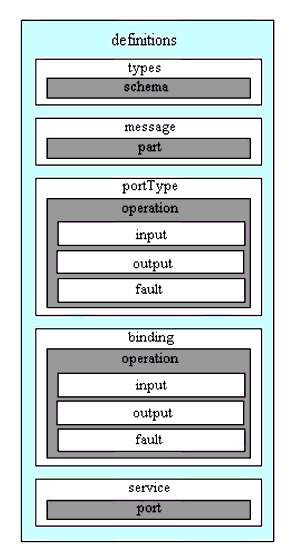
A WSDL document defines services as collections of network endpoints, or ports. In WSDL, the abstract definition of endpoints and messages is separated from their concrete network deployment or data format bindings. This allows the reuse of abstract definitions: messages, which are abstract descriptions of the data being exchanged, and port types that are abstract collections of operations. The concrete protocol and data format specifications for a particular port type constitute a reusable binding. A port is defined by associating a network address with a reusable binding and a collection of ports defines a service. Hence, a WSDL document uses the following elements in the definition of network services:
- Types - a container for data type definitions using some type system (such as XSD);
- Message - an abstract, typed definition of the data being communicated. In general there are many message parts;
- Operation - an abstract description of an action supported by the service. In general there are many operations each associated with one or two messages;
- Port Type - an abstract set of operations supported by one or more endpoints. There may be more than one Port Type defined each can have any number of operations;
- Binding - a concrete protocol and data format specification for a particular port type. There is a separate binding for every concrete protocol that is available;
- Port - a single endpoint defined as a combination of a binding and a network address. More than one port may be defined for each service;
- Service - a collection of related endpoints. More than one service can be described in the WSDL file.
It should be noted that WSDLv1.1 supports the following simple message choreographies:
- Single message to the server - in WSDL this is termed 'one-way';
- Single message from the server - in WSDL this is termed 'notification' and is prohibited in the WS-I Basic Profile [WSI, 04a];
- Single message to the server and single response from the server - in WSDL this is termed 'request-response';
- Single message from the server and single response to the server - in WSDL this is termed 'solicit-response' and is prohibited in the WS-I Basic Profile [WSI, 04a].
More complex choreographies have to be constructed using multiple WSDL file-sets with the choreography between the file-sets imposed by an implementation.
2.2 WSDL Schema
2.2.1 Top-level Structure (<definitions>)
The top level XSD for the WSDL schema is shown in Figure 2.2.
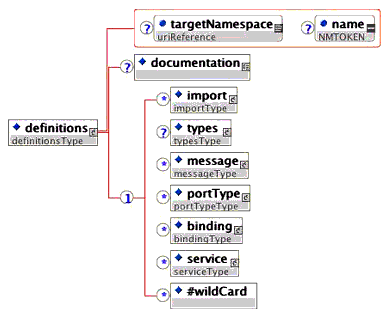
There are three approaches to the creation of the WSDL description:
- Single file - the creation of a single WSDL file that contains all of the WSDL and XSD definitions;
- Split files - the creation of a single WSDL file and single XSD file. The XSD is linked to the WSDL file by the usage of an <xsd:import> statement in the <wsdl:type> element in the WSDL file;
- Service split files - the creation of a service specific WSDL file, an abstract definitions WSDL file and a single XSD file. The WSDL files are linked using the <wsdl:import> statement in the service specific WSDL file. The XSD file is linked using the <xsd:import> statement in the <wsdl:type> element in the abstract definitions WSDL file;
- Multiple files - the creation of a service specific WSDL file, an abstract definitions WSDL file and one or more XSD files. The WSDL files are linked using the <wsdl:import> statement in the service specific WSDL file. The root XSD file is linked using the <xsd:import> statement in the <wsdl:type> element in the abstract definitions WSDL file.
2.2.2 <import> Element Structure
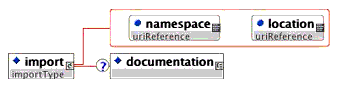
The <import> schema structure is shown in Figure 2.3. The <import> is used to enable a WSDL description to be defined in several linked physical files. 1EdTech will use the <import> element to link the abstract definition file to the specific service file, i.e., the specific service file imports the abstract definitions file.
2.2.3 <types> Element Structure
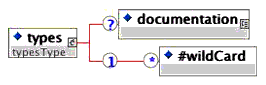
The <type> schema structure is shown in Figure 2.4. The <type> Element is used within the single WSDL or abstract definitions file to link to the associated XSD files. These XSD files will contain the XML definitions of the SOAP structures.
2.2.4 <message> Element Structure
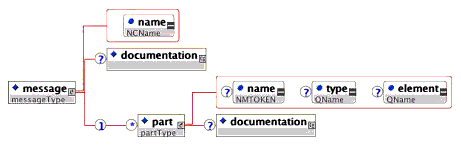
The <message> schema structure is shown in Figure 2.5. This element is used within the single WSDL or the abstract definitions file to define the set of messages that are used to exchange the information for a particular operation. The <part> elements are used to define the message header and body parts.
2.2.5 <portType> Element Structure
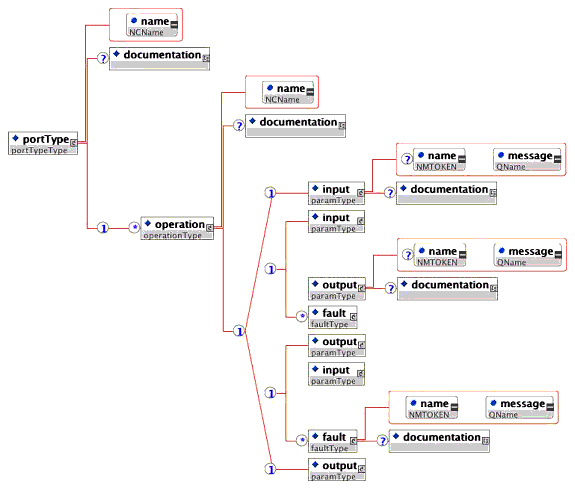
The <portType> schema structure is shown in Figure 2.6. The <portType> element is used within the abstract definitions file to identify the messages used to represent an operation. In a single abstract definition structure an operation can have at most one input message (from the client to the server) and one output message (from the server to the client).
2.2.6 <binding> Element Structure
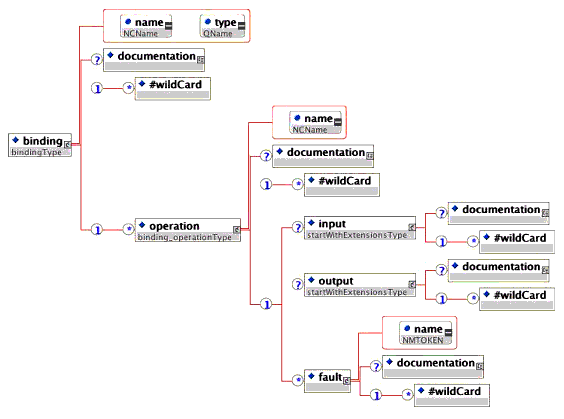
The <binding> schema structure is shown in Figure 2.7. The <binding> element is used within the single WSDL or the specific service file to bind the abstract message definitions to a particular transport mechanism. In the case of the 1EdTech GWS the transport system is SOAPv1.1/HTTPv1.1; no other bindings are supported.
2.2.7 <service> Element Structure
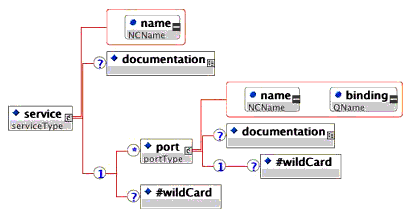
The <service> element is used within the single WSDL or the specific service file to represent a collection of port elements, where each port represents the availability of binding at a particular endpoint. The 'binding' attribute of the port element ties it to the corresponding binding element (see sub-section 2.2.6).
2.3 Basic WSDL File Content
2.3.1 Single File Representation
This is a single file containing the WSDL and XSD information. The basic structure of an integrated WSDL document is:
0001 0002 0003 0004 0005 0006 0007 0008 0009 0010 0011 0012 0013 0014 0015 0016 0017 0018 0019 0020 0021 0022 0023 0024 0025 0026 0027 0028 0029 0030 0031 0032 0033 0034 0035 0036 0037 0038 0039 0040 0042 0043 0044 0045 0046 0047 0048 0049 0050 0051 0052 0053 0054 0055 0056 0057 0058 |
<?xml version = "1.0" encoding = "UTF-8"?>
<wsdl:definitions name = "??" targetNamespace = "??">
   <wsdl:types>
      <xsd:schema>
         ...
      </xsd:schema>
   </wsdl:types>
   <wsdl:message name = "??">
      <wsdl:part name = "??" element = "??"/>
   </wsdl:message>
   ...
   <wsdl:message name = "??">
      <wsdl:part name = "??" element = "??"/>
   </wsdl:message>
   <wsdl:portType name = "??">
      <wsdl:operation name = "??">
         <wsdl:input message = "??"/>
         <wsdl:output message = "??"/>
         <wsdl:fault message = "??" name = "??"/>
      </wsdl:operation>
      ...
      <wsdl:operation name = "??">
         <wsdl:input message = "??"/>
         <wsdl:output message = "??"/>
         <wsdl:fault message = "??" name = "??"/>
      </wsdl:operation>
   </wsdl:portType>
   ...
   <wsdl:portType name = "??">
      ...
   </wsdl:portType>
   <wsdl:binding name = "??" type= "??">
      <wsdl:operation name = "??">
         <wsdl:input/>
         <wsdl:output/>
         <wsdl:fault name = "??"/>
      </wsdl:operation>
      <wsdl:operation name = "??">
         <wsdl:input/>
         <wsdl:output/>
         <wsdl:fault name = "??"/>
      </wsdl:operation>
   </wsdl:binding>
   ...
   <wsdl:binding name = "??" type= "??">
      ...
   </wsdl:binding>
   <wsdl:service name = "??">
      <wsdl:port name="??" binding= "??"/>
         ...
      <wsdl:port name="??" binding= "??"/>
   </wsdl:service>
   ...
   <wsdl:service name = "??">
      ...
   </wsdl:service>
</wsdl:definitions>
|
2.3.2 Split File Representation
This is the separation of the WSDL and XSD into two separate files. The basic structure of the WSDL document is:
0001 0002 0003 0004 0005 0006 0007 0008 0009 0010 0011 0012 0013 0014 0015 0016 0017 0018 0019 0020 0021 0022 0023 0024 0025 0026 0027 0028 0029 0030 0031 0032 0033 0034 0035 0036 0037 0038 0039 0040 0042 0043 0044 0045 0046 0047 0048 0049 0050 0051 0052 0053 0054 0055 0056 0057 0058 |
<?xml version = "1.0" encoding = "UTF-8"?> <wsdl:definitions name = "??" targetNamespace = "??"> <wsdl:types> <xsd:schema> <xsd:import namespace = "??" schemaLocation = "??"/> </xsd:schema> </wsdl:types> <wsdl:message name = "??"> <wsdl:part name = "??" element = "??"/> </wsdl:message> ... <wsdl:message name = "??"> <wsdl:part name = "??" element = "??"/> </wsdl:message> <wsdl:portType name = "??"> <wsdl:operation name = "??"> <wsdl:input message = "??"/> <wsdl:output message = "??"/> <wsdl:fault message = "??" name = "??"/> </wsdl:operation> ... <wsdl:operation name = "??"> <wsdl:input message = "??"/> <wsdl:output message = "??"/> <wsdl:fault message = "??" name = "??"/> </wsdl:operation> </wsdl:portType> ... <wsdl:portType name = "??"> ... </wsdl:portType> <wsdl:binding name = "??" type= "??"> <wsdl:operation name = "??"> <wsdl:input/> <wsdl:output/> <wsdl:fault name = "??"/> </wsdl:operation> <wsdl:operation name = "??"> <wsdl:input/> <wsdl:output/> <wsdl:fault name = "??"/> </wsdl:operation> </wsdl:binding> ... <wsdl:binding name = "??" type= "??"> ... </wsdl:binding> <wsdl:service name = "??"> <wsdl:port name="??" binding= "??"/> ... <wsdl:port name="??" binding= "??"/> </wsdl:service> ... <wsdl:service name = "??"> ... </wsdl:service> </wsdl:definitions> |
The associated XSD file structure that is linked using the <xsd:import> statement (line 5 - in the shaded region) in the WSDL file is:
0001 0002 0003 0004 |
<?xml version = "1.0" encoding = "UTF-8"?> <xsd:schema> ... </xsd:schema> |
2.3.3 Service Split File Representation
This is the separation of the WSDL into two files (abstract definitions and service specific files) and the XSD as a single file. For the 1EdTech GWS the recommended composition for the Abstract Definitions File is:
0001 0002 0003 0004 0005 0006 0007 0008 0009 0010 0011 0012 0013 0014 0015 0016 0017 0018 0019 0020 0021 0022 0023 0024 0025 0026 0027 0028 0029 0030 0031 0032 |
<?xml version = "1.0" encoding = "UTF-8"?> <wsdl:definitions name = "??" targetNamespace = "??"> <wsdl:types> <xsd:schema> <xsd:import namespace = "??" schemaLocation = "??"/> </xsd:schema> </wsdl:types> <wsdl:message name = "??"> <wsdl:part name = "??" element = "??"/> </wsdl:message> ... <wsdl:message name = "??"> <wsdl:part name = "??" element = "??"/> </wsdl:message> <wsdl:portType name = "??"> <wsdl:operation name = "??"> <wsdl:input message = "??"/> <wsdl:output message = "??"/> <wsdl:fault message = "??" name = "??"/> </wsdl:operation> ... <wsdl:operation name = "??"> <wsdl:input message = "??"/> <wsdl:output message = "??"/> <wsdl:fault message = "??" name = "??"/> </wsdl:operation> </wsdl:portType> ... <wsdl:portType name = "??"> ... </wsdl:portType> </wsdl:definitions> |
For the 1EdTech GWS the recommended composition for the Specific Service File is (the link to the abstract definitions file is achieved using the '<wsdl:import> statement in line 3 - see the shaded region):
0001
0002
0003
0004
0005
0006
0007
0008
0009
0010
0011
0012
0013
0014
0015
0016
0017
0018
0019
0020
0021
0022
0023
0024
0025
0026
0027
0028
0029
|
<?xml version = "1.0" encoding = "UTF-8"?>
<wsdl:definitions name = "??" targetNamespace = "??">
   <wsdl:import namespace = "??" location = "??"/>
   <wsdl:binding name = "??" type= "??">
      <wsdl:operation name = "??">
         <wsdl:input/>
         <wsdl:output/>
         <wsdl:fault name = "??"/>
      </wsdl:operation>
      <wsdl:operation name = "??">
         <wsdl:input/>
         <wsdl:output/>
         <wsdl:fault name = "??"/>
      </wsdl:operation>
   </wsdl:binding>
   ...
   <wsdl:binding name = "??" type= "??">
      ...
   </wsdl:binding>
   <wsdl:service name = "??">
      <wsdl:port name="??" binding= "??"/>
         ...
      <wsdl:port name="??" binding= "??"/>
   </wsdl:service>
   ...
   <wsdl:service name = "??">
      ...
   </wsdl:service>
</wsdl:definitions>
|
Each of the associated XSD file structures that are linked using the <xsd:import> statement (lines 5 to 7 - see the shaded region) in the abstract data definitions WSDL file have the structure:
0001 0002 0003 0004 |
<?xml version = "1.0" encoding = "UTF-8"?> <xsd:schema> ... </xsd:schema> |
2.3.4 Multiple File Representation
This is the separation of the WSDL into two files (abstract definitions and service specific files) and one or more XSD files as required. For the 1EdTech GWS the recommended composition for the Abstract Definitions File is:
0001 0002 0003 0004 0005 0006 0007 0008 0009 0010 0011 0012 0013 0014 0015 0016 0017 0018 0019 0020 0021 0022 0023 0024 0025 0026 0027 0028 0029 0030 0031 0032 0033 0034 |
<?xml version = "1.0" encoding = "UTF-8"?> <wsdl:definitions name = "??" targetNamespace = "??"> <wsdl:types> <xsd:schema> <xsd:import namespace = "??" schemaLocation = "??"/> ... <xsd:import namespace = "??" schemaLocation = "??"/> </xsd:schema> </wsdl:types> <wsdl:message name = "??"> <wsdl:part name = "??" element = "??"/> </wsdl:message> ... <wsdl:message name = "??"> <wsdl:part name = "??" element = "??"/> </wsdl:message> <wsdl:portType name = "??"> <wsdl:operation name = "??"> <wsdl:input message = "??"/> <wsdl:output message = "??"/> <wsdl:fault message = "??" name = "??"/> </wsdl:operation> ... <wsdl:operation name = "??"> <wsdl:input message = "??"/> <wsdl:output message = "??"/> <wsdl:fault message = "??" name = "??"/> </wsdl:operation> </wsdl:portType> ... <wsdl:portType name = "??"> ... </wsdl:portType> </wsdl:definitions> |
For the 1EdTech GWS the recommended composition for the Specific Service File is (the link to the abstract definitions file is achieved using the <wsdl:import> statement in line 3 - see the shaded region):
0001
0002
0003
0004
0005
0006
0007
0008
0009
0010
0011
0012
0013
0014
0015
0016
0017
0018
0019
0020
0021
0022
0023
0024
0025
0026
0027
0028
0029
|
<?xml version = "1.0" encoding = "UTF-8"?>
<wsdl:definitions name = "??" targetNamespace = "??">
   <wsdl:import namespace = "??" location = "??"/>
   <wsdl:binding name = "??" type= "??">
      <wsdl:operation name = "??">
         <wsdl:input/>
         <wsdl:output/>
         <wsdl:fault name = "??"/>
      </wsdl:operation>
      <wsdl:operation name = "??">
         <wsdl:input/>
         <wsdl:output/>
         <wsdl:fault name = "??"/>
      </wsdl:operation>
   </wsdl:binding>
   ...
   <wsdl:binding name = "??" type= "??">
      ...
   </wsdl:binding>
   <wsdl:service name = "??">
      <wsdl:port name="??" binding= "??"/>
         ...
      <wsdl:port name="??" binding= "??"/>
   </wsdl:service>
   ...
   <wsdl:service name = "??">
      ...
   </wsdl:service>
</wsdl:definitions>
|
Each of the associated XSD file structures that are linked using the <xsd:import> statement (lines 5 to 7 - see the shaded region) in the abstract data definitions WSDL file have the structure:
0001 0002 0003 0004 |
<?xml version = "1.0" encoding = "UTF-8"?> <xsd:schema> ... </xsd:schema> |
2.3.5 Structure Relationships and Naming Conventions
The Types, Message, Operation, Port Type, Binding, Port and Service elements in the set of WSDL files have strict relationships. To make these relationships we propose a naming convention. The default target namespace is allocated a prefix of 'tns:'. The naming conventions introduced here are further refined in Section 5.
2.3.5.1 Service Definitions
Several services can be defined. Each Service will be given a unique name and will have the string 'Service' at the end. An example of the WSDL is:
0001 0002 0003 0004 0005 0006 |
<wsdl:definitions>
   ...
   <wsdl:service name = "PackagingService">
      ...
   </wsdl:service>
</wsdl:definitions>
|
2.3.5.2 Port Definitions
Several ports can be defined for each service. The Port associates a binding with a network address. Ports that are bound to the same Port Type are treated as alternatives, i.e., two ports could be defined for the same Port Type but one port would use a SOAP binding and the other a HTTP-Post binding. Each Port will have a unique name and will have the string 'Port' at the end. The binding identified in the <wsdl:port> declaration must be defined elsewhere in the WSDL using the <wsdl:binding> element. An example of the WSDL is:
0001 0002 0003 0004 0005 0006 0007 0008 0009 0010 0011 0012 0013 0014 |
<wsdl:definitions>
   ...
   <wsdl:service name = "PackagingService">
      <wsdl:port name = "Packaging1SoapPort" binding = "tns:OpSet1SoapBinding">
         ...
      </wsdl:port>
      <wsdl:port name = "Packaging2SoapPort" binding = "tns:OpSet2SoapBinding">
         ...
      </wsdl:port>
      <wsdl:port name = "PackagingPostPort" binding = "tns:OpSet1PostBinding">
         ...
      </wsdl:port>
   </wsdl:service>
</wsdl:definitions>
|
2.3.5.3 Binding Definitions
Every Port Type must have at least one binding. The binding defines the concrete protocol and data format for a particular Port Type. Each binding must have a unique name and will have the string 'Binding' at the end. The Port Type identified in the <wsdl:binding> element must be defined elsewhere n the WSDL using the <wsdl:portType> element. An example of the WSDL is:
0001 0002 0003 0004 0005 0006 0007 0008 0009 0010 0011 0012 0013 |
<wsdl:definitions> ... <wsdl:binding name = "OpSet1SoapBinding" type "tns:OpSet1PortType> ... </wsdl:binding> <wsdl:binding name = "OpSet2SoapBinding" type "tns:OpSet2PortType> ... </wsdl:binding> <wsdl:binding name = "OpSet1PostBinding" type "tns:OpSet1PortType> ... </wsdl:binding> ... </wsdl:definitions> |
Note that for every binding name there must be an associated port usage (note the shaded words in the 'Port Definitions' and 'Binding Definitions' examples.
2.3.5.4 Port Type Definitions
The Port Type is an abstract set of operations supported by one or more end points. Each Port Type must have a unique name and will have the string 'PortType' at the end. An example of the WSDL is:
0001 0002 0003 0004 0005 0006 0007 0008 0009 0010 |
<wsdl:definitions> ... <wsdl:portType name = "OpSet1PortType"> ... </wsdl: portType > <wsdl:portType name = "OpSet2PortType"> ... </wsdl:portType> ... </wsdl:definitions> |
Note that every Port Type must be used in a binding. The relationship between the 'Port Type Definitions' and the 'Binding Definitions' is shown by the underlined phrases in the corresponding examples.
2.3.5.5 Operation Definitions
An operation is an abstract description of an action supported by the service. Operations are associated with a Port Type. Each operation within a Port Type must have a unique name and this name should be representative of the functional nature of the operation. An example of the WSDL is:
0001 0002 0003 0004 0005 0006 0007 0008 0009 0010 0011 0012 0013 0014 0015 0016 0017 0018 0019 0020 0021 0022 |
<wsdl:definitions>
   ...
   <wsdl:portType name = "OpSet1PortType">
      <wsdl:operation name = "createObject">
         ...
      </wsdl:operation>
      ...
      <wsdl:operation name = "deleteObject">
         ...
      </wsdl:operation>
   </wsdl: portType >
   <wsdl:portType name = "OpSet2PortType">
      <wsdl:operation name = "compressObjects">
         ...
      </wsdl:operation>
      ...
      <wsdl:operation name = "expandObjects">
         ...
      </wsdl:operation>
   </wsdl:portType>
   ...
</wsdl:definitions>
|
2.3.5.6 Message Definitions
A message is the abstract construct of the information being communicated. Messages are used to communicate the activity of the corresponding operations. The number of messages per operation depends upon the choreography for the service is 'one-way', 'request-response', solicit-response' or 'notification'. For the 'request-response' choreography the naming convention for the two messages is to take the name of the operation and append the string 'Request' for the message to the endpoint and the string 'Response' for the message from the end point. The example WSDL is:
0001 0002 0003 0004 0005 0006 0007 0008 0009 0010 0011 0012 0013 0014 0015 0016 0017 0018 0019 0020 0021 0022 0023 0024 0025 0026 0027 0028 0029 0030 0031 0032 0033 0034 0035 0036 0037 0038 0039 0040 0041 0042 0043 0044 0045 0046 0047 0048 0049 0050 0051 |
<wsdl:definitions> ... <wsdl:message name = "createObjectRequest"> ... </wsdl:message> <wsdl:message name = "createObjectResponse"> ... </message> <wsdl:message name = "deleteObjectRequest"> ... </wsdl:message> <wsdl:message name = "deleteObjectResponse"> ... </wsdl:message> <wsdl:message name = "compressObjectRequest"> ... </wsdl:message> <wsdl:message name = "compressObjectResponse"> ... </wsdl:message> <wsdl:message name = "expandObjectRequest"> ... </wsdl:message> <wsdl:message name = "expandObjectResponse"> ... </wsdl:message> ... <wsdl:portType name = "OpSet1PortType"> <wsdl:operation name = "createObject"> <wsdl:input message = "tns:createObjectRequest"> <wsdl:output message = "tns:createObjectResponse"> </wsdl:operation> ... <wsdl:operation name = "deleteObject"> <wsdl:input message = "tns:deleteObjectRequest"> <wsdl:output message = "tns:deleteObjectResponse"> </wsdl:operation> </wsdl: portType > <wsdl:portType name = "OpSet2PortType"> <wsdl:operation name = "compressObjects"> <wsdl:input message = "tns:compressObjectRequest"> <wsdl:output message = "tns:compressObjectResponse"> </wsdl:operation> ... <wsdl:operation name = "expandObjects"> <wsdl:input message = "tns:expandObjectRequest"> <wsdl:output message = "tns:expandObjectResponse"> </operation> </wsdl:portType> ... </wsdl:definitions> |
Note that the message descriptions are linked to the operation descriptions and every message must be used in at least one operation. In the WSDL example above the naming convention is shown by the shaded and underlined phrases.
2.4 WS-I Basic Profile
The WS-I Basic Profile 1.1 [WSI, 04a] consists of a set of non-proprietary Web services specifications, plus clarifications, refinements, interpretations and amplifications of those specifications which promote interoperability. The Profile was developed according to a set of principles that, together, form the philosophy of the Profile, as it relates to bringing about interoperability. The principles are:
- No guarantee of interoperability - it is impossible to completely guarantee the interoperability of a particular service. However, the Profile does address the most common problems that implementation experience has revealed to date;
- Application semantics - although communication of application semantics can be facilitated by the technologies that comprise the Profile, assuring the common understanding of those semantics is not addressed by it;
- Testability - when possible, the Profile makes statements that are testable. However, such testability is not required. Preferably, testing is achieved in a non-intrusive manner, e.g., examining artifacts "on the wire";
- Strength of requirements - the Profile makes strong requirements, e.g., MUST, MUST NOT, wherever feasible; if there are legitimate cases where such a requirement cannot be met, conditional requirements, e.g., SHOULD, SHOULD NOT, are used. Optional and conditional requirements introduce ambiguity and mismatches between implementations;
- Restriction vs. relaxation - when amplifying the requirements of referenced specifications, the Profile may restrict them, but does not relax them, e.g., change a MUST to a MAY;
- Multiple mechanisms - if a referenced specification allows multiple mechanisms to be used interchangeably, the Profile selects those that are well understood, widely implemented and useful. Extraneous or underspecified mechanisms and extensions introduce complexity and therefore reduce interoperability;
- Future compatibility - when possible, the Profile aligns its requirements with in-progress revisions to the specifications it references. This aids implementers by enabling a graceful transition, and assures that WS-I does not 'fork' from these efforts. When the Profile cannot address an issue in a specification it references, this information is communicated to the appropriate body to assure its consideration;
- Compatibility with deployed services - backwards compatibility with deployed Web services is not a goal for the Profile, but due consideration is given to it. The Profile does not introduce a change to the requirements of a referenced specification unless doing so addresses specific interoperability issues;
- Focus on interoperability - although there are potentially a number of inconsistencies and design flaws in the referenced specifications, the Profile only addresses those that affect interoperability;
- Conformance targets - where possible, the Profile places requirements on artifacts, e.g., WSDL descriptions, SOAP messages, rather than the producing or consuming software's behaviors or roles. Artifacts are concrete, making them easier to verify and therefore making conformance easier to understand and less error-prone;
- Lower-layer interoperability - the Profile speaks to interoperability at the application layer; it assumes that interoperability of lower-layer protocols, e.g., TCP/IP , Ethernet, is adequate and well understood. Similarly, statements about application-layer substrate protocols (e.g., SSL /TLS , HTTP) are only made when there is an issue affecting Web services, specifically, WS-I does not attempt to assure the interoperability of these protocols as a whole. This assures that WS-I's expertise in and focus on Web services standards is used effectively.
The 1EdTech GWS Base Profile [GWS, 05a] is heavily based upon the WS-I Basic Profile v1.1 [WSI, 04a] and the WS-I simple SOAP binding Profile v1.0 [WSI, 04d]. There are some points where the 1EdTech GWS Base Profile differs from the WS-I equivalent. These differences are identified in Section 3 of [GWS, 05a].
3. WSDL Files for the Set of Communications Models
Three sets of transformation rules are required, one for each of the communication models that are to be supported by the bindings. The three communication models are:
- Synchronous - the initiator is blocked until the respondent replies;
- Asynchronous - the initiator is not blocked and so there can be more than one outstanding request;
- Polled - once the initiator has sent the request the respondent will not reply until it is polled by the initiator.
3.1 Synchronous Communications Transformation Algorithms
3.1.1 Single File Representation
The transformation algorithm is used to create the single file WSDL/XSD representation shown in Figure 3.1.

The binding files described in Figure 3.1 contain:
- 'SyncSinglev1p0.wsdl' - the full WSDL and associated XSD definitions. The service will use SOAP/http;
- The two shaded files are the W3C WSDL and SOAP XSDs.
The name space prefixes used within this binding are listed in Table 3.1.
| Namespace | Usage |
|---|---|
| "tns:" | The target namespace identifier. |
| "xs:" | The XML schema definition namespace. The reference is to: http://www.w3.org/2001/XMLSchema |
| "soap11:" | The SOAP references used within the WSDL files. The reference is to: "wsisoapv1p1.xsd". |
| "wsdl11:" | The default WSDL files namespace for WSDL v1.1. The reference is to: "wsiwsdlv1p1.xsd". |
3.1.2 Split File Representation
The transformation algorithm is used to create the single WSDL and single XSD files representation shown in Figure 3.2.
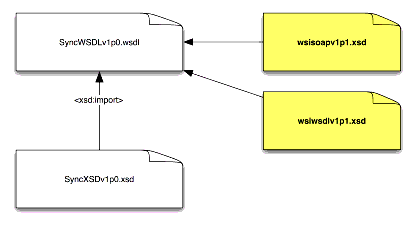
The binding files described in Figure 3.2 contain:
- 'SyncWSDLv1p0.wsdl' - the service specific and abstract definitions WSDL binding file. For a particular Service this is based upon SOAP/http. This file imports the message and data XSD using the <xsd:import> construct;
- 'SyncXSDv1p0.wsdl' - the XSD definitions. This includes the synchronous message body and header definitions and the data schema. This file must be created for each synchronous service binding.
- The two shaded files are the W3C WSDL and SOAP XSDs.
The name space prefixes used within this binding are listed in Table 3.2.
| Namespace | Usage |
|---|---|
| "tns:" | The target namespace identifier. |
| "data:" | The prefix for importing the XSD into the WSDL file. |
| "xs:" | The XML schema definition namespace. The reference is to: http://www.w3.org/2001/XMLSchema |
| "soap11:" | The SOAP references used within the WSDL files. The reference is to: "wsisoapv1p1.xsd". |
| "wsdl11:" | The default WSDL files namespace for WSDL v1.1. The reference is to: "wsiwsdlv1p1.xsd". |
3.1.3 Service Split File Representation
The transformation algorithm is used to create the service specific and abstract definition WSDL and single XSD files shown in Figure 3.3.
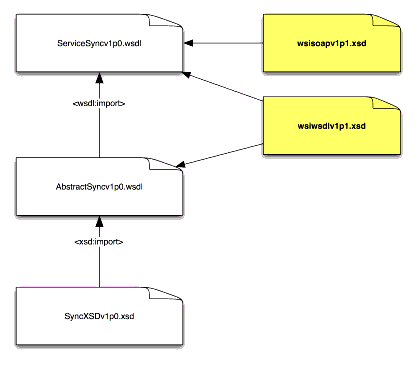
The binding files described in Figure 3.3 contain:
- 'ServiceSyncv1p0.wsdl' - the service specific WSDL binding file. For a particular Service this is based upon SOAP/http. This file imports the abstract definitions using the <wsdl:import> construct. This file must be created for each synchronous service binding;
- 'AbstractSyncv1p0.wsdl' - the abstract message definitions that represent the behavior of a particular Service and its operations. This file imports the message XSD using the <xsd:import> construct. This file must be created for each synchronous service binding;
- 'SyncXSDv1p0.wsdl' - the XSD definitions. This includes the synchronous message body and header definitions and the data schema. This file must be created for each synchronous service binding.
- The two shaded files are the W3C WSDL and SOAP XSDs.
The name space prefixes used within this binding are listed in Table 3.3.
| Namespace | Usage |
|---|---|
| "tns:" | The target namespace identifier. |
| "data:" | The prefix for importing the XSD into the abstract definitions WSDL file. |
| "xs:" | The XML schema definition namespace. The reference is to: http://www.w3.org/2001/XMLSchema |
| "abs:" | The abstract definitions file references. The reference is to: "AbstractSyncv1p0.wsdl" |
| "soap11:" | The SOAP references used within the WSDL files. The reference is to: "wsisoapv1p1.xsd". |
| "wsdl11:" | The default WSDL files namespace for WSDL v1.1. The reference is to: "wsiwsdlv1p1.xsd". |
3.1.4 Multiple File Representation
The transformation algorithm is used to create the multiple WSDL and XSD files shown in Figure 3.4. The binding files described in Figure 3.4 contain:
- 'ServiceSyncv1p0.wsdl' - the service specific WSDL binding file. For a particular Service this is based upon SOAP/http. This file imports the abstract definitions using the <wsdl:import> construct. This file must be created for each synchronous service binding;
- 'AbstractSyncv1p0.wsdl' - the abstract message definitions that represent the behavior of a particular Service and its operations. This file imports the message XSD using the <xsd:import> construct. This file must be created for each synchronous service binding;
- 'MessSchemav1p0.xsd' - the XSD definitions for the synchronous messages. This file imports the appropriate data model XSD using the <xsd:import> construct. This file must be created for each synchronous service binding;
- 'DataSchemav1p0.xsd' - the definition of the particular Service data model. This file must be created for each service binding. The same data model is used for the synchronous, polled and asynchronous bindings;
- 'MessBindSchemav1p0.xsd' - the XSD binding of the message header parts. This includes the message headers for synchronous, polled and asynchronous message models. This file is used for all of the binding transformation rules independent of the type of communications model being supported (see Appendix A for the structure and content of this file);
- 'CommonSchemav1p0.xsd' - the XSD binding of the 1EdTech common data objects. This file is available to the Service data model XSDs as well as the 1EdTech message binding XSD. The content of this file does not change between Service definitions;
- 'wsiwsdlv1p1.xsd' - this is the reference XSD for the WSDL definition. This file is the WS-I amended version of the original file from W3C;
- 'wsisoapv1p1.xsd' - this is the reference XSD for the SOAP extensions to WSDL. This file is from WS-I.
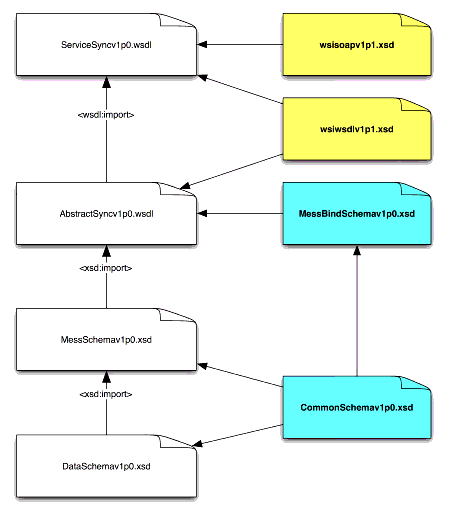
The separation of the 'Service Specific' and 'Abstract Definition' files means that a new Service Specific binding can be created without changing the Abstract Definition. The Abstract Definition describes the behaviors in the UML model whereas the Service Specific file is responsible for binding these to the required transport protocol (in this document this is SOAP/http).
The name space prefixes used within these bindings are listed in Table 3.4.
| Namespace | Usage |
|---|---|
| "tns:" | The target namespace identifier. |
| '***:' | The set of prefixes that are to be used for the set of XSD data files. |
| "xs:" | The XML schema definition namespace. The reference is to: http://www.w3.org/2001/XMLSchema |
| "msg:" | The message structure definition for the service operations. The reference is to "MessSchemav1p0.xsd". |
| "iaf:" | The 1EdTech common data model definitions namespace. The reference is to: "CommonSchemav1p0.xsd". |
| "isb:" | The 1EdTech message header binding definitions namespace. The reference is to: "MessBindSchemav1p0.xsd". |
| "abs:" | The abstract definitions file references. The reference is to: "AbstractSyncv1p0.wsdl" |
| "soap11:" | The SOAP references used within the WSDL files. The reference is to: "wsisoapv1p1.xsd". |
| "wsdl11:" | The default WSDL files namespace for WSDL v1.1. The reference is to: "wsiwsdlv1p1.xsd". |
3.2 Asynchronous Communications Transformation Algorithms
At the current time 1EdTech has not authorized the publication of the Asynchronous Communications transformation algorithms as Final Release. This is because there are no validated implementations of this technique and there is work underway in W3C that could result in that 1EdTech approach becoming proprietary. This work remains published as Public Draft material [GWS, 05a].
3.3 Polled Communications Transformation Algorithms
At the current time 1EdTech has not authorized the publication of the Polled Communications transformation algorithms as Final Release. This is because there are no validated implementations of this technique and there is work underway in W3C that could result in that 1EdTech approach becoming proprietary. This work remains published as Public Draft material [GWS, 05a].
4. Creating a WSDL Binding
The process for creating a WSDL binding based upon the 1EdTech GWS Base Profile is:
- The Information Model must be defined using the 1EdTech Service UML Profile [GWS, 05f]. This profile describes how UML must be used to create a description of the specification that can be used by the 1EdTech auto-generation tools. Note that the specification is created without explicit identification of the type of communications model to be supported by the binding, i.e., the nature of the communication model supported is defined when the binding is created;
- The UML description must be made available as an XMI file, i.e., this is an XML instance that conforms to the XMI specification. At the present time only XMI files that have been created by the Poseidon tool, v2.5 or later, are valid. The Poseidon tool creates a '.zuml' file that must be unzipped and the XMI file within used as input to the I-BAT;
- The XMI file is now used as input to the I-BAT. The XSL file 'UMLtoWSDLTransform.xsl' is applied to the XMI file, using an appropriate XSLT tool (Oxygen is the tool recommended by 1EdTech) to generate the WSDL files. The XSL files automatically create the full set of WSDL files using a predetermined naming convention for the corresponding directory structure, the name(s) of the services and the communications model. The generation process also creates a validation report text file that can be used to identify any problems that the I-BAT found while creating the binding files.
The following points should be noted when using the I-BAT:
- The I-BAT will attempt to generate the binding files irrespective of any problems described in the validation report;
- The I-BAT cannot be used to correct problems with the UML description. Any problems in the Information Model must be corrected using the appropriate UML authoring tool. The binding creation process must then be repeated using the new XMI file;
- Any hand edits of the WSDL/XSD files will be lost when new binding files are created.
5. Base Profile WSDL Auto-generation
5.1 WSDL Auto-generation for Synchronous Communications
5.1.1 Single File Representation
The auto-generation files used to create the single file WSDL/XSD representation are shown in Figure 5.1.
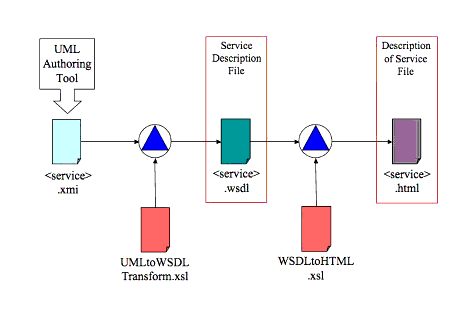
The transformation files are used to:
- 'UMLtoWSDLTransform.xsl' - to generate the single full WSDL/XSD file from the XMI representation of the UML-based description of the specification;
- 'WSDLtoHTML.xsl' - to generate a HTML file that contains the description of the WSDL services described in the single WSDL file.
Details of these XSL files are given in I-BAT [GWS, 05f].
The transformation files use the information supplied in the UML description as described in Table 5.1. In Table 5.1 each attribute has an example value and for each set of values there follows the corresponding WSDL file. All of the attribute values are used in the single WSDL/XSD file.
5.1.2 Split File Representation
The auto-generation files used to create the split file WSDL/XSD representation are shown in Figure 5.2.
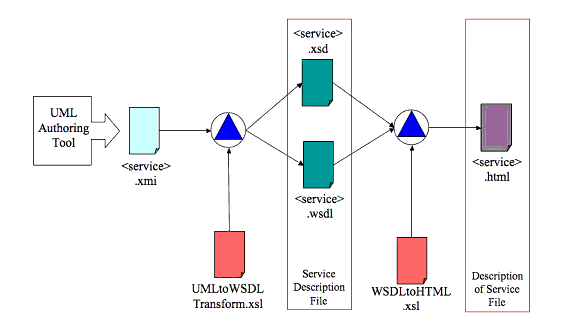
The transformation files are used to:
- 'UMLtoWSDLTransform.xsl' - to generate the single full WSDL and XSD files from the XMI representation of the UML-based description of the specification;
- 'WSDLtoHTML.xsl' - to generate a HTML file that contains the description of the WSDL services described in the single WSDL file.
Details of these XSL files are given in I-BAT [GWS, 05f].
The transformation files use the information supplied in the UML description as described in Tables 5.2 and 5.3. In Tables 5.2 and 5.3 each attribute has an example value and for each set of values there follows the corresponding WSDL file. All of the attribute values are used in the split WSDL and XSD files.
5.1.3 Service Split File Representation
The auto-generation files used to create the split file WSDL/XSD representation are shown in Figure 5.3.
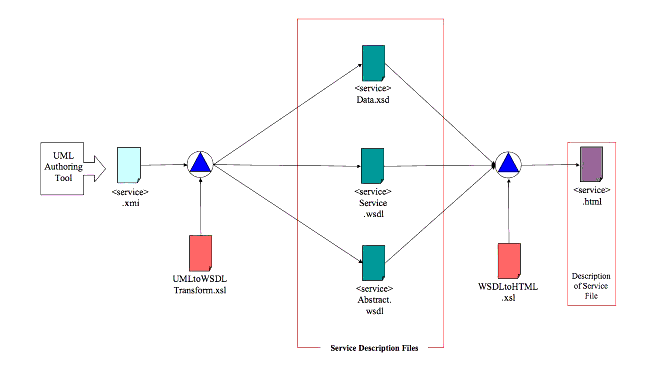
The transformation files are used to:
- 'UMLtoWSDLTransform.xsl' - to generate the service specific and abstract definitions WSDL and XSD files from the XMI representation of the UML-based description of the specification;
- 'WSDLtoHTML.xsl' - to generate a HTML file that contains the description of the WSDL services described in the single WSDL file.
Details of these XSL files are given in I-BAT [GWS, 05f]. At the current time the files created for this approach have not been thoroughly tested in the .NET and J2EE tools and so their details are not presented.
5.1.4 Multiple File Representation
The auto-generation files used to create the multiple files WSDL/XSD representation are shown in Figure 5.4.
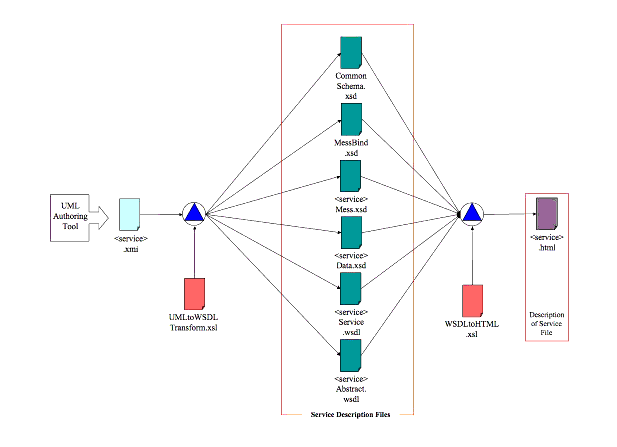
The transformation files are used to:
- 'UMLtoWSDLTransform.xsl' - to generate the service-specific and abstract definitions WSDL and set of XSD files from the XMI representation of the UML-based description of the specification;
- 'WSDLtoHTML.xsl' - to generate a HTML file that contains the description of the WSDL services described in the single WSDL file.
Details of these XSL files are given in I-BAT [GWS, 05f]. At the current time the files created for this approach have not been thoroughly tested in the .NET and J2EE tools and so their details are not presented.
5.2 WSDL Auto-generation for Asynchronous Communications
At the current time 1EdTech has not authorized the publication of the Asynchronous WSDL auto-generation as Final Release. This is because there are no validated implementations of this technique and there is work underway in W3C that could result in that 1EdTech approach becoming proprietary. This work remains published as Public Draft material [GWS, 05a].
5.3 WSDL Auto-generation for Polled Communications
At the current time 1EdTech has not authorized the publication of the Polled Communications WSDL auto-generation as Final Release. This is because there are no validated implementations of this technique and there is work underway in W3C that could result in that 1EdTech approach becoming proprietary. This work remains published as Public Draft material [GWS, 05a].
6. Extending the Binding
6.1 Changing the Binding
The 1EdTech bindings are controlled documents. It is recommended that changes take the form as recommended by the 1EdTech Application Profile Guidelines [APG, 05a], [APG, 05b].
New capability should be added by creating new structures and not by changing a previously defined structure, i.e., instead of changing the definition of an operation a new operation should be created. The auto-generation files have been produced such that once they are re-applied to a new UML description then the new features are included within the new WSDL/XSD files. It is recommended that all new structure have a clear naming convention that show they are extensions to the original definition.
6.2 Adding New Services
It is strongly recommended that a new service be produced by creating a new set of WSDL/XSD files and not by extending an established Service Group definition.
If it is undesirable or inappropriate to create a new Service Group set then a new service can be created by adding a new 'ServiceModel' package to the original UML definition (see the 1EdTech Auto-generation Toolkit Manual [GWS, 05e] for more details on how this should be achieved). When the new service is defined it is recommended that:
- The service is given a unique name. The name should also denote that this is an extension to the original service group definition;
- The 'Legend' for the service is fully defined. The comment field should state that this is an extension to the specification;
- The 'Bindings' for the service are fully defined. If these are not included then the default of 'SOAPv1.1' is assumed;
- The new 'interface' definitions and 'DataModel' packages should now be created as required (see the 1EdTech Auto-generation Toolkit Manual [GWS, 05e] for how this is achieved).
6.3 Adding New Behaviors
It is strongly recommended that a new behavior is not produced by changing the definition of an established operation. Instead, a new operation should be created within its own 'interface' definition, i.e., the new operation should not be added to an established 'interface'. When new behaviors are defined it is recommended that:
- The new 'interface' class is given a unique name (this must be unique across all of the services defined within the Service Group). The name should denote that this is an extension to the original service;
- The new behaviors are given unique operation names (these names must be unique for all operations across all of the services within the Service Group). The name should denote that this is an extension to the original service;
- Each behavior must use the 'StatusInfo' or 'StatusInfoSet' class as the return parameter. The default behavior of the auto-generation files is to assume that 'StatusInfo' is the return parameter;
- If the new behavior(s) require the definition of new data model structures then these new data structures should be declared within a new 'DataModel' package (see the 1EdTech Auto-generation Toolkit Manual [GWS, 05e] for more details on how this should be completed);
- The associated note for the 'interface' is fully defined. The note should state that this is an extension to the specification.
6.4 Adding New Data Structures
6.4.1 Adding New 'DataModel' Packages
The data structure definition can be extended by adding one or more new 'DataModel' packages. When a new 'DataModel' package is defined it is recommended that:
- The 'Legend' for the 'DataModel' is fully defined. The comment field should state that this is an extension to the specification;
- The standard set of XSD stereotypes are adopted and used in a consistent manner.
It is important to note that adding new 'DataModel' packages, as with adding any new Service or behavior, requires that the client are server parts of the system use the same WSDL/XSD definition. It is not possible to have just the client be constructed from the new service and leave the server with the original service definition. This will result in a service rejection and the corresponding SOAP failure code being generated and returned.
6.4.2 Using the DataModel Extension Classes
The only way to extend the service definition without requiring a change to both ends of the system is to use the data model extension classes. These classes allow the XSD to be extended without requiring a change to the XSD itself. However, this approach does not enable an XML parser to validate the modified data definition model.
6.5 Extending the SOAP headers
It is possible to extend the SOAP header definitions using the auto-generation files. SOAP Header extensions should be inserted in the 'DataModel' package description for the Statusinfo class within the service WSDL files. The extensions should be given a new namespace to differentiate the extensions from the original definition.
7. Claiming Conformance to the Specification
7.1 WS-I Conformance Claim Attachment
In an 1EdTech service-oriented specification the Conformance Specification is defined with respect to the Information Model and not to the binding. The binding must sustain the corresponding Information Model conformance statement. Conformance to the binding is expressed as part of the corresponding set of Application Profiles. An Application Profile is defined by the corresponding user community. Therefore, while it is not the responsibility of 1EdTech to define the Conformance Specification for a service binding, 1EdTech must supply the mechanisms by which a Conformance Specification for a binding can be created. This approach is based upon that used by WS-I.
WS-I has written the Conformance Claim Attachments Mechanism document [WSI, 04b]. This document catalogues mechanisms that can be used to attach WS-I Profile Conformance Claims to Web services artifacts, e.g., WSDL descriptions, UDDI registries, etc.
To allow advertisement of profile conformance, artifacts can be annotated with conformance claims, which use URIs to assert that a particular claim subject, e.g., an artifact or a party to a Web service, meets the appropriate requirements in the indicated profile. The requirements considered in-scope for a particular conformance claim are those placed upon the conformance target(s) associated with the claim attachment mechanism by the relevant profile. Therefore, every profile specifies its own conformance claim URI. Furthermore, every profile documents which of its conformance targets are in-scope for each claim attachment mechanism described in the following sections. In WS-I the appropriate claim attachments mechanisms are:
- WSDL 1.1 Claim Attachment Mechanism for Web Services Instances - conformance claims can be attached to a <wsdl:port> element in a WSDL v1.1 description as a child of its <wsdl:documentation> element, using the Conformance Claim Schema. Such conformance claims indicate that the associated Web service instance exhibits conformant behavior, as determined by the requirements associated with this attachment mechanism by the referenced profile. A conformance claim attached to a <wsdl:port> element also indicates that it itself is a conformant XML construct. Additionally, the same claim is made for all elements recursively referenced by it, based on the transitivity rules described in "WSDL 1.1 Claim Attachment Mechanism for Description Constructs";
- WSDL 1.1 Claim Attachment Mechanism for Description Constructs - conformance claims can be attached to <wsdl:binding>, <wsdl:portType>, <wsdl:operation> (as a child element of <wsdl:portType>, but not of <wsdl:binding>) and <wsdl:message> elements in a WSDL v1.1 description, using the Conformance Claim Schema. A conformance claim attached to any of these elements indicates that it is a conformant XML construct, as determined by the requirements associated with this attachment mechanism by the referenced profile. Additionally, the same claim is made for all elements that it references, based on the following transitivity rules, applied recursively:
- A claim on a <wsdl:port> element is inherited by the referenced <wsdl:binding> element
- A claim on a <wsdl:binding> element is inherited by the referenced <wsdl:portType> element
- A claim on a <wsdl:portType> element is inherited by the referenced <wsdl:operation> elements
- A claim on a <wsdl:operation> element is inherited by the referenced <wsdl:message> elements of its child <wsdl:output> and/or <wsdl:input> elements;
- Conformance Claim XML Schema - when possible, i.e., when a claim attachment is made in an extensible XML document, conformance claims SHOULD be made with an Element Information Item. The <Claim> element has a mandatory 'conformsTo' attribute, whose value contains the actual conformance claim URI. The conformance claim schema explicitly allows for extensibility elements and attributes.
7.2 Creating Conformance Claims to 1EdTech Profiles
Apart from the WS-I Conformance Claims mechanism, the W3C is investigating the usage of WS-Policy. Therefore, no definitive recommendation is made on the usage of the WS-I approach. However, if some form of conformance statement is required then the WS-I approach can be used but no firm commitment is made to supporting this technique in later releases of the 1EdTech GWS specification.
8. Recommended Tools
8.1 UML and Auto-generation of the Bindings
The tools that have been used to support the development of the auto-generation files are:
- UML development - Poseidon for UML Standard Edition 3.0 (MacOS X version) from Gentleware was used for the creation of the UML-based descriptions. It should be noted that the XSL files are created based upon the way in which Poseidon stores its data files using the XMI representation. This usage changes from tool to tool (as well as, in some cases, version to version for the same tool);
- XSL creation - Oxygen Editor 6.2 (MacOS X) from SyncRO Soft Ltd was used for the creation of the XSL files. The XSL files contains instructions specific to the Xalan processor. The XSLT testing was also completed using this tool (if other XSLT processors are used then they must support the Xalan extensions). The XSL files assume that the XMI files have been created using Poseidon for UML Standard Edition 3.0 (see above). The resulting behavior using XMI files from other UML tools are undefined.
8.2 Generating Code Stubs using Java
The open source Apache Axis web services engine is used to illustrate how one might implement a web service in Java beginning with a WSDL. Axis provides a utility class, org.apache.axis.wsdl.WSDL2Java, to use for generating client-side and server-side code from a WSDL. To generate stubs for making client-side service calls, execute WSDL2Java against your WSDL. By default WSDL2Java generates client-side code, which includes a class for each type specified in any schemas included in the types section of the WSDL, a stub that represents the call, a service locator implementation, and associated interfaces.
To generate server-side classes, execute WSDL2Java against a WSDL with the arguments "--server-side --skeletonDeploy true". The generated skeleton, the server-side equivalent of the client stub, sits between your implementation of the service and the Axis web service engine, and handles details such as mapping namespaces used in the WSDL onto generated Java classes. WSDL2Java also generates deployment descriptors for use in deploying the service to an Axis web services instance running in a J2EE servlet container such as Apache Tomcat. As in the client, classes are generated for schema types. WSDL2Java takes a number of arguments that allow you, among other things, to fetch a WSDL from a remote URL, map namespaces onto locally sensible package names, and generate Junit test cases. Axis also provides Ant methods that allow you to automate code generation and service deployment within an Ant build. At the end of the day, the Java developer is presented with a collection of familiar looking classes.
Axis can be obtained from the Apache site http://xml.apache.org/axis/.
8.3 Generating Code Stubs Using the Microsoft .NET Framework
The WSDL.EXE tool ships with Microsoft.NET and generates code for web services and web services clients using WSDL contract files, XSD schema files and "discomap" discovery documents. This paper focuses on code generation using WSDL. See 'MSDN Table2' (illustrating options for the WSDL.EXE tool) for examples and other code generation options using the WSDL.EXE tool.
8.3.1 Code Generation using WSDL.EXE
The WSDL.EXE tool is automatically installed when Visual Studio or the .NET Framework 1.1 is installed. In Visual Studio 2003 the WSDL.EXE tool is located in the C:\Program Files\Microsoft Visual Studio .NET 2003\SDK\v1.1\Bin folder. A batch file is included to ensure the developer will have all of the .NET Tools included in the system PATH.
When you use WSDL.EXE to create a proxy class, a single source file is created in the programming language that you specify (see language option in the following tables). The WSDL.EXE tool determines the best type to use for objects specified in the service description. As a result, the generated type in the proxy class might not be what the developer wants or expects. To ensure correct object type casts, open the file containing the generated proxy class and change any incorrect object types to the expected object type. The WSDL.EXE tool expects all WSDL files to be specified on the command line. If your WSDL file imports additional schemas via one or more <wsdl:import> elements, a code generation error may occur. To get around this issue make sure you specify all of your schemas on the command line following the WSDL file. For example, if 'foo.wsdl' imports 'bar.xsd' which then imports 'example.xsd' the command line for the WSDL.EXE tool should be:
wsdl foo.wsdl bar.xsd example.xsd
The "location" attribute (in <wsdl:import>) and 'schemaLocation' attribute (in <xsd:import>) are "hints" that can be ignored by processors that provide alternate means to locate schemas (in accordance with the W3C WSDL and XSD Technical Recommendations).
The table on the following page summarizes the use of the WSDL.EXE tool.
| Argument | Description |
|---|---|
| URL | The URL to a WSDL file (.wsdl). |
| Path | The path to a local WSDL contract file (.wsdl), XSD schema file (.xsd), or discovery document (.disco or .discomap). |
| Option | Description |
|---|---|
| /appsettingurlkey:key or /urlkey:key |
Specifies the configuration key to use in order to read the default value for the URL property when generating code. |
| /appsettingbaseurl:baseurl or /baseurl:baseurl |
Specifies the base URL to use when calculating the URL fragment. The tool calculates the URL fragment by converting the relative URL from the baseurl argument to the URL in the WSDL document. You must specify the /appsettingurlkey option with this option. |
| /d[omain]:domain | Specifies the domain name to use when connecting to a server that requires authentication. |
| /l[anguage]:language | Specifies the language to use for the generated proxy class. You can specify CS (C#; default), VB (Visual Basic), JS (JScript) or VJS (Visual J#) as the language argument. You can also specify the fully qualified name of a class that implements the System.CodeDom.Compiler.CodeDomProvider Class. http://msdn.microsoft.com/library/en-us/cpref/html/frlrfSystemCodeDomCompilerCodeDomProviderClassTopic.asp |
| /n[amespace]:namespace | Specifies the namespace for the generated proxy or template. The default namespace is the global namespace. |
| /nologo | Suppresses the Microsoft startup banner display. |
| /o[ut]:filename | Specifies the file in which to save the generated proxy code. The tool derives the default file name from the XML Web service name. The tool saves generated datasets in different files. |
| /parsableerrors | Displays errors in a format similar to the error reporting format used by language compilers. |
| /p[assword]:password | Specifies the password to use when connecting to a server that requires authentication. |
| /protocol:protocol | Specifies the protocol to implement. You can specify SOAP (default), HttpGet, HttpPost, or a custom protocol specified in the configuration file. |
| /proxy:URL | Specifies the URL of the proxy server to use for HTTP requests. The default is to use the system proxy setting. |
| /proxydomain:domain or /pd:domain |
Specifies the domain to use when connecting to a proxy server that requires authentication. |
| /proxypassword:password or /pp:password |
Specifies the password to use when connecting to a proxy server that requires authentication. |
| /proxyusername:username or /pu:username |
Specifies the user name to use when connecting to a proxy server that requires authentication. |
| /server | Generates an abstract class for an XML Web service based on the contracts. The default is to generate client proxy classes. |
| /u[sername]:username | Specifies the user name to use when connecting to a server that requires authentication. |
| /? | Displays command syntax and options for the tool. |
- Demonstrating how to use the WSDL.EXE tool is available at:
http://msdn.microsoft.com/library/default.asp?url=/library/en-us/cpguide/html/cpconcreatingwebserviceproxy.asp - Illustrating options for the WSDL.EXE tool are available at; http://msdn.microsoft.com/library/default.asp?url=/library/en-us/cptools/html/cpgrfWebServicesDescriptionLanguageToolWsdlexe.asp
8.3.2 The .NET Tools
Configuration and Deployment Tools:
- ASP.NET IIS Registration Tool (Aspnet_regiis.exe) - allows an administrator or installation program to update the scriptmaps for an ASP.NET application to point to the ASP.NET ISAPI version associated with the tool. You can also use the tool to perform other ASP.NET configuration operations;
- Assembly Cache Viewer (Shfusion.dll) - allows you to view and manipulate the contents of the global assembly cache by using Windows Explorer;
- Assembly Linker (Al.exe) - generates a file with an assembly manifest from one or more files that are either resource files or Microsoft intermediate language (MSIL) files;
- Assembly Registration Tool (Regasm.exe) - reads the meta-data within an assembly and adds the necessary entries to the registry, which allows COM clients to create .NET Framework classes transparently;
- Assembly Binding Log Viewer (Fuslogvw.exe) - displays details for failed assembly binds. This information helps you diagnose why the .NET Framework cannot locate an assembly at runtime;
- Global Assembly Cache Tool (Gacutil.exe) - allows you to view and manipulate the contents of the global assembly cache and download cache. While Shfusion.dll provides similar functionality, you can use Gacutil.exe from build scripts, makefile files, and batch files;
- Installer Tool (Installutil.exe) - allows you to install and uninstall server resources by executing the installer components of a specified assembly;
- Isolated Storage Tool (Storeadm.exe) - lists or removes all existing stores for the currently logged-on user;
- Native Image Generator Tool (Ngen.exe) - creates a native image from a managed assembly and installs it into the native image cache on the local computer;
- .NET Framework Configuration Tool (Mscorcfg.msc) - provides a graphical interface for managing .NET Framework security policy and applications that use remoting services. This tool also allows you to manage and configure assemblies in the global assembly cache;
- .NET Services Installation Tool (Regsvcs.exe) - adds managed classes to Windows 2000 Component Services by loading and registering the assembly and generating, registering, and installing the type library into an existing COM+ 1.0 application;
- Soapsuds Tool (Soapsuds.exe) - helps you compile client applications that communicate with XML Web services by using a technique called remoting;
- Type Library Exporter (Tlbexp.exe) - generates a type library from a common language runtime assembly;
- Type Library Importer (Tlbimp.exe) - converts the type definitions found within a COM type library into equivalent definitions in managed meta-data format;
- Web Services Discovery Tool (Disco.exe) - discovers the URLs of XML Web services located on a Web server, and saves documents related to each XML Web service on a local disk;
- WSDL Code Generation Tool (Wsdl.exe) - generates code for web services and web services clients using WSDL contract files, XSD schema files, and "discomap" discovery documents;
- XML Schema Definition Tool (Xsd.exe) - generates XML schemas that follow the XML Schema Definition (XSD) language proposed by the W3C. This tool generates common language runtime classes and 'DataSet' classes from an XSD schema file.
- Microsoft CLR Debugger (DbgCLR.exe) - provides debugging services with a graphical interface to help application developers find and fix bugs in programs that target the runtime;
- Runtime Debugger (Cordbg.exe) - provides command-line debugging services using the common language runtime Debug API. Use this tool to find and fix bugs in programs that target the runtime.
- Certificate Creation Tool (Makecert.exe) - generates X.509 certificates for testing purposes only;
- Certificate Manager Tool (Certmgr.exe) - manages certificates, certificate trust lists (CTLs), and certificate revocation lists (CRLs);
- Certificate Verification Tool (Chktrust.exe) - verifies the validity of a file signed with an X.509 certificate;
- Code Access Security Policy Tool (Caspol.exe) - allows you to examine and modify machine, user and enterprise-level code access security policies;
- File Signing Tool (Signcode.exe) - signs a portable executable (PE) file with an Authenticode digital signature;
- Permissions View Tool (Permview.exe) - displays the minimal, optional and refused permission sets requested by an assembly. You can also use this tool to view all declarative security used by an assembly;
- PEVerify Tool (PEverify.exe) - performs MSIL type safety verification checks and meta-data validation checks on a specified assembly;
- Secutil Tool (Secutil.exe) - extracts strong name public key information or Authenticode publisher certificates from an assembly, in a format that can be incorporated into code;
- Set Registry Tool (Setreg.exe) - allows you to change the registry settings for the Software Publishing State keys, which control the behavior of the certificate verification process;
- Software Publisher Certificate Test Tool (Cert2spc.exe) - creates, for test purposes only, a Software Publisher's Certificate (SPC) from one or more X.509 certificates;
- Strong Name Tool (Sn.exe) - helps create assemblies with strong names. Sn.exe provides options for key management, signature generation, and signature verification.
- Common Language Runtime Minidump Tool (Mscordmp.exe) - creates a file containing information that is useful for analyzing system issues in the runtime. The Microsoft Dr. Watson tool (Drwatson.exe) invokes this program automatically;
- License Compiler (Lc.exe) - reads text files that contain licensing information and produces a licenses file that can be embedded in a common language runtime executable;
- Management Strongly Typed Class Generator (Mgmtclassgen.exe) - allows you to quickly generate an early bound class in C#, Visual Basic, or JScript for a specified Windows Management Instrumentation (WMI) class;
- MSIL Assembler (Ilasm.exe) - generates a PE file from Microsoft Intermediate Language (MSIL). You can run the resulting executable, which contains MSIL code and the required meta-data, to determine whether the MSIL code performs as expected;
- MSIL Disassembler (Ildasm.exe) - takes a PE file that contains MSIL code and creates a text file suitable as input to the MSIL Assembler (Ilasm.exe);
- Resource File Generator Tool (Resgen.exe) - converts text files and .resx (XML-based resource format) files to .NET common language runtime binary .resources files that can be embedded in a runtime binary executable or compiled into satellite assemblies;
- Visual J# Binary Converter Tool (JbImp.exe) - converts certain Java-language bytecode (.class) files to MSIL. This tool enables developers to convert most JDK 1.1.4-level libraries and applications available only as bytecode files to MSIL assemblies and run them on the .NET Framework with the Visual J# Redistributable Package. Use this tool only if the Java-language sources for the applications or libraries are not available. If Java-language sources are available, it is recommended that you use the Visual J# compiler (vjc.exe) instead (to use this tool, the Visual J# .NET Redistributable Package version 1.1 must be installed);
- Windows Forms ActiveX Control Importer (Aximp.exe) - converts type definitions in a COM type library for an ActiveX control into a Windows Forms control;
- Windows Forms Class Viewer (Wincv.exe) - finds managed classes matching a specified search pattern and displays information about those classes using the Reflection API;
- Windows Forms Resource Editor (Winres.exe) - allows you to quickly and easily localize 'Windows Forms' forms.
9. Further Work
The further work to be undertaken on the development of the auto-generation files is:
- Support for new SOAP features include:
- Adoption of SOAP 1.2 - the current binding uses SOAP 1.1 but SOAP 1.2 is now available. We will not consider supporting alternative SOAP bindings until reliable tools are available to support using SOAP 1.2;
- Adoption of WSDL 2.0 - W3C is developing WSDL 2.0 (this was originally referred to as version 1.2). Changing the intermediate representation should not alter the actual SOAP messages to be generated but will enable improved expression to allow more complex bindings to be described in the WSDL file. We will not consider supporting alternative WSDL bindings until reliable tools are available to support using WSDL 2.0;
- Support for the insertion of conformance claims - this may be based upon the WS-I conformance claims mechanism or the usage of WS-Policy;
- Auto-generation of compliance information - in principle it is possible to automatically create a set of compliance test sets directly from the UML description. It is also possible to use stereotypes to mark the specification with indicators to identify the constituents for the conformance statement;
- Auto-generation of the corresponding Open Services Interface Definition (OSID) - it may be possible to generate the equivalent new OSIDs by encapsulating the appropriate information in the UML description. Again the usage of an XSL may then enable the OSID to be automatically generated. This would provide a web service/OSID pairing created from a common UML description.
Appendix A - The Binding Support XSD Files
All of the following data structures are either defined within the WSDL files or supplied in the external XSD file: "imsMessBindSchemav1p0.xsd"3.
A1 - Status Information
The 'StatusInfo' class diagram is shown in Figure A1.1. This class is used to return the status information reporting on the outcome of the associated request.
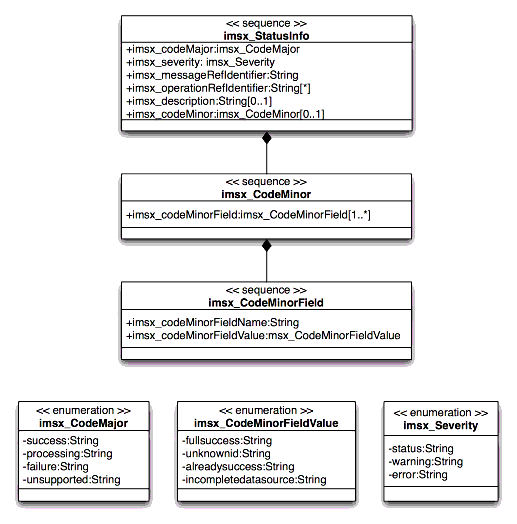
The set of attributes for the 'StatusInfo' class are summarized in Table A1.1.
The associated object constraint language description for this class is:
inv: Set{success, processing, failure, unsupported}.includes(codeMajor)
inv: Set{status, warning, error}.includes(severity)
inv: codeMinorValue.size <= 32
inv: messageRefIdentifier.size <= 32
inv: operationRefIdentifier.size <= 32
CodeMajor/Severity Interpretation Matrix
The interpretation of the 'CodeMajor/Severity' matrix is shown in Table A1.2.
The set of predefined 'CodeMinor' codes is shown in Table A1.3 (these is an initial set of common codes - each specification is expected to define its own set of codes).
The XML binding for the Identifier class is shown in Figure A1.2. This binding is based upon the creation of the complex-type StatusInfo.Type.
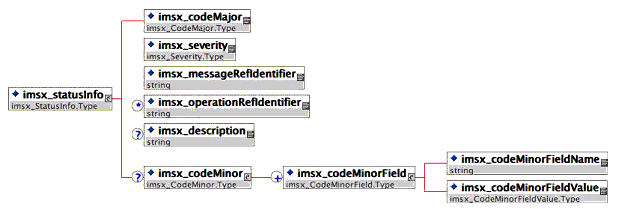
The StatusInfoSet class diagram is shown in Figure A1.3. This is a collection of StatusInfo classes and the order of these reflects the sequence in which the individual operations were requested.
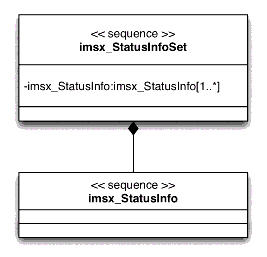
The set of associations for the StatusInfoSet class are summarized in Table A1.4.
| Association Class Name | Multiplicity | Description |
|---|---|---|
| StatusInfo | 1..* | The status information class returned for each and every operation. Each StatusInfo instance references the status of each operation. |
The XML binding for the Identifier class is shown in Figure A1.4. This binding is based upon the creation of the complex-type 'StatusInfoSet.Type'.

A2 - Message Header Structures for Synchronous Models
The following structures are the message headers that are to be used in the synchronous, asynchronous and polled message choreographies to implement the behaviors (these choreographies are described in [GWS, 05b]).
The synchronous request message header structure is shown in Figure A2.1. This header is attached to the request message issued by the client system. The 'wildCard' extension element enables any new namespaced element(s) to used.
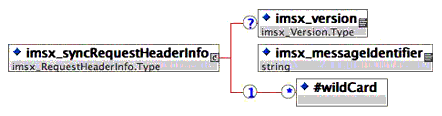
This is the container for the version of the GWS infrastructure being employed. It is an enumerated field. This is an optional field and if not used then the default value should be assumed to be '1.0'.
This is the container for the unique message identifier. This is to be assigned by the system constructing the message header. It is the responsibility of the transmitting system to ensure that the message identifier is unique.
The synchronous response message header structure is shown in Figure A2.2. This header is attached to the response message issued by the server system. The 'wildCard' extension element enables any new namespaced element(s) to used.
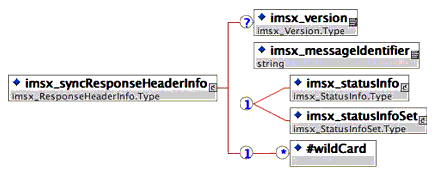
This is the container for the version of the GWS infrastructure being employed. It is an enumerated field. This is an optional field and if not used then the default value should be assumed to be '1.0'.
This is the container for the unique message identifier. This is to be assigned by the system constructing the message header. It is the responsibility of the transmitting system to ensure that the message identifier is unique.
The status information returned as a response to single transaction request; see sub-section A1.1.
The status information returned as a response to multiple transaction request; see sub-section A1.2.
A3 - Message Header Structures for Asynchronous Models
At the current time 1EdTech has not authorized the publication of the Asynchronous WSDL messaging in the Final Release. This is because there are no validated implementations of this technique and there is work underway in W3C that could result in the 1EdTech approach becoming proprietary. This work remains published as Public Draft material [GWS, 05a].
A4 - Message Header Structures for Polled Models
At the current time 1EdTech has not authorized the publication of the Polled WSDL messaging in the Final Release. This is because there are no validated implementations of this technique and there is work underway in W3C that could result in the 1EdTech approach becoming proprietary. This work remains published as Public Draft material [GWS, 05a].
About This Document
| Title | 1EdTech General Web Services WSDL Binding Guidelines |
| Editor | Colin Smythe (1EdTech) |
| Team Co-Leads | Cathy Schroeder (Microsoft Corp.), James Simon (SUN Microsystems Corp.) |
| Version | 1.0 |
| Version Date | 19 December 2005 |
| Status | Final Specification |
| Summary | This document explains how to create a WSDL binding for specifications based upon the 1EdTech General Web Services Base Profile and the Extension Profiles. This auto-generation is achieved using a set of transformation tools that are applied to the Unified Modelling Language-based description of the information model of the specification to create the equivalent WSDL. The auto-generation tools support bindings for the different communications models supported as part of the 1EdTech General Web Services Base Profile. |
| Revision Information | 19 December 2005 |
| Purpose | This document is circulated for public adoption. This document is to be adopted by 1EdTech and all other organizations that wish to construct service-based interoperability specifications using Web Services. |
| Document Location | http://www.imsglobal.org/gws/gwsv1p0/imsgws_wsdlBindv1p0.html |
| To register any comments or questions about this specification please visit: http://www.imsglobal.org/developers/ims/imsforum/categories.cfm?catid=20 |
List of Contributors
The following individuals contributed to the development of this document:
Revision History
Index
A
a-API 1
Abstract Framework 1, 2, 3, 4
API 1, 2, 3
Application Profile 1, 2, 3
Asynchronous 1, 2, 3, 4, 5
B
Base Profile 1, 2, 3, 4, 5, 6, 7
Best Practice 1
C
Conformance 1, 2, 3, 4
Context 1, 2
CRUD 1
D
DCOM 1
G
General Web Services Base Profile 1
I
1EdTech Auto-generation Binding Tool 1, 2, 3, 4, 5, 6, 7
1EdTech General Web Services 1, 2, 3, 4, 5, 6, 7, 8, 9, 10, 11, 12, 13, 14
Addressing Profile 1
Attachments Profile 1
Base Profile 1, 2, 3, 4, 5, 6, 7
Security Profile 1
M
Messaging
Asynchronous 1, 2, 3, 4, 5
Polled 1, 2, 3, 4, 5
Synchronous 1, 2, 3, 4, 5, 6, 7
MOM 1
P
Protocols
FTP 1
HTTP 1, 2, 3
HTTPS 1
IIOP 1
IP 1
SMTP 1
SOAP 1, 2, 3, 4, 5, 6, 7, 8, 9, 10, 11, 12, 13, 14, 15, 16
SSL 1, 2
TCP 1, 2
TLS 1, 2
Q
Quality of Service 1
S
Security 1, 2, 3
SOAP 1, 2, 3, 4, 5, 6, 7, 8, 9, 10, 11, 12, 13, 14, 15, 16
SOAP Versions
1.1 1
1.2 1
Synchronous 1, 2, 3, 4, 5, 6, 7
T
TCP 1, 2
TLS 1, 2
Transport Layer Security 1, 2
U
UDDI 1, 2
Unified Modelling Language 1, 2, 3, 4, 5, 6, 7, 8, 9, 10, 11, 12, 13, 14
UML 1, 2, 3, 4, 5, 6, 7, 8, 9, 10, 11, 12, 13
W
W3C 1, 2, 3, 4, 5, 6, 7, 8, 9, 10, 11, 12, 13
Web Services 1, 2, 3, 4, 5, 6, 7, 8, 9, 10
SOAP 1, 2, 3, 4, 5, 6, 7, 8, 9, 10, 11, 12, 13, 14, 15, 16
WSDL 1, 2, 3, 4, 5, 6, 7, 8, 9, 10, 11, 12, 13, 14, 15, 16, 17, 18, 19, 20, 21, 22, 23, 24, 25, 26, 27, 28, 29, 30, 31, 32, 33, 34, 35, 36, 37, 38, 39, 40, 41, 42, 43, 44, 45
Web Services Interoperability Organization 1, 2, 3, 4, 5, 6, 7, 8, 9
WSDL 1, 2, 3, 4, 5, 6, 7, 8, 9, 10, 11, 12, 13, 14, 15, 16, 17, 18, 19, 20, 21, 22, 23, 24, 25, 26, 27, 28, 29, 30, 31, 32, 33, 34, 35, 36, 37, 38, 39, 40, 41, 42, 43, 44, 45
WSDL Versions
1.1 1
2.0 1
WS-I
Basic Profile 1, 2, 3
Simple SOAP Binding Profile 1
WS-I Basic Profile 1, 2, 3
WS-I Simple SOAP Binding Profile 1
X
XMI 1, 2, 3, 4, 5, 6, 7
XML 1, 2, 3, 4, 5, 6, 7, 8, 9, 10, 11, 12, 13, 14, 15, 16
XML Metadata Interface 1
XML Schema 1, 2
XML Schema Definition 1
XSD 1, 2, 3, 4, 5, 6, 7, 8, 9, 10, 11, 12, 13, 14, 15, 16, 17, 18, 19, 20, 21, 22, 23, 24, 25, 26, 27, 28, 29, 30, 31, 32, 33
XSLT 1, 2, 3
http://msdn.microsoft.com/library/default.asp?url=/library/en-us/cptools/html/cpgrfWebServicesDescriptionLanguageToolWsdlexe.asp
1EdTech Consortium, Inc. ("1EdTech/GLC") is publishing the information contained in this 1EdTech General Web Services WSDL Binding Guidelines ("Specification") for purposes of scientific, experimental, and scholarly collaboration only.
1EdTech/GLC makes no warranty or representation regarding the accuracy or completeness of the Specification.
This material is provided on an "As Is" and "As Available" basis.
The Specification is at all times subject to change and revision without notice.
It is your sole responsibility to evaluate the usefulness, accuracy, and completeness of the Specification as it relates to you.
1EdTech/GLC would appreciate receiving your comments and suggestions.
Please contact 1EdTech/GLC through our website at http://www.imsglobal.org
Please refer to Document Name: 1EdTech General Web Services WSDL Binding Guidelines Revision: 19 December 2005